Income reminders do not show up in account list associated with
I added an income reminder, and the only way I can see it is if I open all reminders.
It lets you choose an account, but it does not show in the account in bill reminders and income
I have to add a bill reminder instead, which adds the income as a negative instead of a positive. Then it shows in the account.
Additionally, if you add an income reminder, it only gives an option to add as a deduction on the form, not income (this,I think, is a bug or form description error).
[Edited - Readability]
Comments
-
Hello @JKQUESTIONS,
Thank you for letting us know you're seeing this issue. I tested in my file, but was not able to replicate what you're reporting. To help troubleshoot, please provide more information:
- When did you first notice this issue?
- Was there anything that happened around the same time, such as a program/computer update?
- Is this happening with regular income reminders, paycheck reminders, or both?
- Which form are you referring to?
I look forward to your response!
Quicken Kristina
Make sure to sign up for the email digest to see a round up of your top posts.
0 -
This is a recent issue for me as well. In any of my checking accounts, any projected deposits are no longer showing up. Also in bills and income there is no longer a way to see them in the same space. have to select either bills OR income. Super unhelpful .
0 -
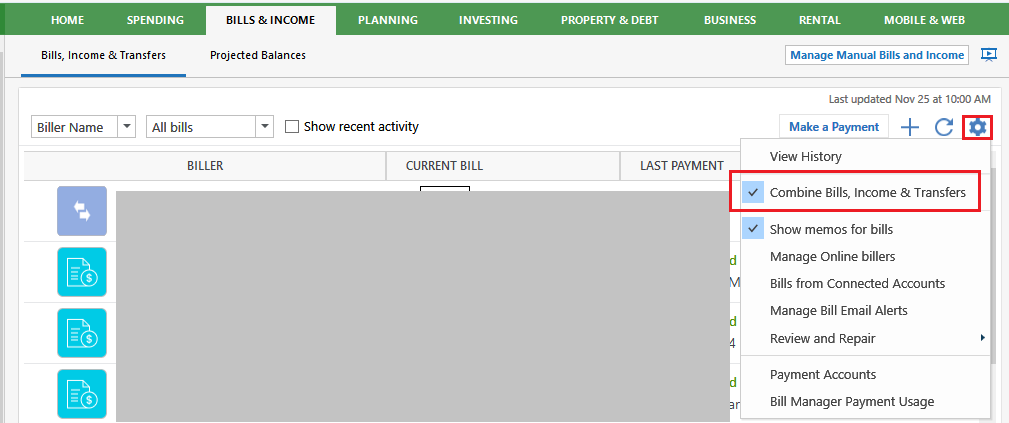
Have you tried the Combined Bills, Income & Transfers view?
Select the gear icon and click to select the "Combine Bills, Income & Transfers" setting.
0
Categories
- All Categories
- 6 Product Ideas
- 34 Announcements
- 248 Alerts, Online Banking & Known Product Issues
- 19 Product Alerts
- 265 Welcome to the Community!
- 301 Before you Buy
- 1.5K Product Ideas
- 55.8K Quicken Classic for Windows
- 16.9K Quicken Classic for Mac
- 1K Quicken Mobile
- 834 Quicken on the Web
- 129 Quicken LifeHub