OL-292 Error Code
I have consistently received this error code from my local bank since August 2025! I have worked with them and Quicken concerning this issue, but to date, there has been no resolution. I cannot even download QFX files from my bank account into Quicken! Frustrated!

Comments
-
Hello @T Nelson,
Thank you for reaching out—I understand how frustrating this must be, especially with it ongoing since August.
To start, could you please provide the name of your financial institution? I’d like to check internally to see if there are any known issues currently reported for that bank.
Additionally, when you attempt to download and import a QFX file, what exactly happens?
- Do you receive an error message or code?
- If so, what does the message say?
- Or does nothing happen at all when you try to import?
- Are you importing by double-clicking the QFX file, or by going through File > Import within Quicken?
Once we have those details, we can better determine the next steps.
In the meantime, please review the guidance below for the OL-292 error:
OL-292 errors generally indicate that Quicken isn’t receiving the expected response from the financial institution during the update process. As a first step, I recommend reviewing this OL-292 support article, which outlines the standard guidance for this error.
In short, the recommended steps are:
- Wait and try updating again the next business day
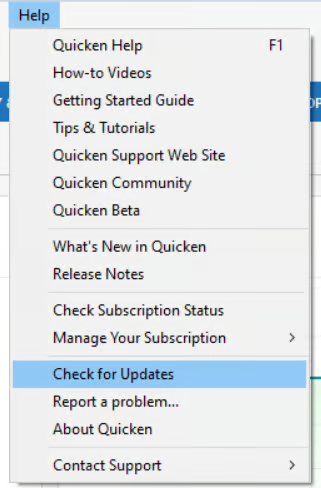
- Make sure Quicken is fully up to date by going to Help > Check for Updates
If the error continues after that, the article explains that the next step would be to contact Morgan Stanley directly and ask to speak with an online services specialist, as Quicken doesn’t have access to their servers to resolve OL-292 errors on our end.
Thank you!
-Quicken Anja
Make sure to sign up for the email digest to see a round up of your top posts.0 - Do you receive an error message or code?
-
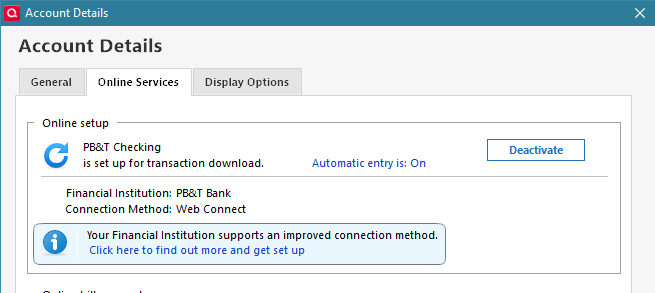
Hi, Anja! My bank is Pueblo Bank and Trust. The error code reads: Quicken is unable to complete your request [OL-220-A]. I have attempted importing by both double-clicking on the QFX file and by using "File Import." My actual preference for downloading transactions would be through either Direct Connect or EWC. However, when I attempt to change the connection method via the Online Service tab, I get the following message. When I follow the prompts in an effort to change to Direct Connect, I get the OL-292-B error code which indicates that the request was 'invalid.'
0 -
@T Nelson Thank you for confirming the financial institution. At this time, we do not have any known issue tickets or active alerts reported for Pueblo Bank and Trust.
Regarding the OL-220 error when importing the QFX file: this error typically indicates that there is an issue with the file being generated by the financial institution. While you may be able to successfully sign in to the bank’s website, the QFX file itself may have been formatted or changed in a way that prevents Quicken from importing it. In Web Connect cases (manual QFX download), this is something that must be corrected by the bank, as Quicken does not generate or modify those files.
Since your preferred connection method (Direct Connect) is returning OL-292, my previous guidance still applies. OL-292 errors indicate that Quicken is not receiving the expected response from the financial institution’s servers, and we do not have access to their systems to correct that. You will need to contact Pueblo Bank and Trust and request to speak with an online services specialist who handles transaction download support.
Both issues point back to the financial institution’s side, and they would need to review their configuration or server setup to resolve it.
I understand how frustrating this has been, especially with it ongoing for so long, but at this point the bank will need to investigate further on their end.
Thank you!
-Quicken Anja
Make sure to sign up for the email digest to see a round up of your top posts.0
Categories
- All Categories
- 20 Product Ideas
- 34 Announcements
- 247 Alerts, Online Banking & Known Product Issues
- 19 Product Alerts
- 518 Welcome to the Community!
- 682 Before you Buy
- 1.5K Product Ideas
- 55.7K Quicken Classic for Windows
- 16.8K Quicken Classic for Mac
- 1K Quicken Mobile
- 834 Quicken on the Web
- 128 Quicken LifeHub