No Fidelity Downoads - Quicken Classic Windows 11

jsk2817
jsk2817 Quicken Windows Subscription Member ✭✭

I can no longer get downloads from my Fidelity Accounts. There are no error messages Tech support had me disconnect my accounts. When I attempted to reconnect per their advice, Quicken would not let me link the accounts back to my existing accounts. The only solution provided was to create all new accounts (while keeping the history in the "old" accounts). This doesn't make any sense. There must be some system errors somewhere.

Please Help!

[Edited - Readability]

Comments

  • Quicken Kristina
    Quicken Kristina Quicken Windows Subscription Moderator mod

    Hello @jsk2817,

    Thank you for reaching out, though I'm sorry to hear Support wasn't able to fully resolve the issue you encountered.

    There is currently a known issue with missing transactions and incorrect information downloading from Fidelity. You may be affected by this issue. For more information, please see this Community Alert:

    To help troubleshoot the current issue you mentioned with being unable to link your accounts, please provide more information. What was preventing you from reconnecting your accounts? For instance, were you seeing any error messages/codes?

    I look forward to your response!

    Quicken Kristina

    Make sure to sign up for the email digest to see a round up of your top posts.

  • jsk2817
    jsk2817 Quicken Windows Subscription Member ✭✭

    There were no error messages. When trying to reconnect I pointed each of many accounts to the link to quicken account option. The resuting list of choices consisted of mainly old, no longer used hidden accounts. None of my existing Fidelity accounts were displayed. Each reconected account was classified in its dropdown as brokerage (if that is useful info). This is a big problem. Please have the team work on a fix and communicate back. If I can provide any more info that could be useful please let me know.

  • Quicken Kristina
    Quicken Kristina Quicken Windows Subscription Moderator mod

    Thank you for your reply,

    Based on your description, it sounds like Quicken may have seen those accounts as still connected and, as a result, not displayed them as available to link. If that was the cause, then you can correct it by following these steps:

    1. Backup your Quicken file.
    2. Deactivate all your Fidelity accounts that use the same set of login credentials.
    3. Navigate to Tools>Add Account.
    4. Follow the prompts.
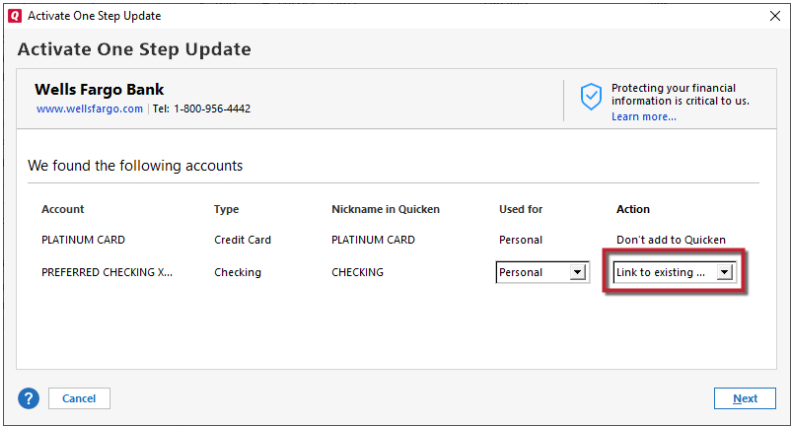
    5. When you get to the Add/Link screen, you should now be able to link to the correct existing accounts in Quicken. Link to Existing.png

    Note: If any of the accounts have a linked checking account in your Quicken file, you will need to turn that feature off before deactivating and reconnecting the account. Once it's reconnected, you should be able to turn the feature back on again.

    Please let me know how it goes!

    Quicken Kristina

    Make sure to sign up for the email digest to see a round up of your top posts.