How Stable is Windows Quicken R66.18?
I have a Windows 10 machine…thought I might finally test the waters with R66.18. I have stayed on R62.16 since last April due to the various issues posted in this forum in newer versions of Quicken.
I installed R66.18 using the Mondo patch this morning. It seemed to work ok until I tried Lifetime Planner 'Change Assumptions' where I get the below screenshot…
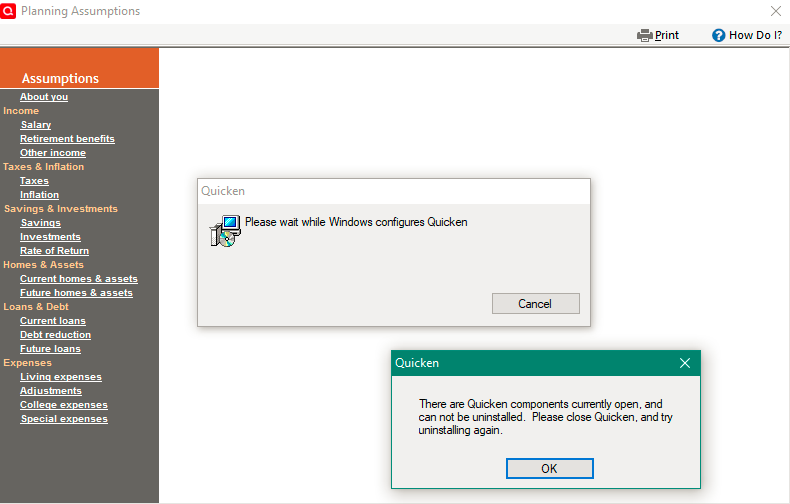
Similar prompts pop up if I open the Tax Planner, so back to R62.16 I will go…
- Deluxe R62.16 on Win 10 Pro 22H2. I don't use Bill Pay, Online Backup, Cloud Sync, Mobile & Web.
Comments
-
You've most like got an incomplete installation of R66.18.
Try downloading and installing the R66.18 Mondo from here:
BTW, I've had no problems with R66.18, other than my general distaste for the LTP because of bugs in it.
Q user since February, 1990. DOS Version 4
Now running Quicken Windows Subscription, Business & Personal
Retired "Certified Information Systems Auditor" & Bank Audit VP2 -
Thanks for the suggestion, however as a rule, I only ever perform an update when a Mondo patch is available.
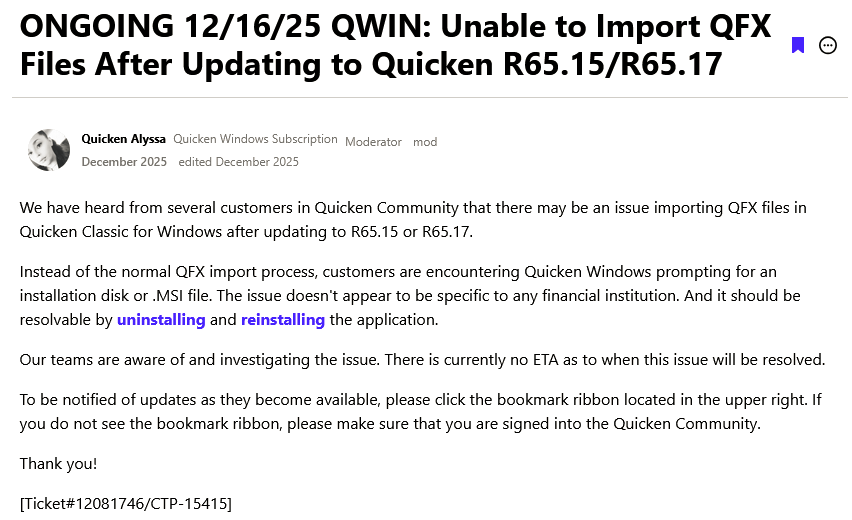
I believe the issue may in fact be related to the following (as yet unresolved) issue…
- Deluxe R62.16 on Win 10 Pro 22H2. I don't use Bill Pay, Online Backup, Cloud Sync, Mobile & Web.
1 -
Hello @TangledWeb,
Thank you for reporting the issues you are running into.
I think you are right, this could be related to the known issue. Did uninstalling/reinstalling the software resolve the issue?
Looking forward to your response!
Quicken Alyssa
Make sure to sign up for the email digest to see a round up of your top posts.
1 -
Hello Alyssa,
Thanks for your help! Uninstalling/reinstalling does not resolve the issue. I have performed an R66.18 uninstall/reinstall on two separate occasions, each time with the same result above.
My process for uninstall/reinstall on each occasion is:
- Uninstall Quicken using Revo uninstaller. Run 'QCleanUI' for good measure.
- Turn WiFi off and reboot.
- Install Quicken using a local copy of 2019 subscription installation exe file. Do not launch Quicken from installation program.
- Update Quicken using a local copy of Mondo patch for the version I am installing. Do not launch Quicken from installation program.
- Turn WiFi back on.
- Launch Quicken by clicking on my *.QDF file.
- Deluxe R62.16 on Win 10 Pro 22H2. I don't use Bill Pay, Online Backup, Cloud Sync, Mobile & Web.
0
Categories
- All Categories
- 47 Product Ideas
- 34 Announcements
- 244 Alerts, Online Banking & Known Product Issues
- 22 Product Alerts
- 513 Welcome to the Community!
- 679 Before you Buy
- 1.4K Product Ideas
- 55.5K Quicken Classic for Windows
- 16.8K Quicken Classic for Mac
- 1K Quicken Mobile
- 829 Quicken on the Web
- 124 Quicken LifeHub