downloaded transactions for pension and social security are not correctly allocated to categories
I am running R66.18 on a one year old laptop with plenty of disk and memory. I have run a full Verify on my data file.
OK, here's my problem. I have created income transaction templates for my pension, and for social security payments for both myself and my wife. Downloaded transactions worked reasonably well for about a year or so, but in the past several months the payments are being allocated in what seems to be a reverse order from what they should be.
For instance, my pension of $1100 gross has $85 state tax deducted from it, leaving a $1015 net payment. The income template is set up as $1100 Pension and -$85 State, leaving a net of $1015. When i download the pension, the net shows up in the register, but if I drill into the split I see that Pension is -$85, and State is $1100.
What is up? Is anyone else having these problems? I have not posted any screen shots, as I fixed the allocations before I came to the Community to post. I will have to wait another month to see it again.
Comments
-
Hello @Rblizard,
Thank you for sharing your experience! To clarify, are the income transaction templates that you use paycheck income reminders? If not, then what kind of template/reminder are you using?
To help troubleshoot this issue, please provide more information:
- You mentioned this has been going on for the past several months. Do you recall which month this behavior started in?
- Do you keep your Quicken file directly on your local hard drive?
- Is your Quicken file synced with any cloud services, such as OneDrive, iCloud, or Dropbox?
- At what point is the data changing to be incorrect?
- For example, is it wrong immediately after downloading?
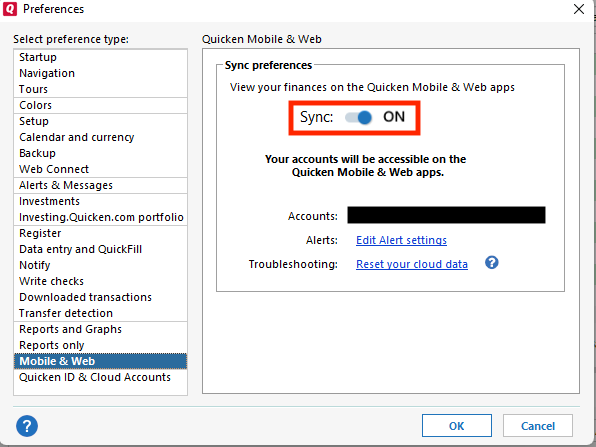
- Do you have Sync turned on in your Quicken file?
- You can check this by going to Edit>Preferences>Mobile & Web.
I look forward to your response!
Quicken Kristina
Make sure to sign up for the email digest to see a round up of your top posts.
0 -
Are these "transaction templates" defined as Scheduled Reminders?
If so, I recommend you Enter these reminders a day or two before Due Date and BEFORE you download transactions from the banks containing these deposits. This way you will have correctly defined and categorized register transactions already available. Quicken, upon download of the deposits, will be able to match the downloaded transaction to the already existing register transaction and not mess up anything.0 -
Answers to your questions:
- You mentioned this has been going on for the past several months. Do you recall which month this behavior started in?
- I dont recall when. I have had so many frustrations with Quicken over the years that I usually just grind my teeth and work around the current problem.
- Do you keep your Quicken file directly on your local hard drive?
- Yes
- Is your Quicken file synced with any cloud services, such as OneDrive, iCloud, or Dropbox?
- No
- At what point is the data changing to be incorrect?
- The data is incorrectly assigned immediately upon downloading and processing the data. I don't think it is "changing"' but is rather misassigned as part of the paycheck automation.
- Do you have Sync turned on in your Quicken file?
- Yes
0 - You mentioned this has been going on for the past several months. Do you recall which month this behavior started in?
-
I have paycheck definitions set up as ongoing. Looking for SSA payments on the 3rd or 4th Wednesday of the month, etc.
0 -
Thank you for your replies,
Due to the nature of the issue, I recommend that you contact Quicken Support directly for assistance, as they have access to tools we don't have on the Community, and they're able to escalate the issue as needed. The Quicken Support phone number can be found through this link here. Phone support is available from 5:00 am PT to 5:00 pm PT, Monday through Friday.
I apologize that I could not be of more assistance!
Quicken Kristina
Make sure to sign up for the email digest to see a round up of your top posts.
0
Categories
- All Categories
- 6 Product Ideas
- 34 Announcements
- 248 Alerts, Online Banking & Known Product Issues
- 19 Product Alerts
- 265 Welcome to the Community!
- 301 Before you Buy
- 1.5K Product Ideas
- 55.8K Quicken Classic for Windows
- 16.9K Quicken Classic for Mac
- 1K Quicken Mobile
- 834 Quicken on the Web
- 129 Quicken LifeHub


![2026-03-18 15_42_36-Quicken Classic Premier - BlizardFamily2024-2025 - [Bills].png](https://us.v-cdn.net/6031128/uploads/CN1BGTKC15AD/2026-03-18-15-42-36-quicken-classic-premier-blizardfamily2024-2025-5bbills-5d.png)