PNC Bank not downloading since February 23, 2026
Good morning, all.
My PNC Bank accounts have not downloaded any transactions since 2/23/2026.
I am using Direct Connect.
No errors, no warning, just no transactions.
I have already Reset the connection, Deactivated/Reactivated connections, and still not transactions.
I am using Quicken Classic version R66.18, Build 27.1.66.18
Anybody else having this problem?
Eduardo Macias
Answers
-
I am having the same issue. No transactions downloading since Feb 23, 2026. No errors displayed in quicken.
I see transactions on the PNC bank website that have cleared and should have downloaded into quicken, but they do not download.
1 -
I am also having the same problem with Quicken Premier. I have deactivated and reactivated online services with Direct Connect several times and it looks like everything is working, but nothing is downloaded. I tried to the change connection method to Web Connect, but when I logged into PNC Bank to authorize the access, I got a message that PNC On-Line Banking was not available.
In addition, when I use the PNC mobile app Control Hub to check by connected apps it only shows my VISA credit card account as authorized.
Version 66.23 Build 27.1.66.23
0 -
Hello @EMacUSCom, @timermanbennett, & @davisrj31,
Thank you for letting us know you're encountering this issue. To troubleshoot, please follow these steps from our article on missing transactions/transactions not downloading:
Be sure to follow these steps in order:
1. Go to Edit > Preferences > Downloaded Transactions. The option Automatically add to banking registers needs to be unchecked.
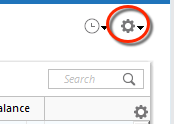
2. Refresh your online account information by clicking the Actions Gear Icon on the upper right of the register, and select Update Now. Follow the on-screen instructions to complete the update.
3. Confirm that the Sort Order in your account is by Date; just click the top of the Date column in your account register. It's possible the transactions are in your register, but not where you thought they'd be.
4. Click the Reset button at the top of the register. This will confirm that there's no filtering in your account register.
5. Try refreshing your login session: To do this, go to Help > Refresh Sign in. After completing the log-in process, trying running a One Step Update again.
6. Go to Actions (Gear Icon) > Register Columns > Check Downloaded Payee in the account register. This allows you to search by Payee to confirm the transactions haven't been renamed unexpectedly.
7. Go to Tools > Account List and check Show Hidden Accounts at the bottom left. Confirm the missing transactions haven't been added to a hidden account by clicking on the name of any account that appears with a check mark in the Hidden column.
If you need further assistance
If the issue isn't resolved and this is not a one-time event, please reach out to Quicken Support.
I hope this helps!
Quicken Kristina
Make sure to sign up for the email digest to see a round up of your top posts.
-2 -
I'm having the same issue, which also started on or around 2/23/2026. The Moderator's suggestions above don't help. This isn't an account-specific or machine-specific issue if multiple customers are all running into the same issue that started at the same time.
1 -
Hello All,
We have forwarded this issue to the proper channels to have this further investigated.
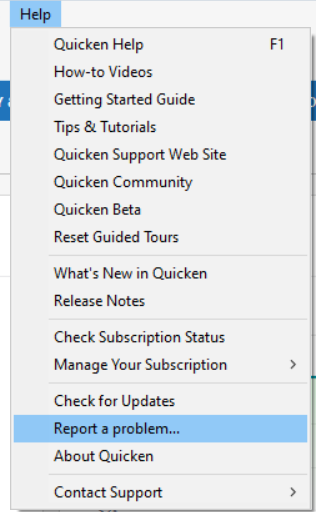
If the troubleshooting in my earlier post does not resolve the issue, then please navigate to Help > Report a problem and submit a problem report with log files attached, at least 3 transactions that should have downloaded but did not (date, payee, and amount), and screenshots showing the transactions in the account activity with the financial institution & showing that they have not downloaded into Quicken in order to contribute to the investigation.
While you will not receive a response through this submission, these reports will help our teams in further investigating the issue. The more problem reports we receive, the better.
We apologize for any inconvenience!
Thank you.
(CTP-16554)
Quicken Kristina
Make sure to sign up for the email digest to see a round up of your top posts.
0 -
For what it is worth I am having the same issue beginning at the same time. Using Direct Connect and paid a couple of bills using bill pay and they showed a normal status with an assigned "Check #" - so those look to be working normally, just no downloaded transactions.
2 -
Same PNC issue happening on Quicken/Mac.
0 -
Hello, @Quicken Kristina, are there any updates on this issue? do we have an Estimated Day for this to work again?
0 -
When can we expect resolution of this, @Quicken Kristina
0 -
I have the same issues. No downloads since Feb 23, 2026
0 -
Piling on - similar issue as everyone else. The last PNC Direct Connect downloaded transaction received was Feb 23, 2026.
Quicken Classic Premier (Windows)
R66.23 Build 27.1.66.23
0 -
I am having the same difficulty. A couple of months ago, it was giving me duplicate transactions, now I get nothing.
Please fix your little wagon here. I have work to do.
0 -
Hello @jrponder, @rmmoore70, @EMacUSCom, @sanjivmshah, @magallagher, @Bryce L, & @Tommy100,
Thank you for letting us know that you're also encountering this issue. I added all of you to the ticket.
Thank you!
Quicken Kristina
Make sure to sign up for the email digest to see a round up of your top posts.
0 -
Same problem. II sthere a way to roll back the last Quicken update R66.23
0 -
Hello @gsrr,
Thank you for letting us know that you're also encountering this issue. I added you to the ticket.
It's unlikely that the current version (R66.23) is the cause of the issue, since people are encountering it in Quicken for Mac as well, and some customers reporting this issue in Quicken for Windows have not yet updated to R66.23.
If you still want to roll back to an earlier version, you can do so by using the article linked below to download the earlier version you want to roll back to. Once you've downloaded the patch, install it to revert your Quicken program to that earlier version:
I hope this helps!
Quicken Kristina
Make sure to sign up for the email digest to see a round up of your top posts.
0 -
Thanks - no need to downgrade. Will await fix.
1 -
I'm having the same issue. Windows - Quicken Classic Personal & Business R66.23 Using PNC Bank - Direct Connect, I'm unable to download any transactions after Feb 23, 2026. Please include me in any ticket so I can be kept aware of the resolution. None of the suggestions I have found anywhere help; same issue.
0 -
Ditto……I'm having the same issue. Windows 11 - Quicken Classic Personal & Business R66.23 Using PNC Bank - Direct Connect, I'm unable to download any transactions after Feb 23, 2026. Please include me in any ticket so I can be kept aware of the resolution. None of the suggestions I have found anywhere help; same issue
0 -
Me too, same exact issue starting on 2/23/2026 … just for the record.
0 -
Hello @aprilsamuels, @thomer41, & @jtgolden11,
Thank you for letting me know you're also seeing this issue. I added all of you to the ticket.
Thank you!
Quicken Kristina
Make sure to sign up for the email digest to see a round up of your top posts.
0 -
I am also having this issue. Started sometime in February. My last transaction downloaded was on 2/6. As I don't download daily, I'm not sure exactly when it started.
1 -
Hello @CindyA,
Thank you for letting us know you're also affected by this. I added you to the ticket.
Thank you!
Quicken Kristina
Make sure to sign up for the email digest to see a round up of your top posts.
0 -
I too am having the same issue since February 23, 2026. I am able to submit online payment requests and get an assigned check number. In fact, two submissions have cleared my bank account. HOWEVER, I am not getting downloads to reflect cleared checks or deposits made to my bank account or drafted payments. I have called both quicken support and they point to PNC. I have called PNC, and they point to quicken.
0
Categories
- All Categories
- 52 Product Ideas
- 34 Announcements
- 243 Alerts, Online Banking & Known Product Issues
- 20 Product Alerts
- 514 Welcome to the Community!
- 680 Before you Buy
- 1.5K Product Ideas
- 55.5K Quicken Classic for Windows
- 16.8K Quicken Classic for Mac
- 1K Quicken Mobile
- 829 Quicken on the Web
- 125 Quicken LifeHub