Quicken Not Connecting to MidFirst Bank Error CC-601
Started having troubles today connecting, getting Error CC-601 with MidFirst Bank. Updated the program, but still having same issue. Deactivated and when trying to reactivate it won't connect at all to MidFirst. Error message is "We cannot find an account with non-zero balance or with any transaction in the last 12 months. Please check on your FI website and try again"
Comments
-
Hello @sultar7,
Thanks for reaching out!
The CC-601 error occurs when Quicken is unable to connect to your bank to receive transaction information. This can sometimes happen if something on the bank’s side is blocking Quicken from connecting.
Here’s what you can try:
- Wait 24 hours and try downloading your account information again.
- If the error persists after 24 hours, please contact Quicken Support so the issue can be investigated further and escalated if needed.
For more details, you can also refer to the official CC-601 support article.
Thank you!
-Quicken Anja
Make sure to sign up for the email digest to see a round up of your top posts.0 -
Hello again,
Since we’re actually seeing multiple reports of CC-601 errors across several financial institutions, this issue has been forwarded for further investigation (CTP-16510).
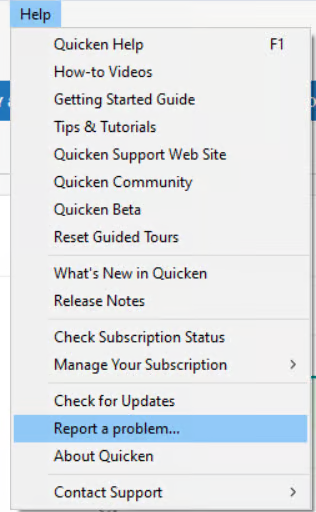
Please submit a problem report with log files from your Quicken program via Help > Report a problem and let us know once it’s done, so we can attach them to the ticket and our teams can analyze your connection and work toward a resolution.
Thank you!
-Quicken Anja
Make sure to sign up for the email digest to see a round up of your top posts.0 -
Report Sent. Thank you!
1
Categories
- All Categories
- 46 Product Ideas
- 34 Announcements
- 248 Alerts, Online Banking & Known Product Issues
- 22 Product Alerts
- 513 Welcome to the Community!
- 679 Before you Buy
- 1.4K Product Ideas
- 55.4K Quicken Classic for Windows
- 16.8K Quicken Classic for Mac
- 1K Quicken Mobile
- 829 Quicken on the Web
- 123 Quicken LifeHub