Here is a workaround for the Bank of America transition to EWC+
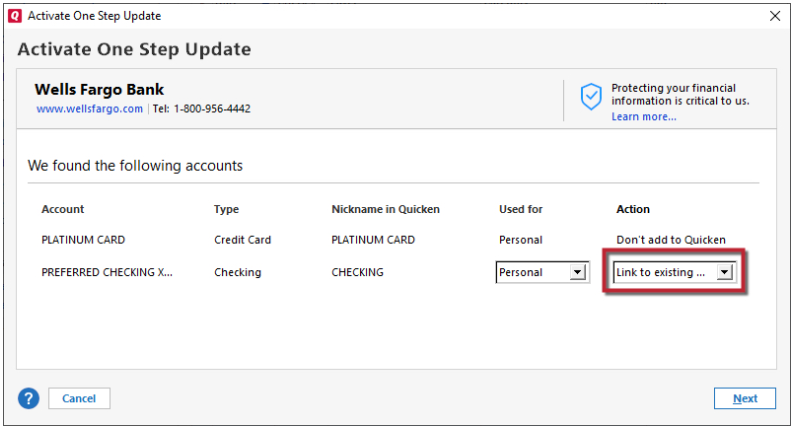
Since Bank of America downloads now use EWC+, when I attempt to activate one step to start using EWC+, the activation process only shows me 40 accounts for me to match against.
40 may sound like a lot, but unfortunately, the 40 includes hidden accounts—which looks to me like it's an "oops" on the part of the programmer.
Because the 40 does not show active accounts, I am unable to do the activation.
With great difficulty, I had to repeatedly delete many hidden accounts until the list of 40 showed my active accounts. Getting rid of the hidden accounts let me activate, but it was so painful!
Comments
-
Hello @al_from_silicon_v,
Thank you for sharing! To clarify, were the hidden accounts showing up on the Add/Link screen as options to link to?
How were they preventing you from linking your active accounts? Did you try marking the accounts as separate instead of deleting them?
I look forward to your reply!
Quicken Kristina
Make sure to sign up for the email digest to see a round up of your top posts.
0 -
Hi Kristina,
They were preventing me from linking my active accounts, because when I clicked on the "Link to existing…" a list appeared. The list only had room for 40 entries, so my active accounts didn't show up because most of the 40 entries were old, long ago hidden accounts.
Even though I've used Quicken for about 15 years, I had never thought of using the "separate" attribute, so I did a few deletes and noticed that with each deletion, some of my active accounts started appearing on the list of 40. I kept deleting more and more of my hidden accounts, and more and more of my active accounts started showing up.
I also did one more thing, which I did not want to post initially because I thought it would confuse the reader. But by the time someone reads your question, then they should at least be understanding the troubleshooting steps I went through.
Here's what I did. My Quicken account name was something like "Alex BofA chk -xxxx", but the bank's account name—they call it a nickname—was just "checking xxxx". Therefore, to give Quicken a better chance of matching, I went to the bank's website and changed its nickname to be the same as my Quicken name. Can I say that that helped? No, but I suspect it simplified the matching process that Quicken is using.
0
Categories
- All Categories
- 46 Product Ideas
- 34 Announcements
- 248 Alerts, Online Banking & Known Product Issues
- 22 Product Alerts
- 513 Welcome to the Community!
- 679 Before you Buy
- 1.4K Product Ideas
- 55.4K Quicken Classic for Windows
- 16.8K Quicken Classic for Mac
- 1K Quicken Mobile
- 829 Quicken on the Web
- 123 Quicken LifeHub