Memo column is missing in the global search results

StanleyK
StanleyK Quicken Windows Subscription Member ✭✭

I noticed a change after the February R66.18 update (Windows 11). The memo column is missing in the global search results (and tag and ck# also) after I enter a term in the upper-right global search transactions search box. It shows columns for account/payee/category/amount, but there is no memo column. This is a change from before, when the memo column was displayed. Quicken Help says the memo column is displayed in the global search results. The memo column is particularly important so you can find something specific you have entered. If I search for a memo term, the results appear for transactions with that term, but there is no memo column. So, you can’t scroll down to the entry you want. This also happens if I use the Quicken find in a register, with no memo column. You must open each one individually. That isn’t useful. If I do a report, however, the memo column (and tag and ck#) is displayed. But that is not as convenient.

Has anyone else experienced this?

Tagged:

Comments

  • NotACPA
    NotACPA Quicken Windows Subscription SuperUser ✭✭✭✭✭
    edited March 4

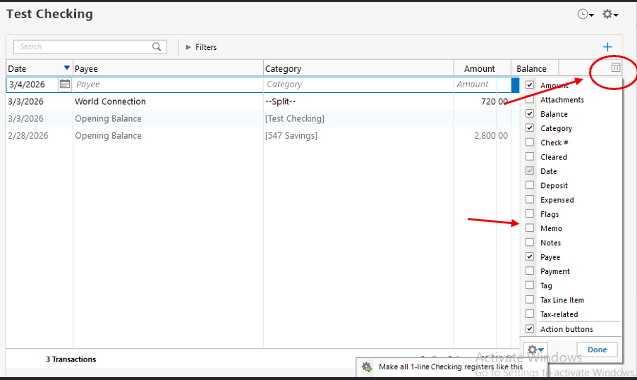
    To the right of the Amount header is a grey icon of some sort … click that to choose what columns to display.

    Q user since February, 1990. DOS Version 4
    Now running Quicken Windows Subscription, Business & Personal
    Retired "Certified Information Systems Auditor" & Bank Audit VP

  • Quicken Laura
    Quicken Laura Quicken Windows Subscription Moderator mod

    Hi @StanleyK,

    Thank you for reaching out.

    As @NotACPA mentioned, you can adjust the column settings from the top-right corner of the register (please refer to the image below for guidance).

    Screenshot 2026-03-04 at 11.58.17 AM.png

    Simply open the column settings, check the box for the Memo column, and then click Done to apply the changes.

    I hope this helps!

    Quicken Laura

    Make sure to sign up for the email digest to see a round up of your top posts.

  • StanleyK
    StanleyK Quicken Windows Subscription Member ✭✭
    edited March 22

    Thanks so much, Laura. I reset my columns. Somehow, the recent R66.18 update changed some of my previous settings. I found that it also reset my backup setting on how many days to update. But I knew how to go into the settings/backup menu and change it back.

  • StanleyK
    StanleyK Quicken Windows Subscription Member ✭✭

    And thanks NotACPA.

  • BarryGraham
    BarryGraham Quicken Windows Subscription Member, Windows Beta Beta
    edited March 22

    Yes, that happened to me too. This was one of several changes to settings made by Quicken after a recent update.

    Barry Graham
    Quicken H&B Subscription
  • Quicken Laura
    Quicken Laura Quicken Windows Subscription Moderator mod

    Hi all,

    @StanleyK, that’s great to hear! I’m glad it’s working properly!

    Thank you for sharing your experiences in the previous updates. The good news is that this issue has been resolved in Version R66.23. I hope everything is now working smoothly for everyone.

    If you have any additional questions, please feel free to reach out!

    Quicken Laura

    Make sure to sign up for the email digest to see a round up of your top posts.