This discussion was created from comments split from:
Vanguard Download Issue - Two Entries Per Transaction
.
I have a similar problem with Vanguard brokerage. In January 2026 I had a double entry for my brokerage account. I can see it in the history. However, I can no longer view detailed information as shown earlier in this thread. How do I get back to the view I used to have showing the individual reinvest, div, etc. so I can delete the duplication?
DirectConnect is set up, but I think I may have manually downloaded too, thus causing the duplication.
Is there a way to get back to the detailed listing I used to have? I would like to get back to what the image shows below.
Hello @PegasusT4,
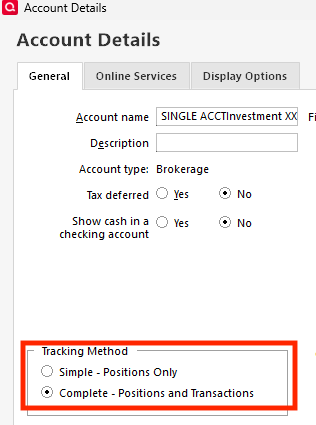
Thank you for letting us know you're seeing this issue! If you're no longer able to view the transaction list for your investment account, the most likely cause is that the investment tracking method got switched to Simple.
To check, please navigate to Tools>Account List and click the Edit button next to the problem account. On the General tab, look in the Tracking Method section.
If it is set to Simple and you have the option to change it to Complete, then change it.
Please let me know how it goes!
We haven't heard back from you in a while. Do you still need assistance?
Check back and let us know! Thank you.
Hello again,
Checking in once more before this thread is closed. Let us know if you still need assistance.
Thank you!
Due to the lack of response, I went ahead and closed this post.
If you still require assistance, please feel free to start a new post.