America First Credit Union - OL-295-A [Edited]

For the past 2-3 weeks, I have been getting OL-294-A and OL-295-A errors when trying to update my America First Credit Union accounts. The issue persists for 2 or 3 days, then spontaneously functions for 2 days, then recurs.
I've contacted AFCU about these errors, and their tech team could not find any problems on their end.
Comments
-
I am having the same issue, so I reset. Still won't connect.
0 -
Just got OL-295-A today for AFCU. Did they kill Quicken support?
0 -
Hi everyone,
Thank you for reporting the error you are getting. I'd be happy to help you with this issue.
Please send your log files so we can forward them to the proper department for further investigation.
To send your logs:
- Open Quicken
- Click Help
- Select Report a Problem
- Click Send to Quicken
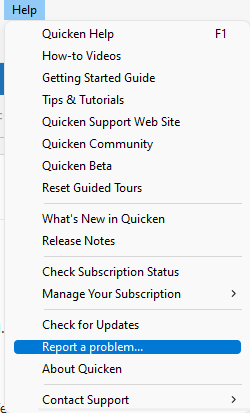
Once submitted, please let us know. I look forward to your response!
Quicken Laura
Make sure to sign up for the email digest to see a round up of your top posts.
0 -
I have the sample problem. I also called AFCU, and they said a bunch of people are calling and it is not an issue on their end. I reported the problem in Quicken after attempting to download transactions again, but the download still failed.
0 -
I was able to fix this myself. Which tells me the issue is with Quicken, which is frustrating because the docs say that OL-295 is DEFINITELY a bank server issue.
For anyone interested, I was able to get it working (who knows for how long) by:
1. Go to my AFCU account
2. Edit account details
3. Online services tab
4. Click the "change connection method" button.
5. There was only 1 option for me, and it was for "Express Web Connect" (I don't think this is actually the way Quicken wants to connect…)
6. Re-set up and relink the account.
I quit Quicken and updated the account again to confirm. There is definitely a bug of some kind in Quicken here, though.0


Categories
- All Categories
- 15 Product Ideas
- 34 Announcements
- 248 Alerts, Online Banking & Known Product Issues
- 20 Product Alerts
- 516 Welcome to the Community!
- 680 Before you Buy
- 1.5K Product Ideas
- 55.6K Quicken Classic for Windows
- 16.8K Quicken Classic for Mac
- 1K Quicken Mobile
- 834 Quicken on the Web
- 126 Quicken LifeHub