Direct Connect missing from OSU Summary

Philip107
Philip107 Quicken Windows Subscription Member ✭✭✭✭

I have one Direct Connect account, Wells Fargo, and it's download results are no longer listed in the One Step Update Summary. Also, in the Account List window the Last Download column is not populated. However, the various Wells Fargo accounts I have are actually updated.

Any ideas how to fix this or is it inherent with the new EWC+ functionality?

2026-03-12_07-46-08.jpg

----Quicken User since 1998 ----

Comments

  • Quicken Kristina
    Quicken Kristina Quicken Windows Subscription Moderator mod

    Hello @Philip107,

    Thank you for letting us know you're seeing this issue. This is not an inherent behavior with Express Web Connect+.

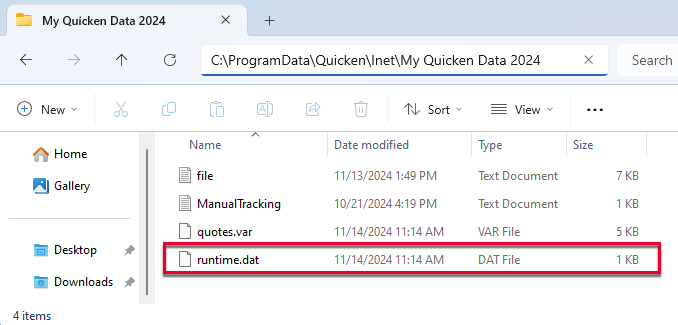
    The behavior you describe is usually caused by issues with the .dat file. To troubleshoot, close the Quicken program and navigate to C:\ProgramData\Quicken\Inet[folder with your data file name].

    Note - The Program Data folder is hidden by default. If you need instructions on unhiding the folder, you can find instructions on Microsoft's support site.

    1. Rename the runtime.dat file found at C:\ProgramData\Quicken\Inet\FILENAME\.

    QWin

    2. Run a One Step Update (OSU) again to confirm the issue is resolved.

    3. If the issue persists, sign out and back in from Quicken and reset the affected accounts.

    These steps should resolve the issue, allowing accounts to show the last download status and the updated banks to appear in the OSU summary.

    Please let me know how it goes!

    Quicken Kristina

    Make sure to sign up for the email digest to see a round up of your top posts.