Downloaded transactions with bad names & categories
When I download my CC transactions from CapitalOne, there is frequent name mangling. Note: this is not being done by a Payee/Rule.
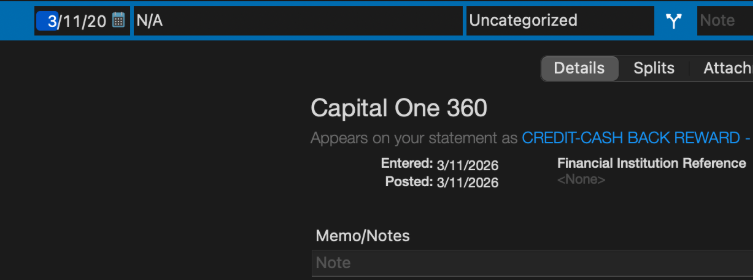
Either Quicken gives me "N/A" or the name is severely truncated in other cases.
Quicken support's answer was to add renaming rules, which I find hilarious, as I would need a rule for each vendor they mess up or many variations of the same thing (might as well not download using Quicken, thanks)
[Edited - Readability/Removed Personal Information]
Comments
-
Hello @FormerIntuit,
Thank you for letting us know you're seeing this issue. Creating renaming rules for each mangled Payee is one way to correct the issue.
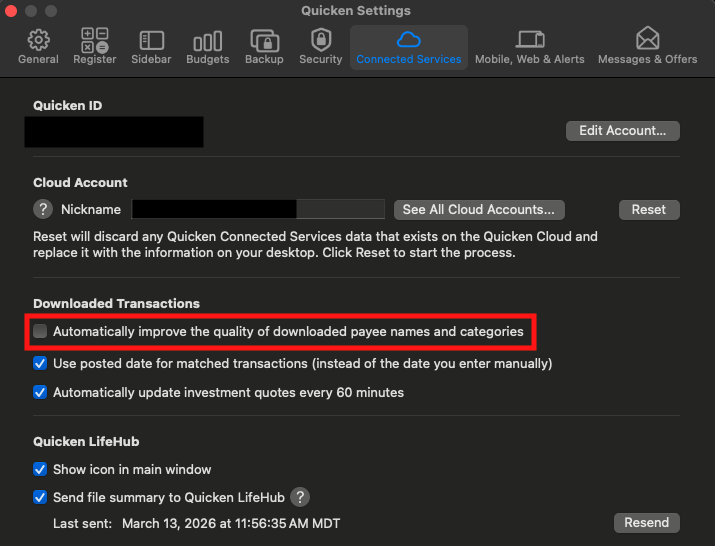
Another possibility is to navigate to Quicken>Settings>Connected Services. Check if "Automatically improve the quality of downloaded payee names and categories" is selected. If it isn't, try selecting it and see if that corrects the issue.
I look forward to your response!
Quicken Kristina
Make sure to sign up for the email digest to see a round up of your top posts.
0 -
@FormerIntuit Select one of the bad transactions and right-click then choose Show Inspector. (Or turn on the Statement Payee column.) If the Statement Payee is "N/A" or some other garbage, there's really nothing Quicken can do about it as this is what's being transmitted by Capital One.
Quicken Mac Subscription; Quicken Mac user since the early 90s0
Categories
- All Categories
- 18 Product Ideas
- 34 Announcements
- 246 Alerts, Online Banking & Known Product Issues
- 19 Product Alerts
- 517 Welcome to the Community!
- 682 Before you Buy
- 1.5K Product Ideas
- 55.7K Quicken Classic for Windows
- 16.8K Quicken Classic for Mac
- 1K Quicken Mobile
- 834 Quicken on the Web
- 127 Quicken LifeHub