Two Transactions Matched to Same Matching Transaction
ISSUE: Three-way Transaction Match
I have now identified three situations (three months) in which two transactions are being matched to the same matching transaction, which should not be possible.
DESCRIPTION:
I downloaded transactions into the checking and credit card account using One Step Update. I noticed that the account balances were incorrect, so I reviewed the paper credit card statement to the Quicken register. For each of these three situations, there are two transactions in the Credit Card Register that are linked to the same one transaction in the Checking Register.
TRANSACTION #1
Account: Credit Card
Date: 9/23/25
Payee: Automatic Payment
Amount: $2107.68
Category: [Checking Account]
Right-click » Go To Matching Transaction
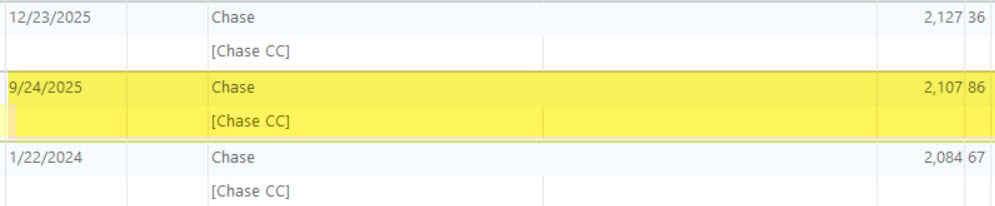
TRANSACTION #3
Account: Checking
Date: 9/24/25
Payee: Chase
Amount: $2107.68
Category: [Chase]

TRANSACTION #2
Account: Credit Card
Date: 9/24/25
Payee: Chase
Amount: $2107.68
Category: [Checking Account]
Right-click » Go To Matching Transaction
TRANSACTION #3
Account: Checking
Date: 9/24/25
Payee: Chase
Amount: $2107.68
Category: [Chase]
QUESTIONS
How is this possible?
Why is this happening?
How do I avoid it going forward?
Answers
-
Hello @DDub,
Thank you for reaching out! To help troubleshoot, please provide more information:
- When did you first notice this issue?
- Were the transfers originally linked correctly?
- Since you used the term matching, are reminders involved in any way, or is this purely an issue with transfers linking to multiple transactions in the other account?
I look forward to your response!
Quicken Kristina
Make sure to sign up for the email digest to see a round up of your top posts.
0 -
It looks to me as if you manually entered a transaction for 9/24. Subsequently, you downloaded a transaction posted a day earlier on 9/23. If the manually entered transaction is in the future, Quicken will assume that they are two separate transactions. Do you have automatically accept transactions enabled? I would disable that. After download, if you suspect a duplicate transaction, change the date of the manually entered transaction in the register to the date that Quicken downloaded the transaction and it will match. Occasionally, this happens to me. Not a bug, just a data entry date error. Alternately, delete one of the transactions. I usually delete the manually entered transaction as the downloaded transaction is Cleared. Although, if the manually entered transaction has attached notes, etc, then I'll delete the downloaded transaction and Clear the manual transaction.
0
Categories
- All Categories
- 16 Product Ideas
- 34 Announcements
- 248 Alerts, Online Banking & Known Product Issues
- 20 Product Alerts
- 516 Welcome to the Community!
- 681 Before you Buy
- 1.5K Product Ideas
- 55.6K Quicken Classic for Windows
- 16.8K Quicken Classic for Mac
- 1K Quicken Mobile
- 834 Quicken on the Web
- 126 Quicken LifeHub


