This discussion was created from comments split from:
Problem downloading data from Vanguard
.
Two issues with downloading transactions from Vanguard into Quicken:
First, pulling the transactions from Vanguard into Quicken (Update Transactions) usually doesn't result in any new transactions in Quicken (maybe 1 time in 20 it does). This problem has been going on for a long time.
Second, pushing transaction from Vanguard.com into Quicken, until maybe 1-2 months ago, I was able to see 3 options with the 2nd one being "Download each fund to a separate Quicken account"; currently, I am not able to see that 2nd option. Vanguards says that option is still there, but possibly something is happening on the Quicken side that prevents my seeing it.
Would appreciate thoughts or guidance on both.
AS Hiker
I'm having the same issue - Vanguard is not downloading new transactions anymore - and I'm not getting any connection error. It's just not downloading them, whether I use One Step Update or Update Transactions.
Hello @as_hiker & @AT_Esquire,
Thank you for letting us know you're seeing this issue. To troubleshoot, please follow these steps from our article on missing transactions/transactions not downloading:
Be sure to follow these steps in order:
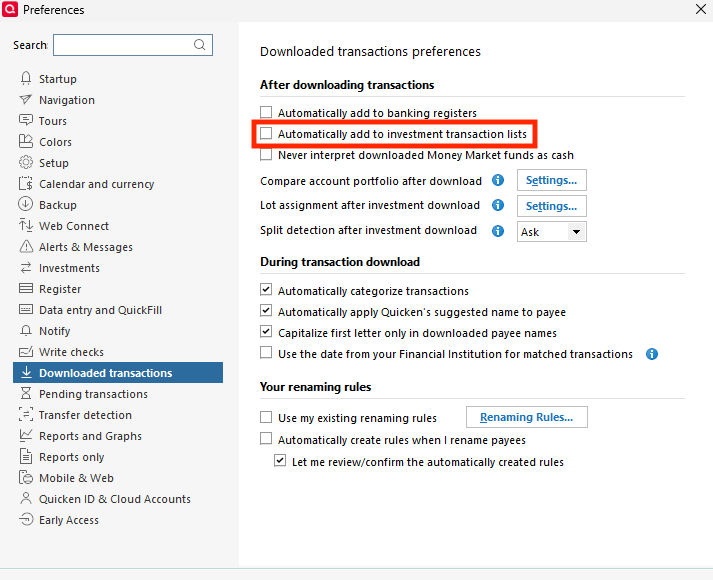
1. Go to Edit > Preferences > Downloaded Transactions. The option Automatically add to investment transaction lists needs to be unchecked.
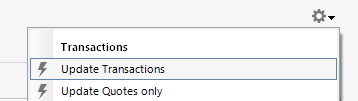
2. Refresh your online account information by clicking the Actions Gear Icon on the upper right of the register, and select Update Transactions. Follow the on-screen instructions to complete the update.
3. Confirm that the Sort Order in your account is by Date; just click the top of the Date column in your account register. It's possible the transactions are in your register, but not where you thought they'd be.
4. Try refreshing your login session: To do this, go to Help > Refresh Sign in. After completing the log-in process, try running a One Step Update again.
5. Go to Tools > Account List and check Show Hidden Accounts at the bottom left. Confirm the missing transactions haven't been added to a hidden account by clicking on the name of any account that appears with a check mark in the Hidden column.
If the issue isn't resolved and this is not a one-time event, please reach out to Quicken Support.
Second, pushing transactions from Vanguard.com into Quicken, until maybe 1-2 months ago, I was able to see 3 options with the 2nd one being "Download each fund to a separate Quicken account"; currently, I am not able to see that 2nd option. Vanguards says that the option is still there, but possibly something is happening on the Quicken side that prevents me from seeing it.
Since you already spoke to the financial institution, and they said nothing changed on their end, I recommend you start by manually reinstalling the current update patch. If the issue is being caused by something that didn't install correctly in the Quicken program, reinstalling the patch can help. The article linked below provides the link to download the patch and instructions on installing: https://www.quicken.com/support/update-and-patch-20182019-release-quicken-windows-subscription-product/#section-windows-2
I hope this helps!
I've tried all those steps and does not resolving the issue - no transactions are being downloaded.
Thank you for your reply,
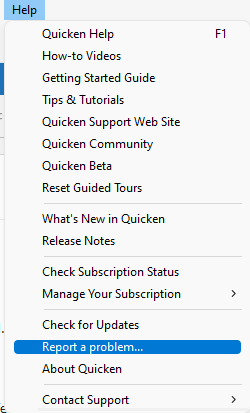
To troubleshoot further, please provide 3 transaction samples (date/payee/amount) that are posted on the financial institution's website but have not been downloaded into your Quicken or entered into your Quicken file manually. Please also go to Help > Report a Problem and submit a problem report with the log files attached.
Providing this information will allow us to verify the information being sent by the financial institution, which will help determine if it's an issue on their end or a problem in Quicken. Please post to this discussion to let me know once the problem report has been sent.
Thank you!
I'm not sure how to post transaction samples or create a file showing those posted transactions that have not been downloaded - can you be more specific
You can either post the information in this discussion or include it in the issue description when creating the problem report. We would need the date, amount, and the payee/security.
The transaction date is 3/13/26, the amount is $121,200, and the security is VCTXX.
When I click "reconcile shares," Quicken recognizes that the shares do not reconcile and the pop up window (after clicking on "details") states that "The share balance received from Vanguard changed but no new transactions were downloaded."
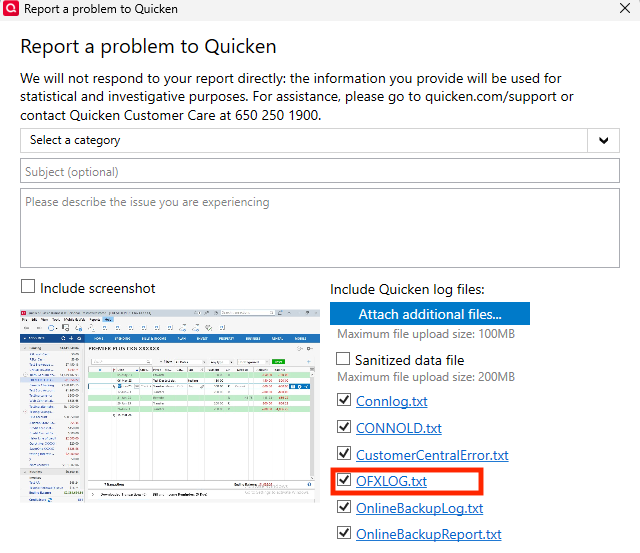
I could not find that sample transaction in the log files you provided. I did notice that no OFX log was included (which is usually where transactions from Direct Connect accounts are listed).
If you're able to send a problem report with the OFX log attached, please do so. If there is no option to do so, please let me know.
Sorry if this is supposed to be obvious - but I'm not following; how would I provide a log of transactions or OFX log of transactions that are not downloaded?
When you navigate to Help> Report a Problem, you will see log files pre-selected in the Report a Problem window.
If you have any accounts connected using Direct Connect, there should be an OFX log. If there is one, please send a problem report with the OFX log attached.
If there isn't one, please let me know.
There is no OFX log listed in the list of files (there are various other .txt files but not an OFXLOG.txt)
For further assistance, I recommend contacting Quicken Support directly, as they have access to tools we can't access in the Community and can escalate the issue as needed. The Quicken Support phone number can be found through this link here. Phone support is available from 5:00 am PT to 5:00 pm PT, Monday through Friday.
I apologize that I could not be of more assistance!