Unable to find mystery downloaded transactions

Charlie@
Charlie@ Quicken Windows Subscription Member ✭✭✭

After a one-step update, the summary shows it has downloaded 2 transactions from Schwab. It never indicates which of several Schwab accounts these transactions are for, and there are no little red flags hovering before any of the accounts, and I cannot find any transactions waiting for acceptance in any of the Schwab accounts.

Checking all the accounts at Schwab, and all recent transactions have been accounted for in Quicken, so I am not sure what is happening here. Any thoughts?

[Edited Readability]

Best Answer

  • Charlie@
    Charlie@ Quicken Windows Subscription Member ✭✭✭
    Answer ✓

    So for the first suggestion, there is no runtime.dat file in my folder, or in any other sub-folder of the inet folder.

    I will try the logout/reset option shortly.

Answers

  • NotACPA
    NotACPA Quicken Windows Subscription SuperUser ✭✭✭✭✭

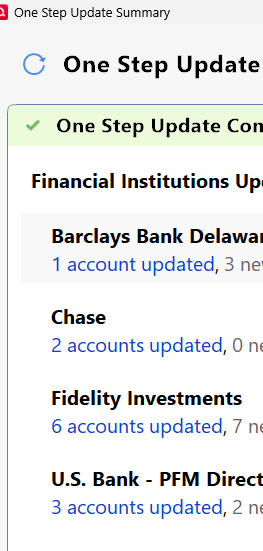
    Click on the "accounts updated" text to see which accounts were updated.

    image.png

    Q user since February, 1990. DOS Version 4
    Now running Quicken Windows Subscription, Business & Personal
    Retired "Certified Information Systems Auditor" & Bank Audit VP

  • Charlie@
    Charlie@ Quicken Windows Subscription Member ✭✭✭

    Thanks for that. For the particular account It says:

    2 new transactions downloaded

    No transactions to review

    I do not see any transactions in the account register, so I have no idea what the 2 transactions are, that are there on every download. Note the account is set for manual review/accept.

  • JND
    JND Quicken Windows Subscription Member ✭✭

    That happens to me all the time on just one of my Fidelity brokerage accounts.

    I used to be able to have them magically appear by backing up the file, but now I have to actually close the Quicken file and then reopen it. Just like magic, there are the downloaded transactions.

    Support has tried to help, but no joy.

  • Quicken Laura
    Quicken Laura Quicken Windows Subscription Moderator mod

    Hi @Charlie@ & @JND,

    Thank you for sharing what you are experiencing. I’d be happy to help troubleshoot this issue with you.

    To help narrow down the possible cause, could you please provide a bit more information?

    • Where is your Quicken data file located?
      To check this, please open Quicken and select File. At the bottom of the menu under Recent Files, the file with the checkmark next to it is the one that is currently open. Please let me know the full file path displayed there.
    • Is your data file being backed up or synced by any third-party services, such as Carbonite, OneDrive, or Backblaze?
    • When did you first notice the problem?
    • Have you tried restoring a backup from a date prior to when the issue began?

    Your answers will help us better understand what may be causing the issue. I look forward to your response. Thank you!

    Quicken Laura

    Make sure to sign up for the email digest to see a round up of your top posts.

  • Charlie@
    Charlie@ Quicken Windows Subscription Member ✭✭✭
    edited March 17

    Laura,

    1. C:\Users\cju2\Documents\Quicken\Qdata20260223
    2. Only backed up to the local C drive upon program exit. Then backed up to a local network hard drive later.
    3. Sometime within the last 2 weeks.
    4. No, because I have made many changes since the 02/23 file, which was a copy of the previous data file, and there is probably no way I can remember all of the changes.

    Of note. The account having the mysterious TXns is an IRA account in which a number of withdrawals were made in mid-February (before the data file copy) and which brought the account balance to 0. Eventually, I will have Fidelity close the account, but I have not gotten around to that yet. Every transaction in that account has previously been accepted, and I'm pretty sure all of them are accounted for since the balance of 0 matches up with Fidelity. I suppose I could close the account in Q, but I was going to wait until next year to do that.

    [Edited Readability]

  • Quicken Laura
    Quicken Laura Quicken Windows Subscription Moderator mod

    Hi @Charlie@,

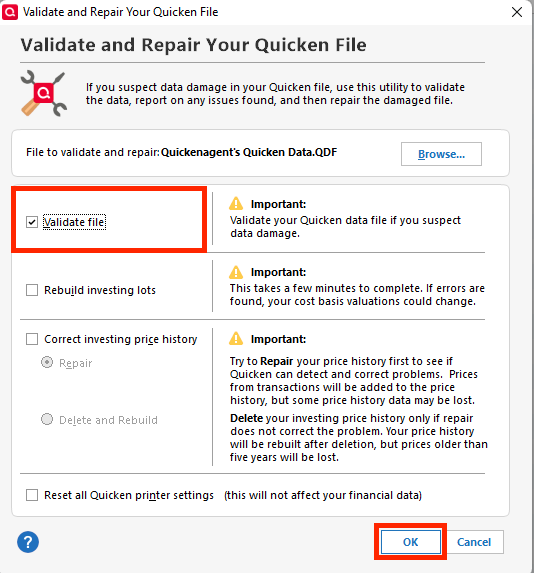
    Thank you for providing those details—that’s very helpful. As a next step, I recommend validating your file to help rule out any possible file corruption. You can do this by following the steps below:

    • Go to File
    • Select Validate and Repair File
    • Choose Validate File
    • Click OK validate file.png

    Once the process is complete, a log file (validate.txt) will open in Notepad. Please review the log for any unrecoverable transactions that may need to be corrected manually.

    This process can help identify and resolve errors related to file integrity.

    Please let me know how it goes or if you have any questions!

    Quicken Laura

    Make sure to sign up for the email digest to see a round up of your top posts.

  • Charlie@
    Charlie@ Quicken Windows Subscription Member ✭✭✭

    It went fine. Note, I also did a super validate with the same results as below. Note2, that stock split thing has been showing up for at least 20 years and that account has been closed for about as long…

    [Tue Mar 17 08:12:47 2026]

    File: "C:\Users\cju2\Documents\Quicken\Qdata20260223"

    QDF:
    Validating your data.
    No errors.

    QEL:
    No read errors.

    QEL:
    All internal consistency checks passed.

    [Tue Mar 17 08:14:06 2026]
    Quicken has found 1 stock split(s) for account "CJU's misc. securities", security "AT&T INC", on 2/20/1998 that might be missing.
    Maximum security reference: 368, number of securities: 368.
    All security references are within the normal range.

    Validation has completed.

  • Quicken Laura
    Quicken Laura Quicken Windows Subscription Moderator mod

    Hi @Charlie@,

    Thank you for trying the validation. Let’s proceed with a few additional troubleshooting steps to help resolve the issue (make sure to back up first).

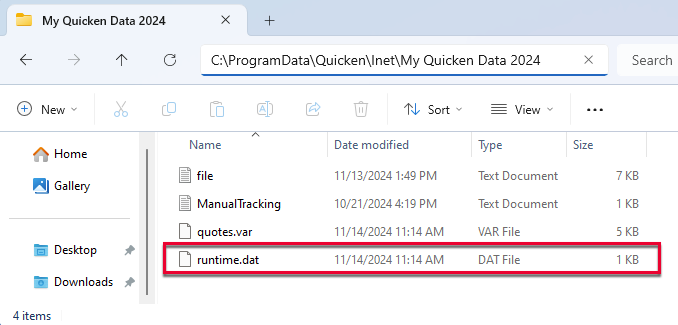
    1. Open File Explorer and navigate to: C:\ProgramData\Quicken\Inet[folder with user’s data file name]
    2. Locate the runtime.dat file and rename it FILENAME C:\ProgramData\Quicken\Inet\FILENAME\. image.png
    3. Run a One Step Update (OSU) again to confirm the issue is resolved.

    If the issue persists, sign out and back in from Quicken and reset the affected accounts.

    Steps to sign out and back in.

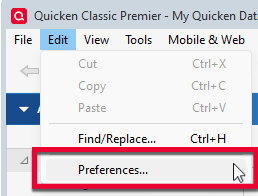
    1. Click on the Edit menu, and select Preferences. image.png
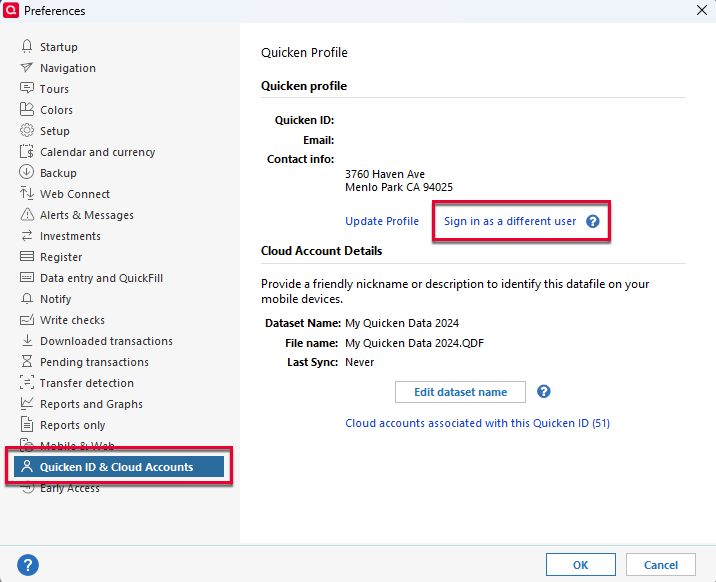
    2. In the left panel, select Quicken ID & Cloud Accounts
    3. Click Sign in as a different user image.png
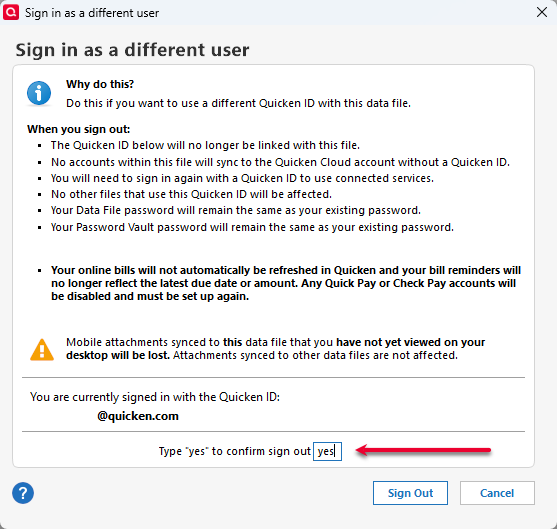
    4. Type "yes" as prompted and click Sign Out. image.png
    5. Sign back in with your Quicken ID.

    Steps to reset the accounts:

    Step 1: Deactivate all affected accounts

    1. Go to Tools > Account List.
    2. In the Account List, select the account and click Edit.
    3. In the Account Details window, open the Online Services tab.
    4. Click Deactivate next to the online service.
    5. Confirm by clicking Yes.
    6. Repeat these steps for each affected account.
    7. Log in to your bank’s website and revoke Quicken’s third-party access (if applicable).

    Step 2: Reactivate and link the accounts

    1. Go to Tools > Add Account.
    2. Search for and select Bank of America.
    3. If prompted, choose the appropriate connection method.
    4. Follow the on-screen instructions to sign in.
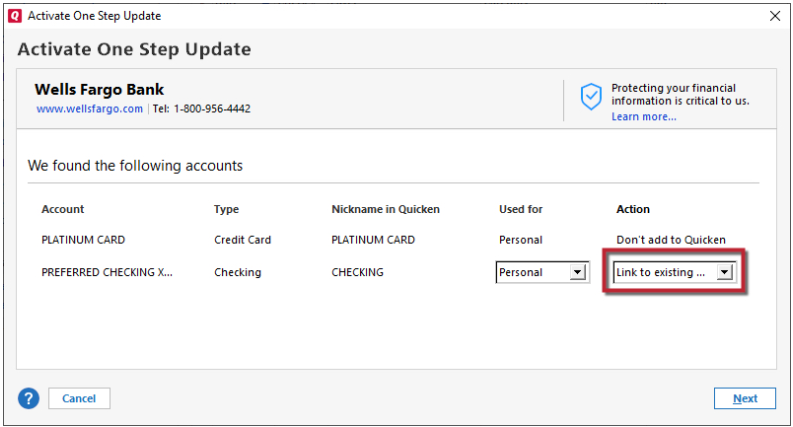
    5. When the list of found accounts appears, make sure to select Link to connect them to your existing accounts (do not choose Add, as that would create duplicates). Link to Existing.png

    Please let me know how it goes!

    Quicken Laura

    Make sure to sign up for the email digest to see a round up of your top posts.

  • Charlie@
    Charlie@ Quicken Windows Subscription Member ✭✭✭
    Answer ✓

    So for the first suggestion, there is no runtime.dat file in my folder, or in any other sub-folder of the inet folder.

    I will try the logout/reset option shortly.

  • Quicken Laura
    Quicken Laura Quicken Windows Subscription Moderator mod

    Hi @Charlie@,

    Sure, no problem, I'll be here to help you with further questions.

    Quicken Laura

    Make sure to sign up for the email digest to see a round up of your top posts.