Everbank slow again
Everbank is unbelievably slow with the MFA. Takes several minutes to send the SMS, then another couple minutes to verify the code. Other banks are very fast. This was allegedly being worked on months ago, but still persists. Any updates, or need a new ticket? Thx.
Comments
-
Hello @Paulio,
Thank you for reaching out! To help troubleshoot, I checked our internal tools and can see that the last time you tried to update, you received a CC-502 error. Did you see that error when you tried to update?
To troubleshoot, I recommend that you start by following these steps from our article on CC-502 errors:
Refresh your account information
- Open the transaction register for the account with the error message.
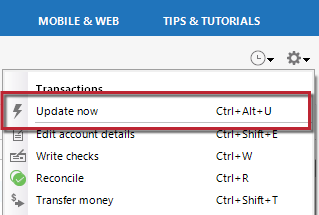
- Click the Gear Icon in the upper right of the register and select Update Now.
- Follow the on-screen instructions to complete the update.
- Repeat these steps for each account with this error.
If refreshing your accounts does not resolve the issue
Try waiting one business day. This error message is typically caused by maintenance on your bank's website. You can try updating again in a few hours or the next business day. If the issue still occurs after one business day, try the steps above again.
If the issue persists
Please Contact Us so we can help you fix this issue.
I hope this helps!
Quicken Kristina
Make sure to sign up for the email digest to see a round up of your top posts.
0 -
I did not receive any CC errors. I did disconnect and reconnect the account, no changes, still slow.
0 -
Thank you for your reply,
Does it successfully connect (just slowly), or does it eventually give you an error message/code?
You mentioned there was a previous ticket. Do you have the reference number handy?
There is a chance that the slowness is a file-specific issue. To troubleshoot for that, I suggest that you try validating your data file. Please save a backup file prior to performing these steps.
Validate:
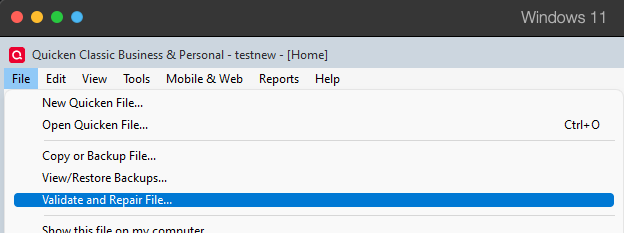
- File
- Validate and Repair File...
- Validate File
- Click OK
- Close the Data Log
- Close Quicken (leave it closed for at least 5 secs)
- Reopen Quicken and see if the issue persists.
Please let me know how it goes!
Quicken Kristina
Make sure to sign up for the email digest to see a round up of your top posts.
0 -
Does it successfully connect (just slowly), or does it eventually give you an error message/code? Connects very slowly
You mentioned there was a previous ticket. Do you have the reference number handy? I do not as it was back in Dec., but several discussions on this board back then.
There is a chance that the slowness is a file-specific issue. To troubleshoot for that, I suggest that you try validating your data file. Already have tried that, there were no errors anyway.
0 -
As of this morning, it doesn't even send an MFA, just spins the updating window for 5 min, then 'complete' with no error code and no update.
0 -
Thank you for your reply,
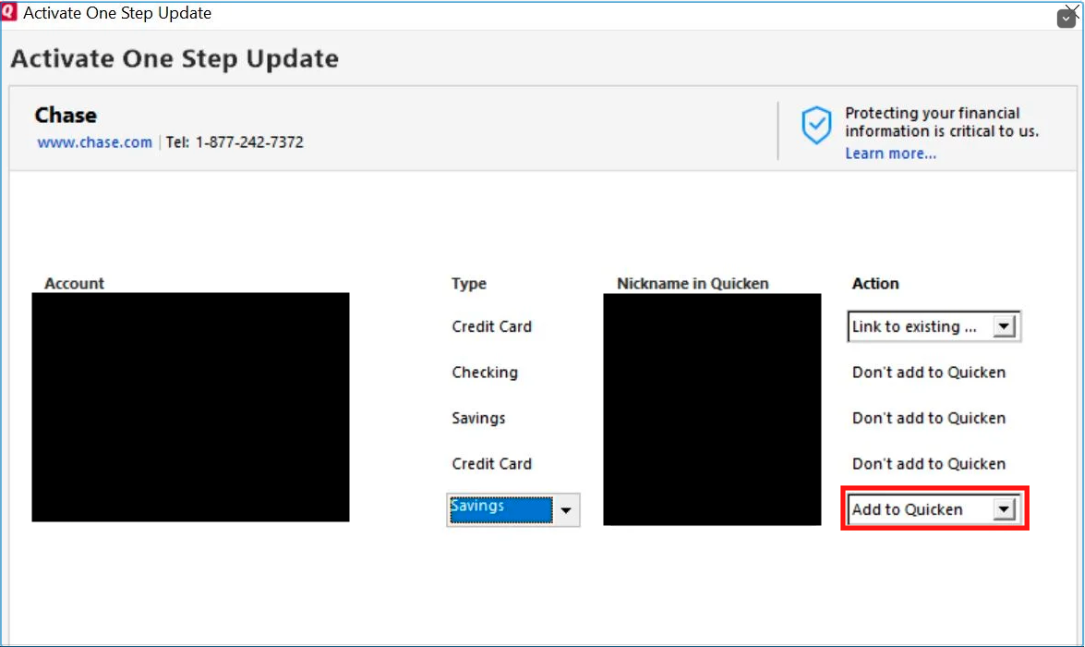
To continue troubleshooting, please backup your Quicken file, then deactivate all of your Everbank accounts. Once the accounts are deactivated, reconnect them by navigating to Tools>Add Account and following the prompts. Once you get to the Add/Link screen, add the accounts as new rather than linking to existing accounts.
Once the accounts are added as new accounts, test to confirm if the slowness persists.
I hope this helps!
Quicken Kristina
Make sure to sign up for the email digest to see a round up of your top posts.
0