How To Forecast Cash Balance Using Bills and Income (Q Mac)
I'm using Mac Classic Quicken Starter on a Mac.
I'd like to forecast my cash balance throughout the year and prepare for any shortfalls when I will inject more cash. I have a simple setup with a bank account, and a credit card account which are consolidated in Quicken. They are both linked to my bank where I download transactions. All of my bills are paid electronically.
I've started to use the Bills and Income function, and have setup several regular transactions such as a paycheque on the income side, and rent on the bills side. The problem I'm experiencing is that when the actual transactions occur, they are double counted - the bills and income which are setup for the future are not erased when the actual bill or income take place. This is throwing off the forecasted balance and the actual balance. If I delete the transactions manually, it does balance to the penny, but it seems the manual effort is not what was intended.
Any suggestions?
Thanks in advance.
Comments
-
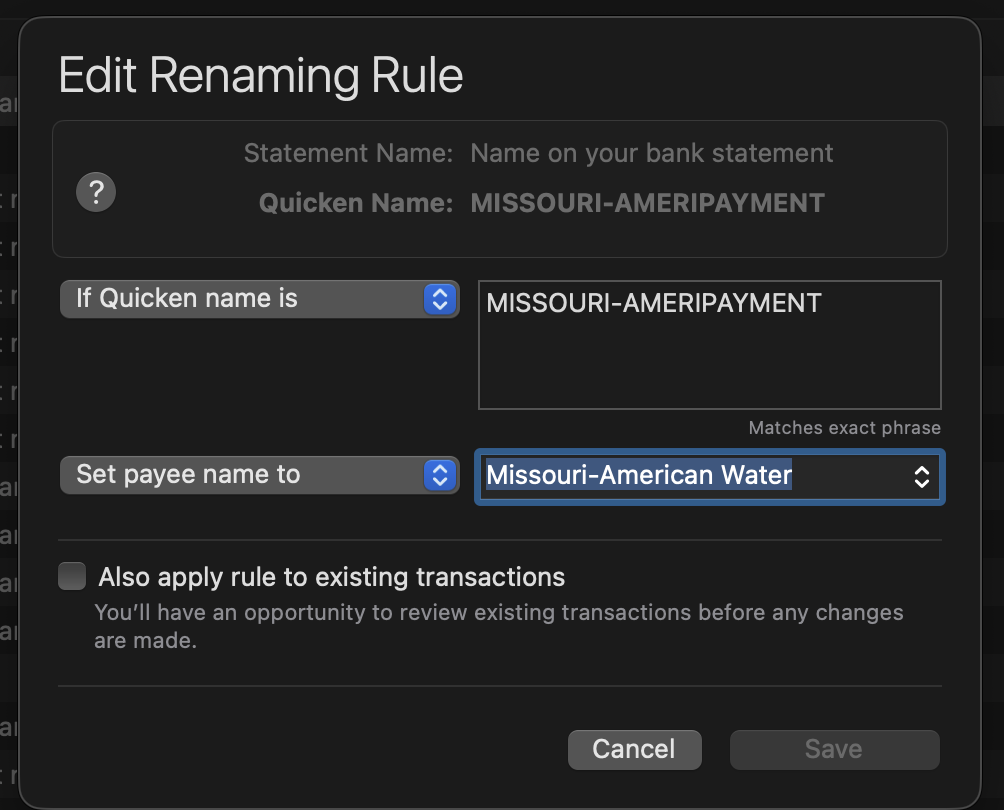
If the payee name you have on your scheduled transaction is different than the payee name that gets downloaded from the bank (not an unusual occurrence in my experience) then you can create a renaming rule that will help Quicken match them up. Here's one I have for my water bill:
"MISSOURI-AMERIPAYMENT" is the name on the downloaded transaction, and "Missouri-American Water" is the payee name on my scheduled transaction. This rule requires an exact match to get triggered; there's also an option for "If statement name contains" which will let you set up a rule that matches just part of a name.
Renaming rules can be found in the Payees & Rules window.
Also, if the amount in the scheduled transaction doesn't match the actual amount the transactions might not get matched up automatically. sometimes you may be able to fix that ahead of time. Many of my utility bills change from month to month but I always get an email ahead of time telling me how much the next bill will be so I can update the scheduled transaction before it happens. If you can't accurately anticipate the transaction amount there's not much you can do. However, you can drag the downloaded transaction onto the scheduled transaction to match them up manually; you might find that marginally easier than deleting one of them.
0