Duplicate Payment entries for a credit card (Q Mac)
My Q for Mac is set to download all my credit card and bank transactions.
For some reason, one credit card account is showing two duplicate payments each month. That's causing the balance on the credit card to be increasingly positive each month.
I don't know which of these transactions is the right one and which is not. I suspect the bank account and the credit card account are both showing a payment and not recognizing that one is a duplicate.
How do I reconcile this? Screenshot attached.

Answers
-
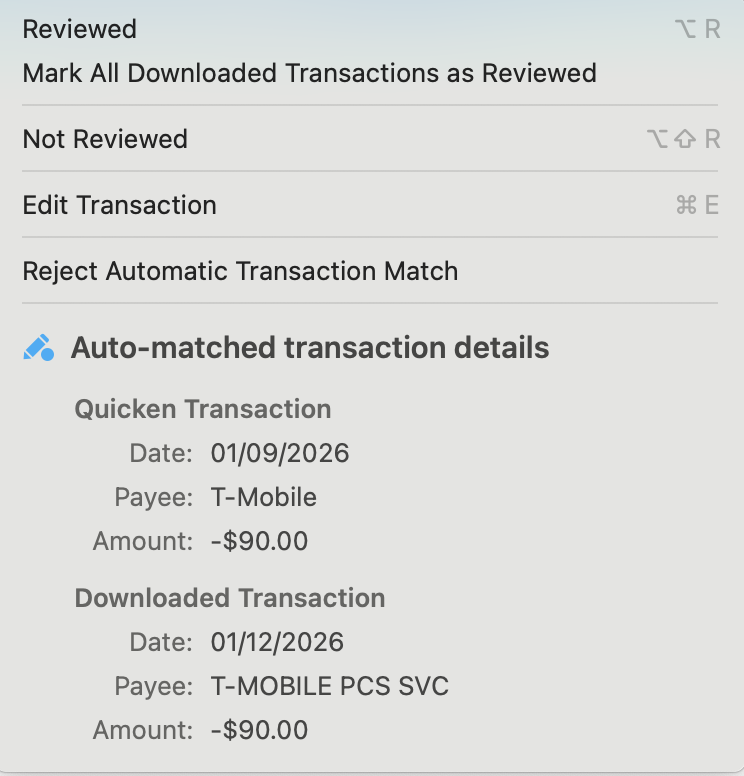
From your screenshot, these two transactions represent the same single real-world payment. The first one is a transaction you manually entered to denote the payment of (transfer to) the credit card account. The second one is the downloaded transaction from your financial institution of a payment. Sometimes, Quicken is able to automatically match the two and merge them, but in this case it hasn't. (No one knows the exact secret sauce in the algorithm Quicken uses to determine whether two transacitons do or don't match!) But the solution is simple: drag one on top of the other. This will manually match the two transactions. The status icon will change to an orange pencil + blue dot, to convey this was a manually-matched transaction, and you'l retain the proper transfer from your checking account.
New in version 8.5, if you click on the status icon once the transaction is merged, it gives you a quick glance at the manual and the downloaded transactions which were merged together, so you can un-match them if they had been incorrectly matched:
Quicken Mac Subscription • Quicken user since 19930 -
Thanks. That's a solution. Is there a way to automate this? I have around 45 transactions in different accounts to drag.
0 -
@snsokstan No, there's not an automated way to manually match transactions. If Quicken had a way of auto-0matcing them, it would have done so at the time they were downloaded. 😉
That said, dragging a transaction over another takes mere seconds, so even if you have 45 such duplicates, it shouldn't take more than a few minutes for you to match them and be caught up.
Quicken Mac Subscription • Quicken user since 19930
Categories
- All Categories
- 23 Product Ideas
- 34 Announcements
- 248 Alerts, Online Banking & Known Product Issues
- 19 Product Alerts
- 265 Welcome to the Community!
- 301 Before you Buy
- 1.5K Product Ideas
- 55.8K Quicken Classic for Windows
- 16.9K Quicken Classic for Mac
- 1K Quicken Mobile
- 834 Quicken on the Web
- 129 Quicken LifeHub