I've read numerous posts about Quicken CC-503 errors with Synchrony Bank Accounts. Sometimes the users say they have been able to get around it by finding back doors. Sometimes, Support Agents post that this is a known problem. Sometimes support agents give basic troubleshooting instructions. Intuit Quicken Support has not made an official statement on this. If they have, the front-line agents didn't get the memo!
WHAT [Removed - Language] IS GOING ON HERE? Call Quicken support, and they act like this is the 1st time they've heard about it and give front-line t-shooting steps, but after a couple of hours, basically redirect the user to Synchrony. Call Synchrony, and they say it's not their problem at ALL! They really couldn't care less. We, users, know all about this vicious circle, which is, of course, a whole other story.
This is not OS specific. This is not version-specific. This is not configuration-specific. This is not release-specific. THIS IS INTUIT QUICKEN SPECIFIC (and all Intuit products see note at end).
This is obviously a BUG. But I can't 100% blame Quicken if Synchrony changed everything (although I tend to do that 1st). Nor can I blame Synchrony, after all, who are they to be concerned with a little company like Intuit?!! Although some synchronization (pun intended) between the 2 may have helped the hundreds, no thousands, NO MILLIONS (see note at the end) of users left out to fend for themselves. And for GOD'S SAKE, just admit the problem and quit wasting hours of users' valuable time!!!
I only recently opened 3 Synchrony-backed cards: 2 Private Label cards and 1 MasterCard branded as Sam's. 1 Private Label is Harbor Freight, which Quicken says the site to use for that is HarborFreight.syf.com, which is sort of true. Each card has a different site address, but I went straight to Synchrony.com, thinking this would be straightforward. not……….
I ended up calling their support for help because it was all very confusing. And I have to mention that when calling support, there are specific departments for each private label card. Agents from Harbor Freight cannot and will not help any of the others, and vice versa.
"So, here's what seems to be the Rest….. Of The Story……"
The real deal here is that Synchrony is redirecting all of those private-label card addresses to a single address under Synchrony.com. And there is concrete evidence for this. I go directly to Synchrony.com, and when I click on the link for login, this menu appears asking me what kind of Login I want. (interesting)
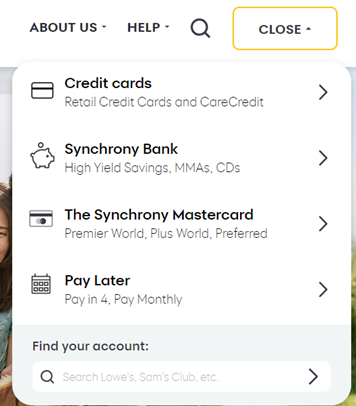
I chose Credit Cards since that most closely matches what I have, and this little pop-up appears. I believe here is the 1st clue as to what’s happening with the Synchrony login problems, for the credit cards at least. This threw me when I was setting them up. What New Sign-In Experience?
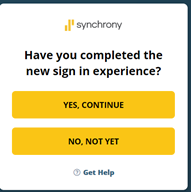
Clicking on the GET HELP link brings up an FAQ where the Quicken user can sort of put 2 & 2 together to figure out that the whole structure of Credit Cards underwritten by Synchrony is being migrated to 1 big, massive, sprawling tree under Synchrony.com. The 1st in this long list is how to register your Synchrony Credit Card, which takes the user to this window… which is the evidence that this whole thing has changed.
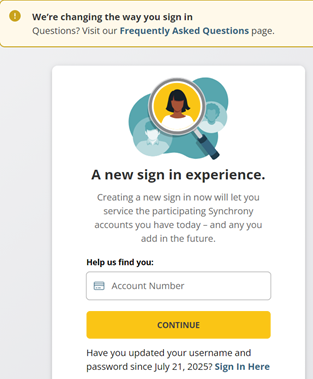
Inside Quicken….
Searching for Synchrony in the list of banks gives a list of everything that contains synchrony in the name. Clearly coming from an Internal Quicken database. Some have a Concatenation of the Synchrony name and the Private Label it’s targeted to. Some not. Many have Synchrony.com and an icon that changes with the Private label selected. Using most of these concatenated site names in a browser redirects to the Mother Site, Synchrony.com.
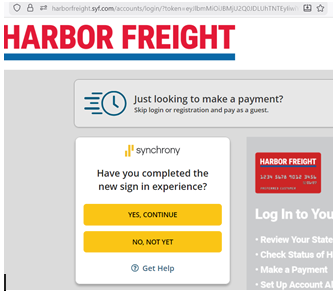
More evidence, using the HarborFreight.syf.com address, brings up this integrated pop-up asking about the New Sign In Experience. (Just Google Synchrony new sign-in experience.)
Finally, here is the new Synchrony Account dashboard, where all Synchrony accounts can be managed. And it seems like after a card registration takes place, it will automatically appear here in this dashboard. At least that's how it worked for me.
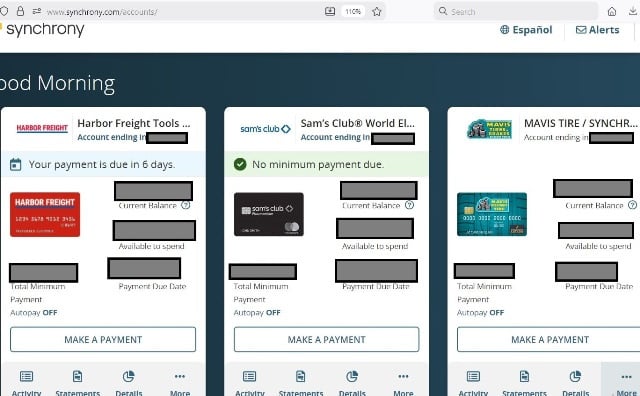
All of these screenshots are from a computer browser, not an app on a phone
NOW… while I can't blame 1 or the other, this is clearly on Intuit to figure out how to change the Quicken code. They have to figure out a way to get to the final login page after all these preliminary pop-ups. Where the user actually enters their credentials.
And to compound the problem, Synchrony could be migrating users of a specific private label in groups instead of 1 fell swoop (the smart thing to do on their part). Therefore, how can Quicken change the code for half of Harbor Freight cardholders? Obviously, they can't, I don't think….
According to Synchrony, 1 in 4 American adults (over 100 million) have a Synchrony-backed account of some kind. If that's true, then this affects ~25% of Inuit Quicken users.
FYI, this is also a problem for all QuickBooks products. 25% of Intuit's combined user base is ~7-8 million users. OMG!! It has to be a problem across all of Intuit's products!!! WAKE-UP!!!
How long will this migration by Synchrony take?? No one will answer but…. FOR GOD'S SAKE!!!!
Intuit, take a stand!! Admit the problem!!! EXPLAIN to users what's going on!!!
We can understand that a problem of this magnitude (~7-8 million Intuit users) doesn't get fixed overnight, and while it appears that the coding may have to wait for Synchrony to complete the migration….. QUIT TELLING US YOU'RE WORKING ON IT!!!
Give us a dedicated page that explains that problem… And please, please, please give the memo to everyone on the front support lines…… Make a poll where users could enter the name of the private label card, choice of multiples stating whether they are or are not having problems. Not a complaint page but a statistic page. Maybe that will help users see the magnitude of the problem and figure out which accounts have been migrated and the status of that migration. Post updates from Intuit to let us know the response isn't a canned response.
Once you give us facts and information and explain to us what's actually going on, we will stop screaming into the void!!!!!
maybe
[Edited - Readability]


