Hanscom Federal Credit Union new web platform and password update required
Today HFCU activated a new online platform and required a password update. When I try to download transactions in Quicken it says invalid password. I have entered the new password in Quicken by resetting connection and deactivating to no avail. For some reason I can't download from HFCU since they changed their web platform and required a password update. Please investigate!
Comments
-
You'll get a faster response if you directly contact Q Support via the link at the top of this page.
This forum is primarily user-to-user, and we can't investigate anything.
Q user since February, 1990. DOS Version 4
Now running Quicken Windows Subscription, Business & Personal
Retired "Certified Information Systems Auditor" & Bank Audit VP0 -
Just spoke to a human tech support person at Quicken and they are aware of issues with credit unions changing platforms and passwords and said to try login in a few days as they work to fix hopefully problem!
0 -
Today I was able to authenticate and add all accounts to automatic update!
0 -
The dreaded cc-503 invalid login message has returned today and I was not presented with the authentication pop up when I tried to reauthorize after de-authorizing all HFCU accounts! Yikes!
0 -
Hi @chestrenu,
Before we follow any troubleshooting steps. I suggest creating a backup file.
If you haven’t tried this yet, I recommend deactivating and reactivating all accounts associated with this financial institution.To Deactivate an Account:
- Go to the Tools menu and select Account List…
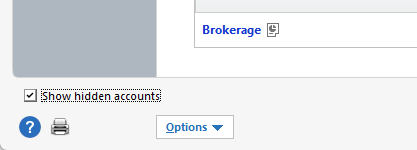
- If you have a hidden account, check the box in the lower left to display it.
- In the Account List, select the account you want to deactivate, then click Edit.
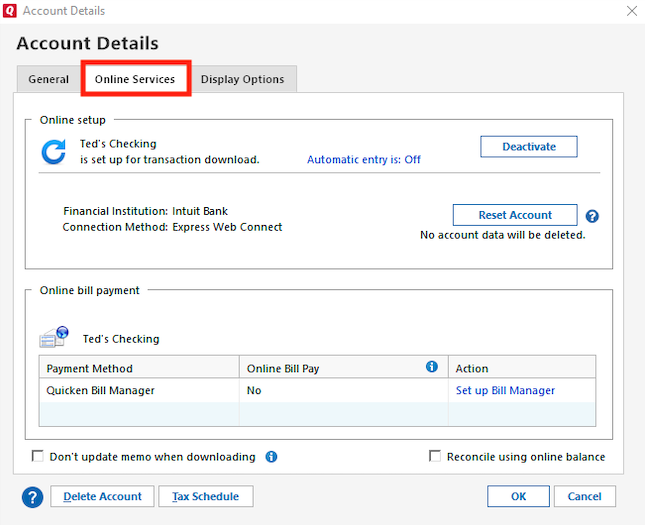
- In the Account Details window, go to the Online Services tab.
- Click Deactivate next to the service you want to disable.
- Confirm by clicking Yes.
- Repeat this process for all accounts related to this financial institution.
To Reactivate Account(s):
- Go to Tools > Add Account.
- Select the bank for the deactivated account(s). If prompted, choose the connection method.
- Enter your credentials and click Connect.
- When the list of located accounts appears, click LINK next to each account you want to reactivate.
- Click Next, then Done on the final prompt.
Let me know how it goes! I’ll be looking forward to your reply.
Quicken Carlos
Make sure to sign up for the email digest to see a round up of your top posts.
0 - Go to the Tools menu and select Account List…
-
I went through ALL of the steps you advised today and still get CC-503 and never get to the authentication screen. When Hanscom FCU updated their online platform last week requiring a password change, I had the same issue with Quicken and the CC-503 message. Contacted Quicken support and they got access to my screen and went through the same steps to no avail. Then on March 26 I tried again and got through authentication and added download for all Hanscom accounts. Everything was downloading fine until yesterday when the CC-503 came back for only Hanscom. It seems to me that there must be a software issue somewhere that is related to Hanscom's new online platform and password change that is at fault. I am 100% sure I have done all that has been requested and entered all of my login info correctly. Maybe this issue should be elevated? I am growing frustrated with this issue. I can't recall ever having this issue with Hanscom until they did this major change to their online platform which I can log into directly from their web site without a problem.
0 -
Hi @chestrenu,
I just sent you a direct message so we can continue with the process to escalate the CC-503 issue.
To check your messages, please click the envelope icon.I hope this helps!
Quicken Carlos
Make sure to sign up for the email digest to see a round up of your top posts.
0 -
I am having the exact same problem as chestrenu. Initially after the update, I was able to download transactions, but at some point it stopped letting me connect and is giving the CC-503. This has been going on for over a week, so waiting a few days doesn't help. Trying HFCU support now.
0 -
Solved! Deactivate all of your Hanscom accounts in Quicken. Add back but choose Hanscom FCU Retail instead of Hanscom Federal Credit Union.
0 -
So far that has been working for me too. Hope it keeps working!
0 -
Thanks for following up, @chestrenu and @rhinmass,
I’m glad to hear that deactivating and reactivating the accounts worked for you and that everything is still running smoothly.
If you run into any issues, please don’t hesitate to reach out to us!
Quicken Carlos
Make sure to sign up for the email digest to see a round up of your top posts.
0