Please advise about this latest TD Bank connection issue.

newpawta
newpawta Quicken Windows Subscription Member ✭✭

Win 11 Pro 64 bit

Ver R66.28, Build 27.1.66.28

I see there was something same/similar posted recently, but I don't understand the solution. I think this happened after I installed latest Q updates this morning. Opened one of my files and tried to run OSU and got this:
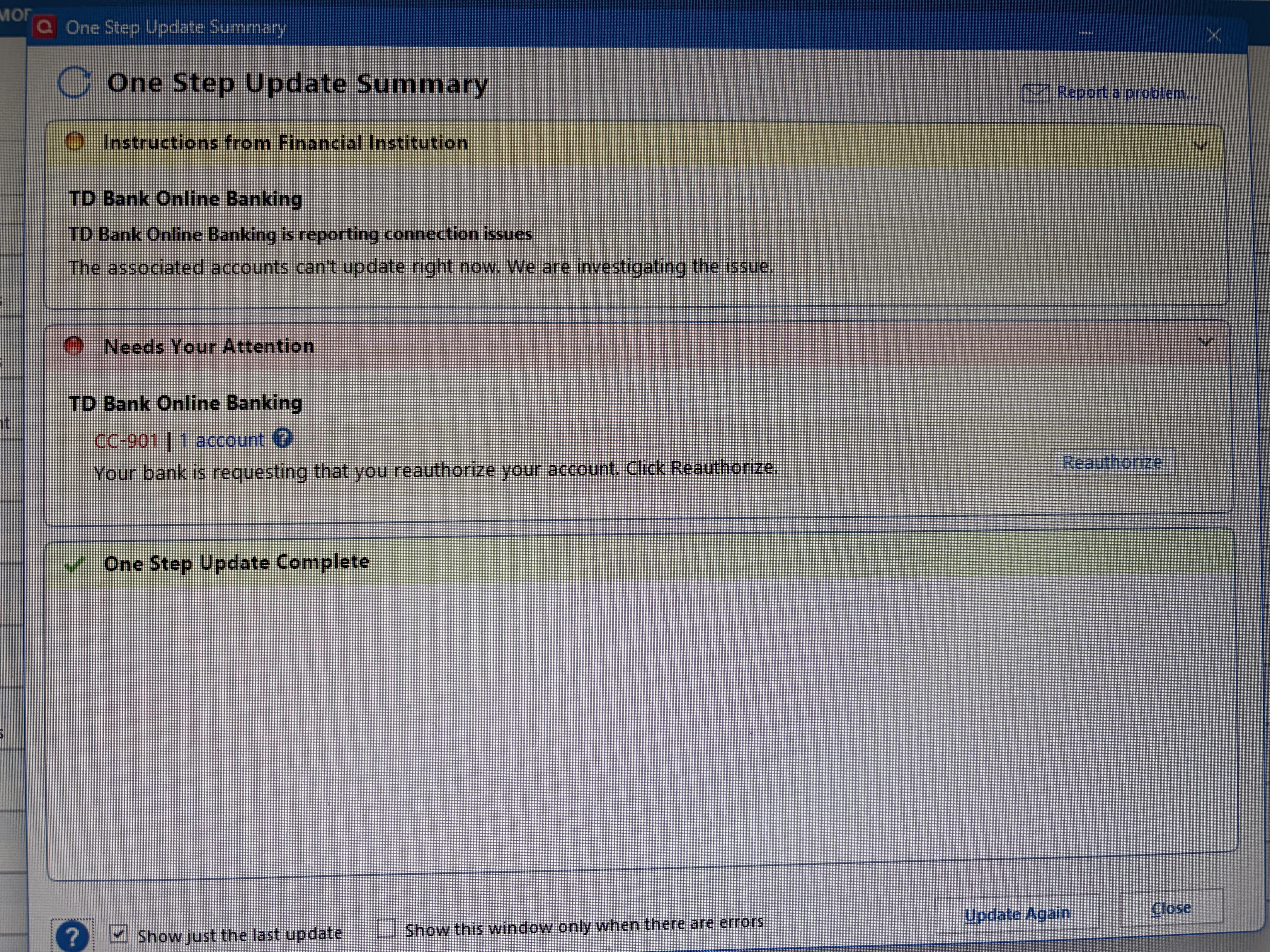
Quicken connection error 3.25.26.jpg

OSU DID NOT complete (download transactions), nor could I reauthorize the account; the pop-ups for that seemed to keep flashing in/out instead of opening.

Pleeeeease help with yet another TD connection issue; I likely will need step-by-step and am scared of "losing" stuff!!!


Best Answers

  • Quicken Anja
    Quicken Anja Moderator mod
    Answer ✓

    Hello @newpawta,

    After checking your account internally, it looks like TD Bank is currently returning an FDP-350 internal error, which can present in Quicken as a CC-901 error.

    For context, CC-901 generally appears when Quicken detects that your account authorization needs to be refreshed. This can happen if:

    • Your security token has expired and you need to reenter your credentials.
    • Your login information needs to be refreshed.

    You can resolve this by reauthorizing your TD Bank account:

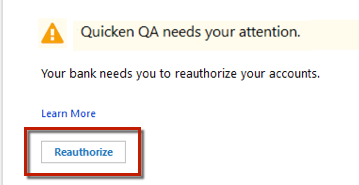
    1. Click Reauthorize in Quicken. image.png
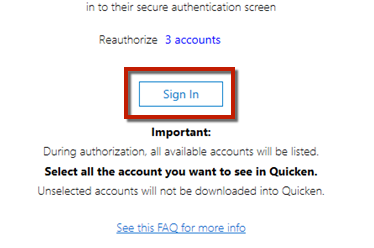
    2. Click Sign In on the next dialog. image.png
    3. Enter your TD Bank username and password, then click Sign In.
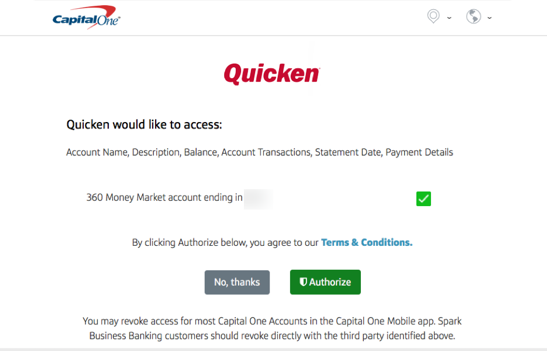
    4. Select the accounts you want to authorize and click Authorize. image.png
    5. You should see a Success message once complete.

    Important: If you have multiple TD Bank accounts or instances in Quicken, you may need to authorize each one individually. Make sure you don’t uncheck accounts unless you don’t want them in Quicken, as that would revoke their authorization.

    If reauthorizing doesn’t resolve the issue, you may need to follow the steps in this support article to deactivate and reactivate the affected accounts.

    Let us know if you continue to see the error after completing these steps.

    Thank you!

    -Quicken Anja
    Make sure to sign up for the email digest to see a round up of your top posts.

  • newpawta
    newpawta Quicken Windows Subscription Member ✭✭
    edited March 28 Answer ✓

    Thank you, Anja. I will need to access the support article and see if that helps; the reauthorization window (which I need to do quite often unfortunately) is just glitching and not opening, and it's only on one of my account files.

    Okay! I did the deactivate/reactivate - been through these steps before - and accidentally created a new account file because I didn't think to "add to existing" in the drop-down. Also this added the downloaded transactions to the new file. Once I re-figured-out how to delete the new file and reactivated/connected the account to my original file, it seems everything is working - including the downloading of most recent transactions to the original file. YAY! Thanks.

Answers

  • Quicken Anja
    Quicken Anja Moderator mod
    Answer ✓

    Hello @newpawta,

    After checking your account internally, it looks like TD Bank is currently returning an FDP-350 internal error, which can present in Quicken as a CC-901 error.

    For context, CC-901 generally appears when Quicken detects that your account authorization needs to be refreshed. This can happen if:

    • Your security token has expired and you need to reenter your credentials.
    • Your login information needs to be refreshed.

    You can resolve this by reauthorizing your TD Bank account:

    1. Click Reauthorize in Quicken. image.png
    2. Click Sign In on the next dialog. image.png
    3. Enter your TD Bank username and password, then click Sign In.
    4. Select the accounts you want to authorize and click Authorize. image.png
    5. You should see a Success message once complete.

    Important: If you have multiple TD Bank accounts or instances in Quicken, you may need to authorize each one individually. Make sure you don’t uncheck accounts unless you don’t want them in Quicken, as that would revoke their authorization.

    If reauthorizing doesn’t resolve the issue, you may need to follow the steps in this support article to deactivate and reactivate the affected accounts.

    Let us know if you continue to see the error after completing these steps.

    Thank you!

    -Quicken Anja
    Make sure to sign up for the email digest to see a round up of your top posts.

  • newpawta
    newpawta Quicken Windows Subscription Member ✭✭
    edited March 28 Answer ✓

    Thank you, Anja. I will need to access the support article and see if that helps; the reauthorization window (which I need to do quite often unfortunately) is just glitching and not opening, and it's only on one of my account files.

    Okay! I did the deactivate/reactivate - been through these steps before - and accidentally created a new account file because I didn't think to "add to existing" in the drop-down. Also this added the downloaded transactions to the new file. Once I re-figured-out how to delete the new file and reactivated/connected the account to my original file, it seems everything is working - including the downloading of most recent transactions to the original file. YAY! Thanks.

  • Quicken Anja
    Quicken Anja Moderator mod
    edited March 28

    @newpawta Thanks for the update! Glad to hear everything is working now.

    -Quicken Anja
    Make sure to sign up for the email digest to see a round up of your top posts.