One Step Update Keeps Grabbing Old Incorrect Stock Split
I have a stock in my portfolio. Every time I use One Step Update it keeps creating a tiny stock split in December 2022 and December 2020. When I look at the stock split it says it came from the feed. These stock splits are not real. I delete the stock splits. Next time I do One Step Update it pulls them in again. I would prefer to manually enter my stock splits rather than have them pulled down.
How do I prevent One Step Update from pulling down stock splits?
Answers
-
Hi @Glenn Hamilton,
Thank you for reaching out and sharing what you’re experiencing. I understand how concerning this can be.
Have you had a chance to check for placeholder entries? If not, please follow the steps below (I recommend saving a backup first):
Check for placeholders:
- Open the account in question
- Look for the Placeholder Entries section at the bottom of the register
- If you find a placeholder related to the affected security, try deleting it
If you don’t see any placeholder entries at the bottom of the account register, you can enable hidden transactions by following these steps:
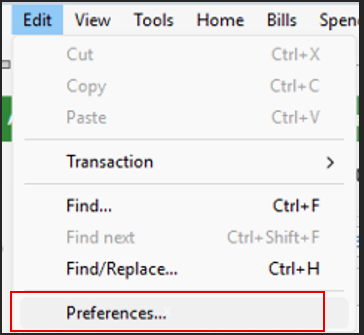
- Go to Edit
- Click Preferences
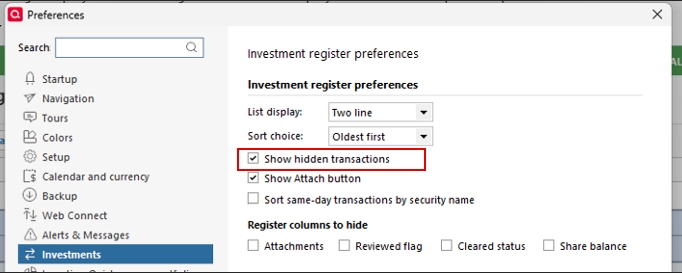
- Select Investments
- Check the Show hidden transactions box
Once enabled, review the account again for any hidden placeholder entries and remove any that may be causing the issue.
Please let me know how it goes!
Quicken Laura
Make sure to sign up for the email digest to see a round up of your top posts.
0 -
What's the stock involved? And, could the company have issued a small stock div (sometimes known as a "stock chip" vs "split")?
And, there's no way in Q to select what actions are downloaded. The best that you could do is to click EDIT, Preferences, Downloaded Transactions and UNcheck the 2 "Automatically add .." boxes at the top.
That way, at least this actions will be held at the bottom of the register prior to being recorded in your account.
BUT, I'm also curious as to why they're repeating. Because of the FITID that's part of every downloaded transaction (even one's you delete), Q should recognize these as dupes and ignore/bypass them.
So, how are you doing those downloads?
Q user since February, 1990. DOS Version 4
Now running Quicken Windows Subscription, Business & Personal
Retired "Certified Information Systems Auditor" & Bank Audit VP0
Categories
- All Categories
- 6 Product Ideas
- 34 Announcements
- 248 Alerts, Online Banking & Known Product Issues
- 19 Product Alerts
- 265 Welcome to the Community!
- 301 Before you Buy
- 1.5K Product Ideas
- 55.8K Quicken Classic for Windows
- 16.9K Quicken Classic for Mac
- 1K Quicken Mobile
- 834 Quicken on the Web
- 129 Quicken LifeHub