Citi downloads - confused

EmKay
EmKay Quicken Windows Subscription Member ✭✭✭✭

I searched to see if I could find the "known product issues" related to Citi downloads but, for some reason, came up empty…

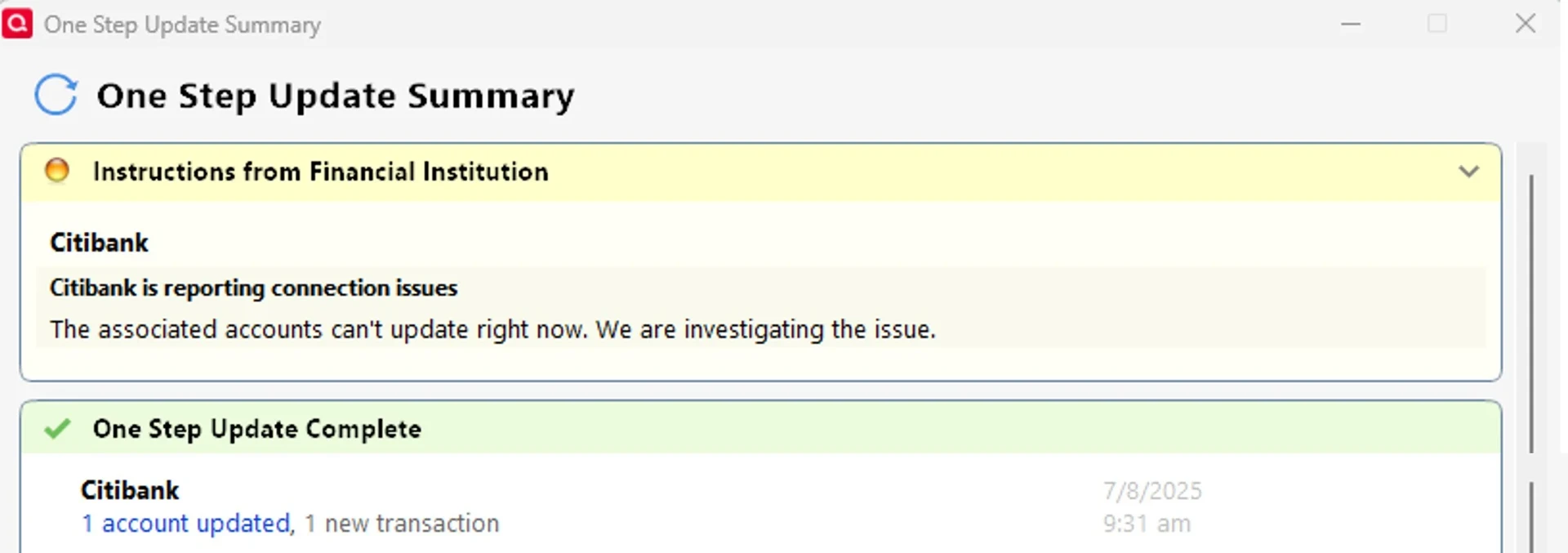
I have a Citi Visa card. When I do my OSU, I get an alert saying "Citibank is reporting connection issues…The associated accounts can't update right now. We are investigating the issue."

But I ALSO get, "Citibank: 1 account updated, 4 new transactions."

Is there an issue, or is there not an issue? If not - how can I clear that error message (that has been showing up for quite some time, now).

My connection method is Express Web Connect+. My Quicken version is R65.29 (Classic Premier).

Quicken Classic Premier (Windows) R65.29 Build 27.1.65.29

Comments

  • Quicken Anja
    Quicken Anja Moderator mod

    Hello @EmKay,

    Thanks for taking the time to reach out regarding this issue!

    First, I attempted to review your account using the email associated with your Community profile, but it appears there’s no active subscription tied to it. Are you possibly using a different email for your Quicken subscription? If so, just let me know, and I can send you a private message to collect that email address securely.

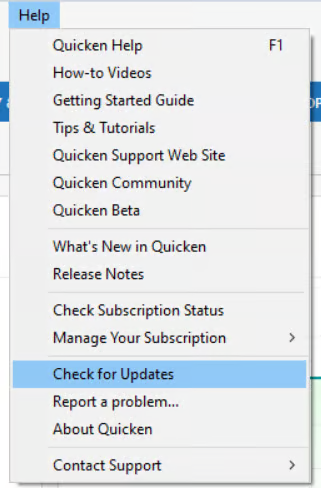
    In the meantime, I do notice you mentioned you're running version R65.29, which is an older release. Please update to the latest version (R66.28) by navigating to Help > Check for Updates within Quicken Classic for Windows.

    image.png

    Alternatively, you can install the latest update using the manual patch available in this support article.

    Thank you!

    -Quicken Anja
    Make sure to sign up for the email digest to see a round up of your top posts.

  • EmKay
    EmKay Quicken Windows Subscription Member ✭✭✭✭

    FYI, I always hold back on installing updates because I so frequently read about issues with the updates. This issue has existed since before the version I am currently on, I believe. I will EVENTUALLY update.

    And, yes - I use a different email for the forum than for my Quicken account.

    Am I the only one reporting this issue?

    Quicken Classic Premier (Windows) R65.29 Build 27.1.65.29

  • Quicken Anja
    Quicken Anja Moderator mod

    @EmKay Thanks for the follow-up!

    We have not received any recent reports of this issue with Citibank. However, this was a previously reported issue, which may explain why you’re still seeing that message even though transactions are downloading successfully.

    Since you mentioned you're holding off on updates, I do still recommend updating when you're comfortable, as newer releases often include fixes for known issues like this.

    Also, thanks for confirming you’re using a different email. To further investigate, I’ll need the email address associated with your subscription. I’ve sent you a direct message, please navigate to the inbox in the top right-hand corner of the Community page and check your inbox.

    image.png

    Thank you!

    -Quicken Anja
    Make sure to sign up for the email digest to see a round up of your top posts.

  • Quicken Anja
    Quicken Anja Moderator mod

    @EmKay Thank you for sending over your Quicken ID associated with your subscription.

    When checking internally, I do not see any error occurring there. However, just to confirm, is this the error you're seeing in-product?

    image.png

    If so, several users in the past have reported that the steps below have resolved this error for them:

    1. Run One Step Update (OSU) first to see if the issue resolves.
    2. If the issue persists, close Quicken
    3. Using Windows File Manager to rename the runtime.dat file located at: 
      C:\ProgramData\Quicken\Inet\FILENAME\ where FILENAME is the name of your current Quicken data file, e.g. My Quicken Data 2024 as seen in the image below. There usually is an \Inet\… subfolder for each Quicken data file in existence.
      • (For example, add a 1 at the beginning of the file name so it reads 1runtime.dat.) image.png
    4. Start Quicken and run One Step Update again to check if the problem is resolved.
    5. Close and restart Quicken to ensure changes take effect.

    📌 Note: The ProgramData folder is hidden by default. If you need help accessing it, Microsoft's support site has instructions on how to unhide folders.

    Hope this helps!

    -Quicken Anja
    Make sure to sign up for the email digest to see a round up of your top posts.

  • EmKay
    EmKay Quicken Windows Subscription Member ✭✭✭✭

    @Quicken Anja I just ran an OSU on JUST my Citi card account and 2 interesting things happened: No error/warning (I was trying to confirm that I was getting the same message as the one in your reply) - and I never got prompted to enter my vault password! That seems odd.

    Anyway - if it reappears, I will try the suggested steps. Thanks!

    Quicken Classic Premier (Windows) R65.29 Build 27.1.65.29

  • Quicken Anja
    Quicken Anja Moderator mod

    @EmKay Thanks for the update! That’s helpful information.

    If the error message returns, go ahead and try the steps I provided earlier, as they’ve helped resolve similar cases.

    Please let me know if you see the issue come back or notice any other changes!

    -Quicken Anja
    Make sure to sign up for the email digest to see a round up of your top posts.