2023 Memorized Payee Report vs 2026

CowanInc
CowanInc Quicken Windows Other Member ✭✭

Not sure when this may have changed but a 2026 report of Memorized Payees doesn't include fields for "Auto-Categorize" & "Last Used". I have reports from 2022 & 2023 that do include these fields. I have a massive number of these and I wanted to try to cut it down. The Last Used field was handy for doing that.

Am I missing something or did these fields really go away?

Tagged:

Comments

  • Tom Young
    Tom Young Quicken Windows Subscription SuperUser ✭✭✭✭✭

    The fields are still there.

    image.png

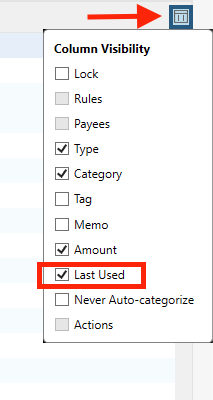
    Click that little box(?) to the far right lower corner of the picture and "Last used" is there, just not showing right now.

  • Quicken Carlos
    Quicken Carlos Quicken Mac Subscription Moderator mod
    edited March 31

    Hi @CowanInc,

    Thanks for reaching out to the Quicken Community!

    Those options aren’t available in the Reports section. However, you can add the "Last Used" field in the Memorized Payee List.

    Here’s how to do it:

    1. Go to Tools.
    2. Click on Memorized Payee List.
    3. Click the small column icon in the upper-right corner.
    4. If the Last Used option is unchecked, add a check mark next to it.
    Screenshot 2026-03-31 at 7.55.35 AM.png

    The Last Used column will then appear in your Memorized Payee List.

    Hope this information helps! Please let us know.

    Quicken Carlos

    Make sure to sign up for the email digest to see a round up of your top posts.