Quicken Won't Open Files

MichaelC17
MichaelC17 Quicken Windows Other Member ✭✭

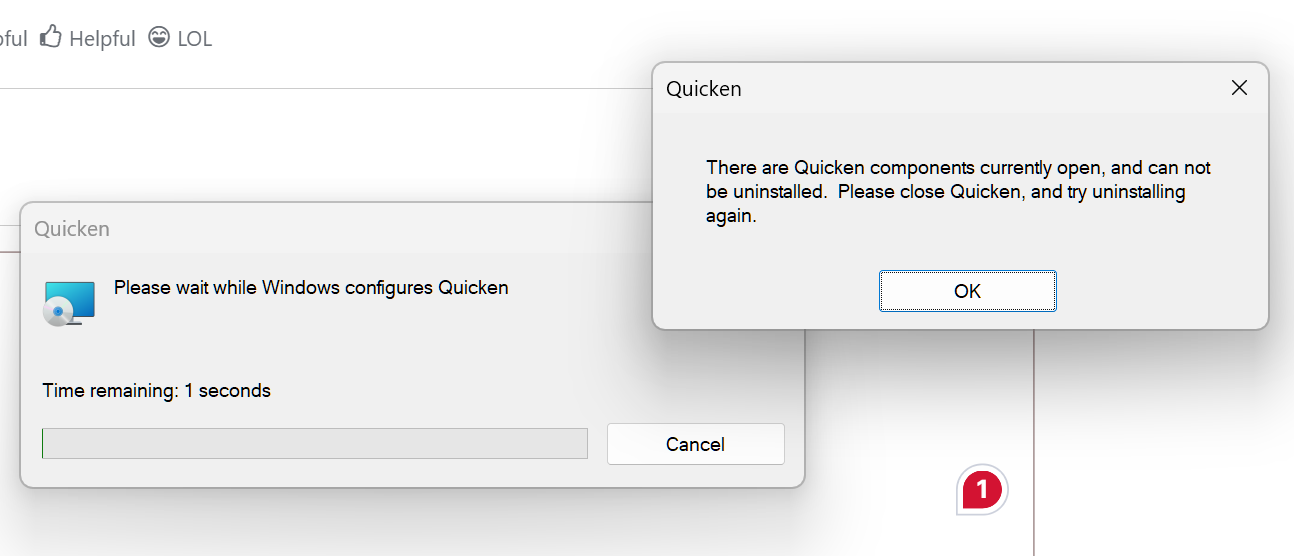
I've used Quicken for years to manage my checking. My last update to the file was in January 2026. Today, I clicked on the file and got a message from Quicken that Quicken.msi location must be updated. A jpeg is attached showing the message. I couldn't find Quicken.msi anywhere on my PC. I tried opening the backup file and got the same message. If I go to the Windows 11 application list, click on Quicken, it opens with the file I want to amend. Does anyone know why it won't open and it gives me the message attached when I click on the file. I have the file backed up to a USB in case I have to uninstall and reinstall Quicken. Windows 11 is up-to-date. Quicken help says I have the current revision. PC has been restarted with same result.


Tagged:

Comments

  • Quicken Kristina
    Quicken Kristina Quicken Windows Subscription Moderator mod

    Hello @MichaelC17,

    Thank you for letting us know you're seeing this issue. To troubleshoot, please provide more information:

    • Is the file you're trying to open on the computer's local hard drive?
      • If it is not, have you tried copying it to your local hard drive?
    • Is the Quicken file synced with any cloud service, such as OneDrive, iCloud, or Dropbox?
      • If it is, make sure the service is paused when you try to open the file.

    I look forward to your response!

    Quicken Kristina

    Make sure to sign up for the email digest to see a round up of your top posts.

  • RalphC
    RalphC Quicken Windows Subscription Member ✭✭✭✭

    I think the current Quicken version update got corrupted and needs to be reinstalled.

  • MichaelC17
    MichaelC17 Quicken Windows Other Member ✭✭

    The file is on the PC hard drive. It is not synced with any cloud service. I've used this same file for 3 years tracking bank checking activity with no issues.

  • Quicken Kristina
    Quicken Kristina Quicken Windows Subscription Moderator mod

    Thank you for your reply,

    If both the Quicken program and your file are on the PC's local hard drive, and you're seeing that error, then as @RalphC posted, it's likely a program issue.

    To start troubleshooting, please try manually reinstalling the update patch. Please use the article linked below for instructions and to download the update patch: https://www.quicken.com/support/update-and-patch-20182019-release-quicken-windows-subscription-product/#section-windows-2

    Let me know how it goes!

    Quicken Kristina

    Make sure to sign up for the email digest to see a round up of your top posts.