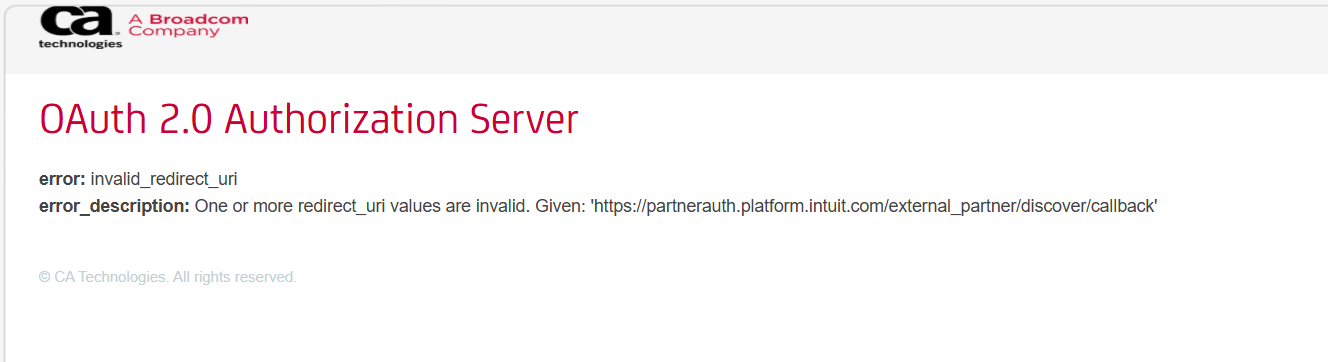
I keep getting this error message when I try to re-connect my discover card to my quicken download
This has been a continual mess for me. Every time I start Quicken it wants me to re-authorize my discover accounts (bank and credit card). now, I get a URL error when I try to reauthorize.
error: invalid_redirect_urierror_description: One or more redirect_uri values are invalid. Given: 'https://partnerauth.platform.intuit.com/external_partner/discover/callback'
browser has URL: https://ddapis.discover.com/dfs/auth/oauth/v2/authorize?scope=DDA_ACCOUNT+OAUTH_TOKEN_REVOKE+openid+OPENID_USER_INFO+DDA_HEALTHCHECK&response_type=code&redirect_uri=https%3A%2F%2Fpartnerauth.platform.intuit.com%2Fexternal_partner%2Fdiscover%2Fcallback&client_id=l7dee81cfa4b814b24af8f44e574fa9c02&state=awb.8638fbfa-d74b-46e4-95bc-5324fdc1efae
I've already given up on the Chase authorizations. We have two separate accounts with Chase with different login credentials. A few years ago, updates were just fine. Now, only one account will update and if I try to re-authorize the other, then the first stops working.
I tried clearing cache & cookies, but same failure message.
I am also getting that same error during the re-activate/download process.
I have tried a different browser. I have deleted all cookies. I have allowed all pop-ups
Getting this same error. Cleared all cookies & cashe. Tried a different brower. Allowed all pop ups. No firewall or VPN.
Hi @KSZ and @DaveLong, Thanks for bringing this to our attention, and thank you for sharing the screenshots and the steps you’ve taken; they’re very helpful.
I did some research on my end and found the FDP-350 error.
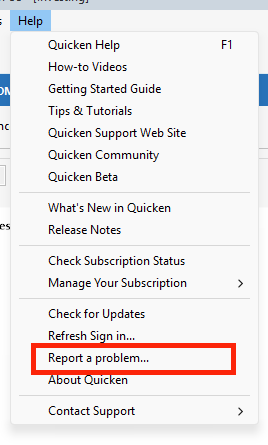
For further investigation, I suggest sending your logs by going to Help > Report a Problem in Quicken.
Please let me know once you’ve submitted them. I’m looking forward to your reply!
Updating a Discover Card account in Quicken Mac 13.7.8 prompted to reauthorize:
Error FDP-350
Channel: FDP_WSI_OATH
Error code: PAUTH_INVALID_TOKEN
But when the reauthorization attempt opens the web browser, it gets an error from https://ddapis.discover.com/dfs/auth/oauth/v2/authorize?scope=DDA_ACCOUNT+OAUTH_TOKEN_REVOKE+openid+OPENID_USER_INFO+DDA_HEALTHCHECK&response_type=code&redirect_uri=https%3A%2F%2Fpartnerauth.platform.intuit.com%2Fexternal_partner%2Fdiscover%2Fcallback&client_id=<redacted>
I've tried it with Safari, Firefox, Chrome, and Opera.
You can add Edge to that list.
Same error. Mac user here. Cleared all cookies & cashe. Tried a different brower. Allowed all pop ups. No firewall or VPN.
I have done the "Report a Problem" steps again and included the logs. I couldn't find a way to attach a screen shot (no "attach" button available). It's the same as KSZ's error message. The re-activation process has worked in the past with the Edge browser and the Aura VPN enabled. I disabled the VPN, same error. I was also able to log in directly to my Discover account with no issue.
Hi @DaveLong,
Thanks for your reply and for sending the report.
I’ve created an investigation ticket and forwarded the information to the appropriate team. Here is the ticket for reference: CBT-1091.
Thanks so much for your patience! [CBT-1091]
I am having the same issue when trying to update my Discover Card accounts. Same error. Very frustrating!
Until perhaps 2 months ago Discover account download to Quicken worked fine. Since then I've been repeatedly asked to re-authorize my account every week. Until today doing that allowed my account download to proceed. Today was not the case every attempt to complete the re-authorization process results in this error message:
© CA Technologies. All rights reserved.
What's the problem? Nothing changed on computer…
Quicken wants me to re-authorize my discover accounts (bank and credit card). now, I get a URL error when I try to reauthorize.
OAuth 2.0 Authorization Server
Hi All,
Thanks for reporting this issue with Discover Card. For further investigation, I recommend sending your logs by going to Help > Report a Problem in Quicken.
Once you’ve submitted the report, please let me know so we can add it to the investigation ticket. [CBT-1091]
Same error. Windows user with Quicken Classic Premier version R66.28, Build 27.1.66.28. It said I needed to reauthorize access to my Discover card but when I click the Sign In button it opens my browser and displays this:
The URL the browser is trying to go to is:https://ddapis.discover.com/dfs/auth/oauth/v2/authorize?scope=DDA_ACCOUNT+OAUTH_TOKEN_REVOKE+openid+OPENID_USER_INFO+DDA_HEALTHCHECK&response_type=code&redirect_uri=https%3A%2F%2Fpartnerauth.platform.intuit.com%2Fexternal_partner%2Fdiscover%2Fcallback&client_id=l7dee81cfa4b814b24af8f44e574fa9c02&state=awb.2a65fd3c-152d-412d-83ae-efd78e8339bb
I tried using a different browser
I have submitted the report on this issue.
Same error message for me.
same issue - same authorization error page after disconnecting account and starting the process to re-link (add account)
I've been beating my head against the wall about this too and then I came here and found the problem. Of course Discover told me to contact Intuit!
Discover is my main card and I depend on Quicken to keep it straight. If Quicken and Discover can't fix this I will be forced to drop one and it'll be tough but dropping Quicken will be easier than dropping Discover.
To add fuel to the fire…
I am having the same problem as described above. I attempted to download transactions from Discover Card. I Reset the account but got that ERROR that everyone seems to be getting (the one shown at top of this thread by KSZ).
I contacted Discover Card. I asked about any changes since Capitol One acquired them and the answer was nothing has changed. I am able to login to my Discover Card. Therefore, I was told that the problem is at Intuit's end. (A usual response that goes both ways).
For now, my Discover Card account in Quicken is dead. Unable to setup a transaction download. Manual entry in Quicken's Discover Card register functions as designed.
Quicken R66.28 - Build 27.1.66.28 - Windows 11 25H2 - Microsoft Edge version 146.0.3856.97
I realized today that my Discover transactions had not downloaded to Quicken in some time. I deactivated the online services and when I tried to reconnect I got the error.
I tried to download the transactions from my Discover account but the csv file is not in the correct format for Quicken.
I have reported the problem to Quicken via Help→Report a Problem. Both my Quicken and Windows are up to date.
Having same issue with Discover downloads today - submitted report a problem to Quicken Support with screenshot of OAuth 2.0 Authorization Server error page. Didn't get any kind of acknowledgement so not sure it was received or not.
Downloads seem to be having issues for past few months. Have to keep reauthorizing. Discover is by far the worst, but also had issues with Merrill and Citibank. So happy I just paid last month to renew my subscription.
I'm having the same issue and I've submitted a "report a problem"
Hello @remote2000, @hbaulisch, @BamaT75, & @judyper,
Thank you for letting us know you're also affected by this issue. I added you to the ticket.
Thank you!
I am also receiving this same error noted above. Can I be added to the ticket or should I submit a new ticket?
I have also submitted a "report a problem" with the same issue.
Hello @DublinTaxMan & @RocketScientist,
Thank you for letting us know you're also seeing this issue. I added you to the ticket.
Same problem…..
I have the same problem. I keep getting
errors