Since the last update, I have been experiencing problems. Portfolio view will not open, and cannot add new securities. Also, calendar problems.
[Edited Readability]
Hi @drvollmer,
Thank you for reaching out. I’d like to gather a bit more information to better understand the issue. Could you please clarify the following:
I look forward to your response!
No response when I click on Portfolio view. Add new securities seems to work but security added is not present in security list. My file is located on Google drive. G:\My Drive\Quicken Files\QData-2025. No other backup.
I have not tried restoring.
Calendar-memorized income (e.g. Social Security) not showing in current month. Reminders not able to delete. Calendar balance not accurate.
Thank you for providing those additional details; that’s very helpful.
We recommend storing your Quicken data file locally on your computer, rather than on a cloud service, network location, or external drive. Keeping the file in those locations risks encountering unexpected Quicken performance and potential data file corruption issues (which may not always be recoverable).
Before making any changes, please be sure to save a backup of your data file.
Default recommended location
The default and recommended location is:
C:\Users\username\Documents\Quicken
Steps to change the file location:
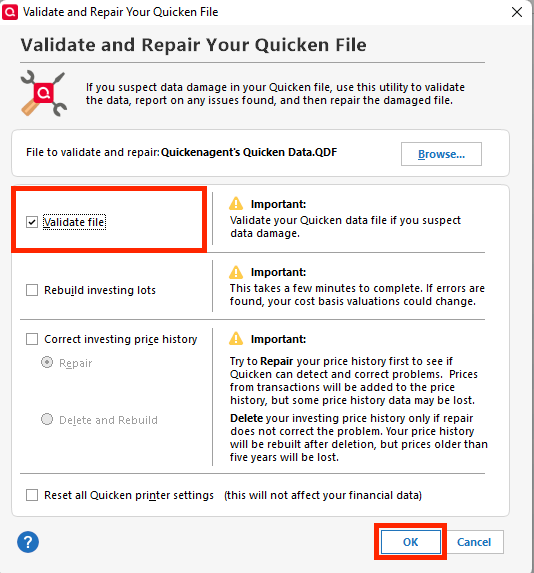
Next, please validate your data file:
To validate your file:
Finally, please check the following:
Please let me know how it goes!
I just wanted to follow up since I haven’t heard back from you. I’m checking in to see if you still need assistance.
Hello again,
Checking in once more before this thread is closed. Let us know if you still need assistance.
Thank you!
Hey Laura, hope you can help! The community "Superuser" tried to help me but did not solve my continuing issue.
On Windows 11, what once worked brilliantly, no longer works. When pressing either the "Investing/Go To Investing/Portfolio" menu bar item or the "Go To Investing/ Portfolio" toolbar icon (between "Write and Print Cheques" and "Address Book" icons) nothing happens and I can no longer view my portfolio.
If I click on Investing "Allocations" or "Dashboard", those work fine. It's just the portfolio view where nothing happens. My data file is located locally in C:\Users\[USERNAME]\Documents\Quicken
I already validated and supervalidated my data file, and redownloaded and installed the Quicken product again, but nothing. Is there a fix? Here is a screenshot of some settings:
Hi @Frank Talarico,
Thank you for joining the discussion and for providing the details of the troubleshooting you've already completed. I appreciate you letting us know that your data file is stored locally and that you've already validated, super validated, and reinstalled Quicken.
To help determine whether the issue is related to your data file or to the Quicken program itself, I recommend creating a new test file and checking whether the Portfolio view opens there.
Note: Creating a test file will not affect your existing data file. However, you may want to create a backup before proceeding.
NEW FILE
Before adding any accounts to the new file, please navigate to Investing > Portfolio and let me know whether the Portfolio view opens successfully.
I look forward to your update.
Hi Laura,
After creating a new file, and not adding any accounts to it, I was looking for the "Investing" heading to reach the "Portfolio" section, and there is none (see below)! I don't see anywhere that Investing could be added. I'm guessing that I need to create an Investing account first?
Here is the Quicken version:
Thank you for trying the steps provided.
Yes, please go ahead and add an investment account by following these steps:
Then, please navigate to Investing > Portfolio and let me know whether the Portfolio view opens successfully.
Please let me know how it goes.
After creating a mock brokerage account, the "Investing" menu item appears, and the dropdown "Portfolio" item is selectable and brings up the portfolio page that I dearly miss. So it appears that my data file might be corrupt and "Validating" did nothing to fix this issue. I hope you have a miracle ready to help, as I have about 30 years of data to save.
On a side note, my original data file is 89.5 MB in size, and annually I save only the current years data, while backing up the prior years data to a backup file. I read somewhere that Quicken does not remove old investing transactions when making annual backups.
Is this fixable? There has to be a way.
@Frank Talarico - I don't remember from your other post on this issue but do you have the Investing tab selected to be shown?
Thank you for taking the time to test this in a new file.
You are correct; the Quicken backup file contains a copy of your entire data file.
At this point, we have two options. We can either restore a backup from before the issue began, or we can create a copy of your current file to preserve your information while potentially resolving any file corruption that may be causing the issue.
If the issue started recently and you have a backup from before it began, please follow these steps:
Please note: Creating a copy of the file will disconnect your online-connected accounts, and you will need to reactivate those connections afterward.
Please let me know if you have any questions about either process or if you encounter any issues along the way.
Boatmaniac,
Yes all items are checked, exactly as shown in your image.
I cannot use Option #1, as I have three backup copies in three separate cloud drive, none of which are ever used except to restore. My actual working data file is always on my local computer drive. I must have backup an already potentially corrupted file in the three drive locations.
During Option #2 (Create a copy of current file), I followed your steps to the letter, and after pressing OK to use the New copy, Quicken crashed with the following message:
I then restarted Quicken, and followed the same steps for Option #2. This time Quicken did not crash, and I was able to open the new file. Although this data file is 20MB smaller than my original data file, the data seems correct, but the issue still remains: Portfolio is not opening. I feel like we are making some progress, but more work to do!
@Frank Talarico by default, Quicken will periodically create backups of your data. This is in addition to manual backups you make. Also backups are made when you apply new versions and when you validate your file.
Have you searched your hard drive for Quicken files? Search for files with extension .qdf or .qdf-backup.
An easy way to search your hard drive for other backup files you might not be aware of: File > Find Quicken Files. Quicken will now search your local drive for all .qdf and .qdf-backup files. The search process runs fairly quickly (faster than searching your C-drive via Windows Explorer).
@Quicken Laura, @mshiggins & @Boatnmaniac
Thanks for the insights, and after a relatively quick search, Quicken unloaded a list of auto backed up files.
I had to go back quite a few months to find a file that, when restored, gave me a functioning "Investing\Portfolio" view. Not sure why more recent backups would not execute the "Portfolio" view. Unfortunately, there is too much data to recreate to make a viewable Portfolio with such an older dataset to begin with.
The silver lining in using my current file, is that when I select to "Update Quotes", it does in fact update the quotes (somewhere), because the Net Worth (lower left corner of window) does update after it refreshes its data. I just can't view the accounts and individual holdings in one clean view like before.
The only other positive is I can view a simpler portfolio view of my holdings on "Investing.Quicken.Com" although this is only useful if I have access to a secure internet connection (like home). Investing Reports (Desktop) doesn't function, but I can update/sync to the online version, although it is more simplified than the desktop version that I am paying for annually. It's just frustrating.
Thank you for the update and for taking the time to test those backups.
Based on the results you've shared, it does appear that the issue is tied to the current data file. The fact that the Portfolio view works correctly in an older backup and in a newly created test file, but not in the current file, even after validating, super validating, and creating a copy, suggests that there may be file corruption that Quicken's built-in repair tools are unable to resolve.
Unfortunately, there is a limit to what can be repaired once a data file becomes corrupted, and there is not always a method available to fully restore all functionality while preserving every piece of current data. I understand that restoring an older backup is not a practical option given the amount of data that would need to be recreated.
At this point, I recommend contacting Quicken Support directly for further assistance. They can guide you through additional troubleshooting steps in real time and escalate the issue if needed.
You can find the Quicken Support phone number here: Support Home | Quicken. Phone support is available Monday through Friday, from 5:00 AM PT to 5:00 PM PT.
As another potential option, you may consider exporting your data to a QXF file and importing it into a new Quicken file. While this process does not transfer all data types perfectly and may require some cleanup afterward, it can sometimes help work around issues caused by file corruption. If you decide to try this, I strongly recommend creating a backup of your current file first.
I realize this is not the outcome you were hoping for, especially after maintaining your data for so many years. I do appreciate all the troubleshooting you've done and the detailed updates you've provided throughout this discussion.
Please feel free to reach out if you have additional questions.