Ipad app not populating budgets with transactions

MCMAHST
MCMAHST Quicken Mac Other Member ✭✭

Hello, recently, in March sometime, when I view my quicken classic version on my iPad, the transactions are not posting on the budget. In April, it has completely stopped. I've done the account sync process a few times with no help. It looks like it's working on my iMac. What do I do to fix this?


Best Answers

  • Quicken Kristina
    Quicken Kristina Quicken Windows Subscription Moderator mod
    Answer ✓

    Hello @MCMAHST,

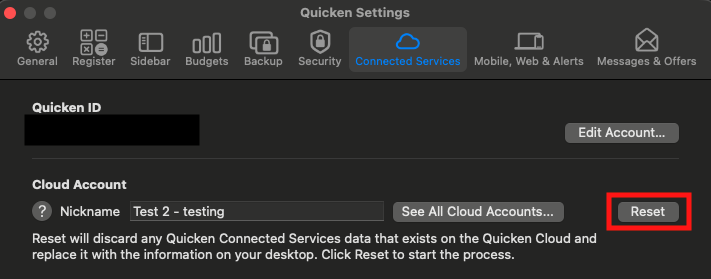
    Thank you for letting us know you're encountering this issue. To troubleshoot, I recommend resetting the cloud. To do that, please backup your Quicken file, then navigate to Quicken>Settings>Connected Services. Then, click the Reset button.

    Screenshot 2026-04-05 at 5.17.21 PM.png

    It may take a few minutes for the reset to complete. Once it is finished, log out of the mobile app, log back in, and verify whether the issue is resolved.

    I look forward to your reply!

    Quicken Kristina

    Make sure to sign up for the email digest to see a round up of your top posts.

  • MCMAHST
    MCMAHST Quicken Mac Other Member ✭✭
    Answer ✓

    That did it, thanks.

Answers

  • Quicken Kristina
    Quicken Kristina Quicken Windows Subscription Moderator mod
    Answer ✓

    Hello @MCMAHST,

    Thank you for letting us know you're encountering this issue. To troubleshoot, I recommend resetting the cloud. To do that, please backup your Quicken file, then navigate to Quicken>Settings>Connected Services. Then, click the Reset button.

    Screenshot 2026-04-05 at 5.17.21 PM.png

    It may take a few minutes for the reset to complete. Once it is finished, log out of the mobile app, log back in, and verify whether the issue is resolved.

    I look forward to your reply!

    Quicken Kristina

    Make sure to sign up for the email digest to see a round up of your top posts.

  • MCMAHST
    MCMAHST Quicken Mac Other Member ✭✭
    Answer ✓

    That did it, thanks.