This discussion was created from comments split from: Linking Discover Bank Account after Capital One Merger.
I typically log on weekly and download transactions from multiple sites. For the past two months, I have had to reauthorize Discover Card and Discover Bank EVERY TIME I run the one-step update. Discover shows that Quicken/Intuit is an authorized third party with whom they can share data. Quicken states that Discover requires reauthorization.
Thankfully, I don't have any issues manually reconnecting - just a complete waste of time. I have deleted the authorization on the Discover site multiple times and reauthorized.
When will this be corrected?
Hi @jrorgan1, Thank you for taking the time to reach out to the Quicken Community!
We are aware of some connectivity issues with Discover Card. To help us understand what might be causing this, I have a few questions:
I look forward to your reply!
Hi @jrorgan1,
I just wanted to follow up since I haven’t heard back from you. I’m checking in to see if you still need assistance.
I am having this same problem with Discover credit cards. Every time I try to do a One Step Update it requires me to reauthorize with Discover twice. I have two accounts and after the first re-authorization it says it can't find the existing accounts but will authorize two new accounts. It then disconnects the existing accounts in Quicken from Online Services. I then have to go back into those accounts to setup online services again, and it authorizes successfully and downloads transactions. This has been happening consistently ever since the update process was changed for Discover.
To answer the questions posed by @Quicken Carlos to the OP, these are not joint accounts, the quicken file is located on my local hard drive, the file is not being synced to online services, and just using the built in Windows Security.
Hi @joe_ender,
Thanks for joining this thread and for helping answer the questions above.
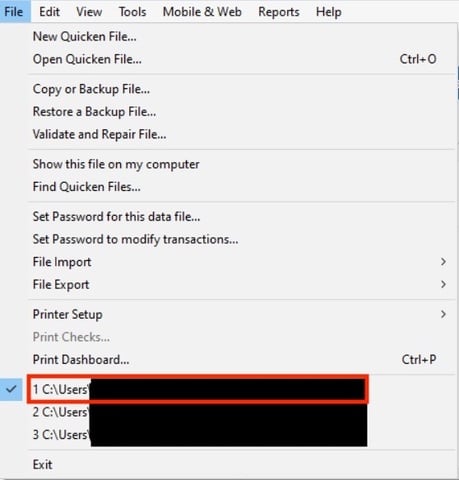
If you haven’t tried this yet, I recommend following the steps below. First, let’s create a backup file.
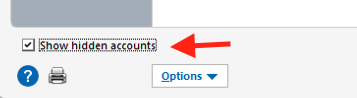
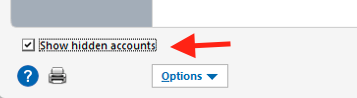
Then, we can deactivate all accounts with Discover Card, including hidden accounts and closed accounts if applicable.
To deactivate the account(s):
After deactivating the account, you can log in to your bank’s website to revoke access from the financial institution. We can provide general guidance, but the exact steps may vary depending on the bank’s website:
To reactivate the account(s):
I hope this helps! Let me know how it goes.
Ditto - same problems with Discover. None of your suggestions is working.
Hi @jtskrabak,
Thank you for joining the thread. I’ve checked your account on our end, and it appears to be connected properly. Are you seeing any error message when updating the account? If so, could you please share the exact wording or a screenshot if possible?
If needed, please refer to this Community FAQ for instructions on how to attach a screenshot. Alternatively, you can also drag and drop screenshots to your response if you are not given the option to add attachments.
Looking forward to your response!
I have the same issue. It is becoming very tiresome. I have done the troubleshooting and it does not address the issue.
Hi @BarryMo,
Thank you for letting me know you’re experiencing this issue.
After some internal research, I couldn’t find any errors with your Discover account; it’s currently showing a "Status: OK". As @Quicken Laura requested in the previous comment, I recommend uploading a screenshot of the error you’re seeing so we can take a closer look and provide next steps to help narrow this down. I look forward to your reply!
It is intermittent and I do not get an error. It just tells me my accounts need to be re-authorized.
@BarryMo,
Thank you for following up!
Due to the nature of this issue, it is recommended that you contact Quicken Support directly for further assistance, as they can walk you through troubleshooting steps in real-time and escalate the situation as needed. The Quicken Support phone number can be found through this link here.
Phone support is available from 5:00 am PT to 5:00 pm PT, Monday through Friday. Chat support is available at the same times, 7 days a week.
Thanks again!
As with several others in this thread, I too am having almost identical issues. And I'm using a straight Win11 PC, no fancy backup or third party security. I've had the problem recur repeatedly and have opened tickets with Quicken tech support. Deleting and recreating the account fixed it — until I tried to download a week later. The same problem, CC-901. Please fix this problem Quicken!
Hi @benjamin_moser,
Thank you for joining this thread. After reviewing my internal tools, I found the following error: FDP-350 – Status: PAUTH_INVALID_TOKEN.
You may receive an FDP-350 error when attempting to update your accounts. This issue is related to the CC-901 error you mentioned in your comment. It typically occurs when your security token has expired, requiring you to re-enter your account credentials.
In some cases, the account may continue prompting for reauthorization if there are closed or hidden accounts still connected.
I recommend checking for any hidden or closed accounts to confirm whether they are still active. If they are, please follow the steps shared in the previous comment and then try authorizing the accounts again.
To check hidden accounts:
If there are no hidden accounts connected and the issue persists, I suggest following the troubleshooting steps outlined in the previous comment.
I hope this helps! Let us know how it goes.
I too am having the same problem. I download my transactions every week and every week I am forced to reauthorize. My Quicken file is on my hard drive. I'm not going to bother doing the suggestion to fix it (disconnect/reconnect), since it has been reported that it doesn't help. Just chiming in to let you know there is yet another person suffering with this issue. [Edited-Readability]
Hi @kcantrel,
Thank you for joining this thread. Are you receiving the CC-901 error, or only the prompt to reauthorize the account?
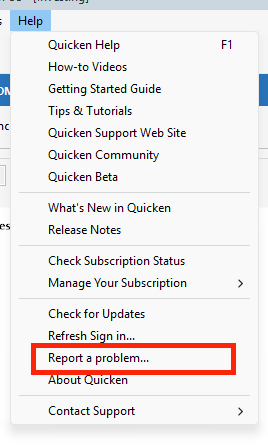
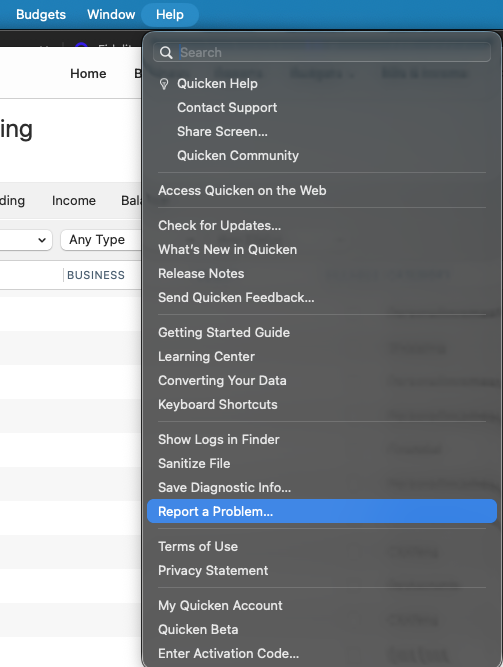
I also recommend sending the logs via Help > Report a Problem so we can add the information to the investigation ticket. Windows Users:
Mac Users:
Please let me know once you have uploaded the logs so I can add them to the ticket.
I look forward to your reply. [CBT-1131]