How to change(adjust) the Avg Cost Basis in Quicken.
I have a long held Mutual Fund where the Quicken average cost ($35.560773) does not agree the MF company average cost of $38.24. I would like to keep them in agreement going forward so I can rely on the Quicken capital gain calculations.
[Edit-readability]
Comments
-
Hi @jvprice6,
Thanks for reaching out to the Quicken Community!
Currently, there isn’t an option to directly change or adjust the average cost basis. Instead, you’ll need to update the underlying investment transactions so Quicken can recalculate the cost basis correctly.
If you’d like Quicken’s history to match each purchase and sale, you can go back and edit the individual buy/sell transactions so the cost basis aligns with your statements.
To do this:
- Open the account in question.
- Sort the transactions by security.
- Click on the Security column.
- Edit the cost for the transactions as needed.
- To edit, highlight the transaction and click Edit.
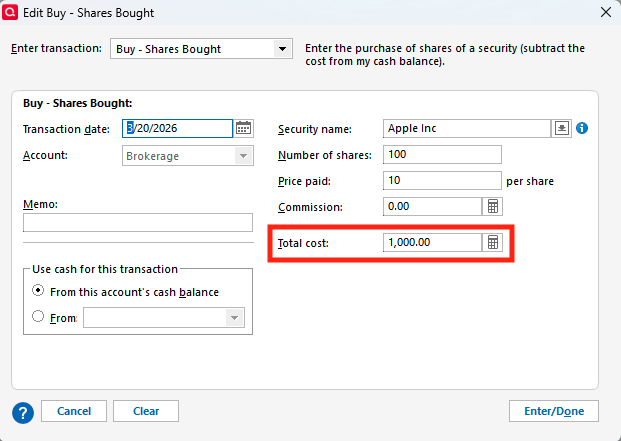
- Update the total cost to match your statement, then click Enter/Done.
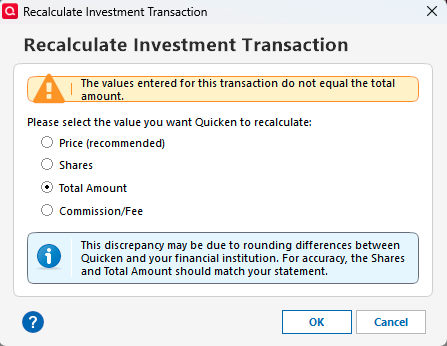
You may then be prompted to recalculate the investment transactions:
- Select the option to recalculate and click OK.
- Follow the prompts for each transaction as needed.
Once finished:
- Click on the Date column to sort the transactions by date.
- Review and confirm that the average cost is accurate.
I hope this helps!
Quicken Carlos
Make sure to sign up for the email digest to see a round up of your top posts.
0 -
Clearly there is an error in there somewhere. I know you said it is long held, but I would still try comparing MF statements to your quicken data at various points in time to see if you can home in on when the discrepancy first showed up. Then closely review the transactions before that point in time.
Quicken Business & Personal Subscription, Windows 11 Pro
0 -
Of course the best thing would be to conform every single transaction in the Quicken Account with the broker.
But, If your share count agrees to the broker and all you want to do is get the current average cost to agree with the broker, which means adding some dollars to the basis of your holdings, then here's something you might try, after making a backup.
As you know a return of capital reduces basis, but what you need is an increase in capital. Essentially a negative return of capital.
I tried this in a test file and it worked.
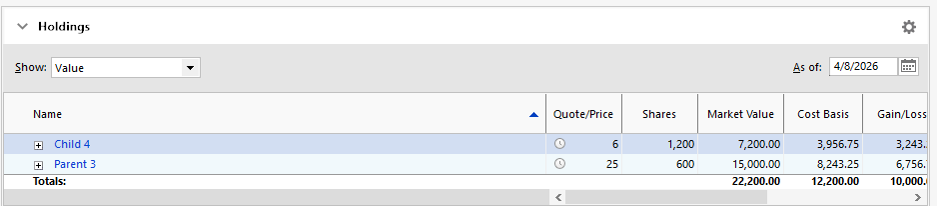
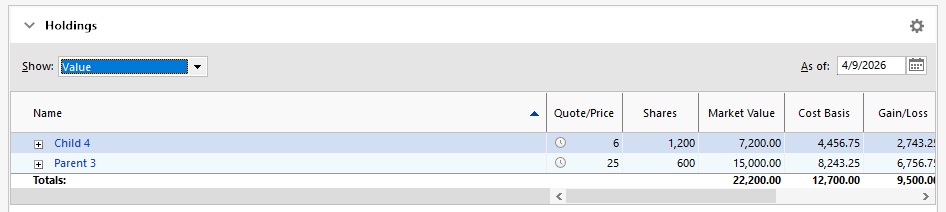
You can see that yesterday the stock Child 4 had a basis of $3,953.75.
Today I made a Return of Capital transaction initiated through the "Enter Transaction" button in the amount of negative $500.
That resulted in this:
The basis of Child 4 has been increased by $500, and the Account is showing negative cash of $500.
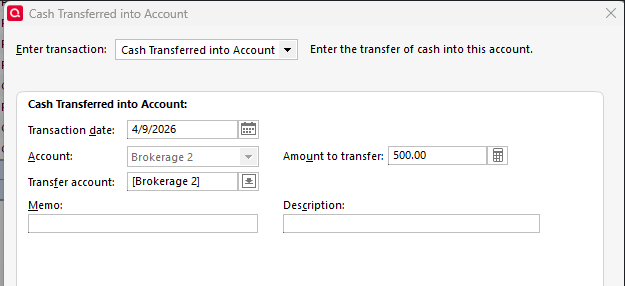
Then I did a "cash in" transfer to the Account, with the same Account also being the source of the cash:
Final result:
Child 4 has its new increased basis and there is no cash in the Account.
If you do this and get a "top level" proper result - basis in Quicken equals basis at broker and average cost agrees - then check things over carefully that there is no adverse "fallout" by going this route. I did this with a "stock" not a "mutual fund" and didn't investigate beyond what I can see in the Holdings view.
1 -
Question: Is the MF using an average cost method to report capital gains on sales? If so, can you determine if it is the same (simplistic) approach Quicken tries to use? If they are reporting an average cost, but using a by-lot calculation for their 1099-B, that is a whole different picture for you to match.
If you are trying to match their average cost method, you might try this:
- Backup you current file
- Make sure you Quicken security is set to use Average Cost. That will apply across all accounts holding that security.
- Use a Remove Shares transaction to remove all shares of that security in that account.
- Use one Add Shares transaction to add back in one lot with the total number of shares and the desired 38.24 per share basis. (I’d enter the total desired basis and let Quicken calculate the per share value.)
Limited testing seems to suggest Quicken can track subsequent reinvestments and sales adequately if the transactions are simple enough
1