Hidden Categories automatically selected in reports
This issue was reported in a post in Dec 2022, edited Jan 2023, then closed, seemingly with no resolution.
This continues to occur. When customizing a report by categories, hidden categories are automatically selected. You can clear all, but they come back. If you show hidden categories, clear them, then select the ones wanted in the report, then uncheck the box to show hidden categories, then immediately check the box again to show them, all hidden categories will automatically be selected. I've been fighting this for years, it's never been corrected. Does anyone know why or know any more about this?
I had to buy a new laptop with Win 11 and ran into it again as I was doing file maintenance and reduction for the transition to the new laptop and system.
DDavis
Comments
-
Hello @dkdavis1,
Thank you for reaching out! I can see there were reports on the Community about issues with hidden categories in 2022/2023, but I'm not seeing any open tickets for the issue you describe.
To assist with this issue, I tested in my Quicken file and observed the same behavior you describe, but only with Early Access turned off. I forwarded this issue to the proper channels for further investigation and resolution.
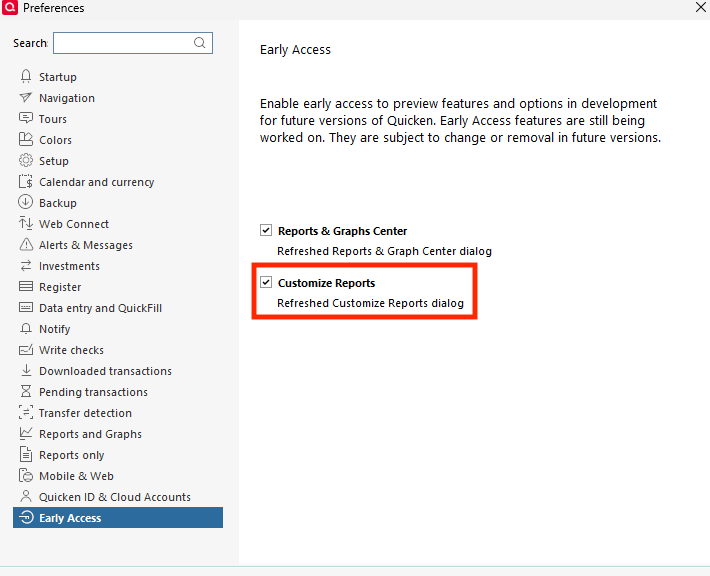
In the meantime, you should be able to prevent this issue by going to Edit > Preferences > Early Access and making sure that Customize Reports is selected.
Thank you!
(CTP-16955)
Quicken Kristina
Make sure to sign up for the email digest to see a round up of your top posts.
0 -
I have now signed up for the email digest. (Thank you)
I selected Customize Reports and this seems to have resolved the issue. Thank you.
1 -
Thank you for your reply,
I'm glad to hear that turning on Customize Reports in Early Access corrected the issue.
If you need further assistance, please feel free to reach out!
Quicken Kristina
Make sure to sign up for the email digest to see a round up of your top posts.
0