This discussion was created from comments split from:
Prompted to reauthorize Discover accounts with every update
.
I only have one account at Discover and I still have to reauthorize every time I update. Why can't that be fixed with Discover?
Hello @escschwartz,
Thank you for letting us know you're encountering this issue. To help troubleshoot, please provide more information:
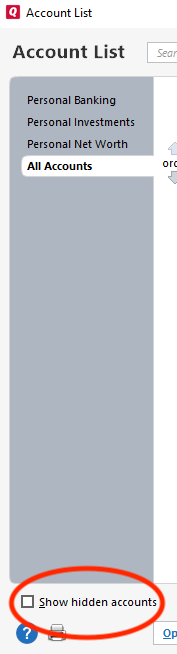
The most common cause of this issue is the account being added as a new account instead of being linked to the existing one. To check for this, backup your Quicken file, then go to Tools>Account List. Select Show hidden accounts if the option is visible.
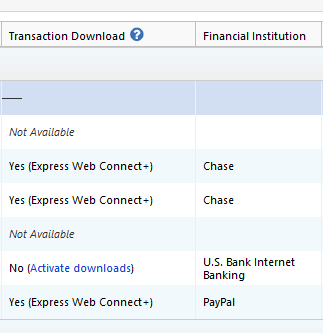
Review the Account List for any accounts that are connected to Discover. You will be able to see which financial institution an account is connected to by looking in the Financial Institution column.
Deactivate all accounts that are connected to Discover.
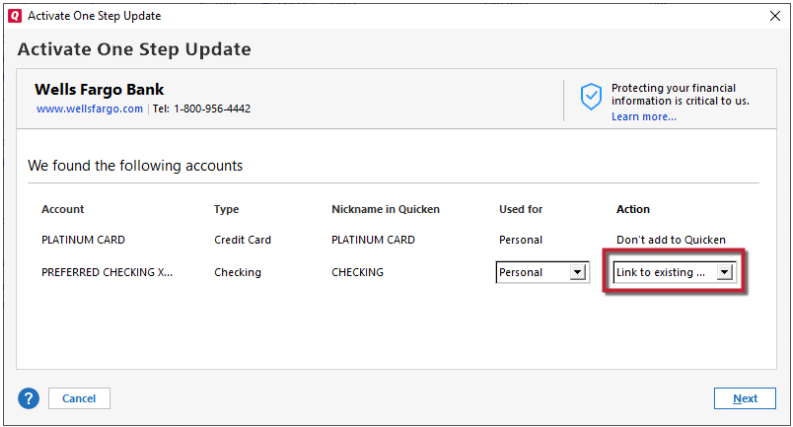
Then navigate to Tools>Add Account and follow the prompts. When you get to the Add/Link screen, carefully link the account to the correct nickname in Quicken.
If the problem was being caused by a duplicate account or an old, no longer active/closed account that was still connected in Quicken, this process will correct the issue.
Please let me know how it goes!
We haven't heard back from you in a while. Do you still need assistance?
Check back and let us know! Thank you.
Hello again,
Checking in once more before this thread is closed. Let us know if you still need assistance.
Thank you!
Due to the lack of response, I went ahead and closed this post.
If you still require assistance, please feel free to start a new post.