Have multiple accounts, one won't reconcile
Answers
-
Two things can prevent transactions from showing up in the reconcile window even if the transaction data is before the statement date you entered.
Transactions that are already marked reconciled will not be included.
The second is if the posting date (which is the date that was downloaded from the financial institution) is after the date you entered for statement ending date.
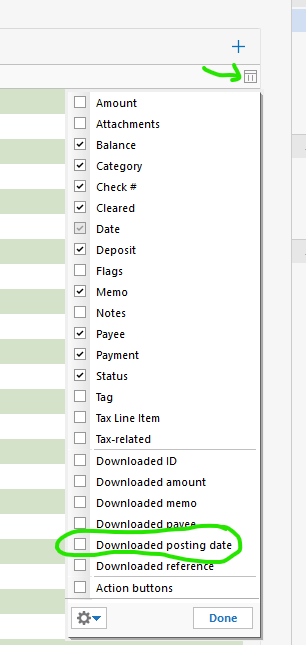
If you click on this menu and select Downloaded posting date, you can see if that is the case.
0 -
Comments inline below:
Two things can prevent transactions from showing up in the reconcile window even if the transaction data is before the statement date you entered.
Transactions that are already marked reconciled will not be included.
Transactions are not marked reconciled
The second is if the posting date (which is the date that was downloaded from the financial institution) is after the date you entered for statement ending date.
Posting date is before the statement ending date.
If you click on this menu and select Downloaded posting date, you can see if that is the case.
Not sure how to get the menu referenced but I don't download transactions, I still enter manually.
0 -
Hi @Robert Baskerville,
Thanks for your reply!I wasn’t able to replicate the issue on my end, so to better understand what’s happening, could you help me by answering a few questions?
- When was the last time you were able to reconcile the account without any issues?
- Are the transaction dates correct as they appear on your statement (Month/Day/Year)?
- Are the transactions within the last 30 days, or are they older than that?
- Is your Quicken file being backed up or synced by any third-party services like Carbonite, OneDrive, or Backblaze?
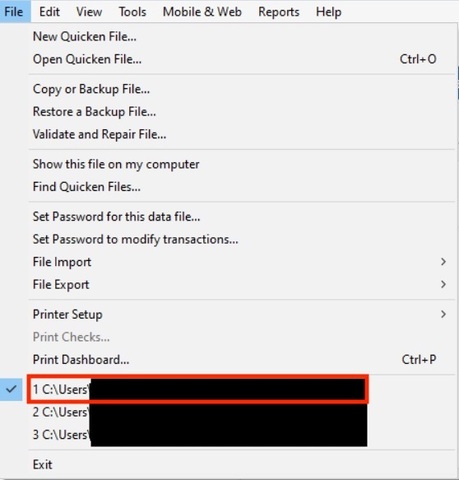
- Where is your Quicken data file located? To check, please open Quicken and go to File. At the bottom of the menu (above the Exit button), the file with the check mark next to it is the one currently open. Please share the full file path shown there.
I look forward to your reply!
Quicken Carlos
Make sure to sign up for the email digest to see a round up of your top posts.
0