Memorized Payee not filling in columns
Version R66.28 Build 27.1.66.28
The auto complete is not working for Memorized Payee. The pop-up shows the fields populated but when entered, only the Payee is populated.
Also Payees from years ago have re-appeared in my list.
I followed instructions to rebuild the list and I validated my QDF file. The problem persists
Is this a known problem?
Best Answer
-
If you edited the Memorized Payee List entries, I think that updates the Last used date.
There is certainly no harm in deleting memorized owners that you do not intend to use in the future.
QWin Premier subscription0
Answers
-
Check the settings at Edit > Preferences > Data Entry and Quickfill > "Complete fields using previous entries" and "Recall memorized payees."
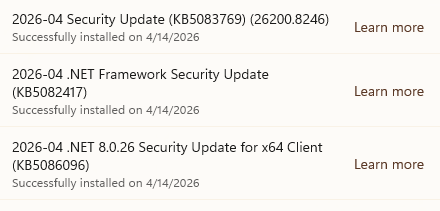
For some reason those settings are getting un-checked. It happened to me just now. I am quite sure I did not change them. No Quicken software updates have been downloaded recently, but I did receive the following Windows updates last night
QWin Premier subscription0 -
The "Recall memorized payees" was un-checked. I checked that box and restarted Quicken. That helped. Now if I use a Memorized Payee the Category is populated and correct.
The memorized payee list is still corrupt in that payees that haven't been used in many years (or never) have a "Last Used" of 4/15/2026.
Perhaps I should delete all the entries in the Memorized Payee list and start over0 -
If you edited the Memorized Payee List entries, I think that updates the Last used date.
There is certainly no harm in deleting memorized owners that you do not intend to use in the future.
QWin Premier subscription0