Portfolio Review Certain (%) Columns missing "%"

Wize
Wize Quicken Windows Subscription Member

Anybody know how to get the % sign to to show up in certain fields? For example in the Gain/Loss (%) column it only shows a two digit decimal. Same with ROI. But for the Price Day Change (%) you get a two digit decimal with a trailing %.

I like having the % in the field as it provides visual distinction between dollars and % for my eyes in reports.

Quicken Windows 27.1.66.28
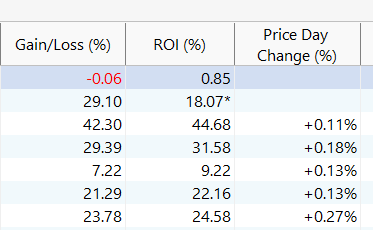
image.png
Tagged:

Comments

  • NotACPA
    NotACPA Quicken Windows Subscription SuperUser ✭✭✭✭✭

    And the column header doesn't tell you it's a percentage???

    I know of no way to add (or remove) that symbol from the detail line.

    Q user since February, 1990. DOS Version 4
    Now running Quicken Windows Subscription, Business & Personal
    Retired "Certified Information Systems Auditor" & Bank Audit VP