How to make invoices with subtotals for multiple groups of line items?

DougR
DougR Quicken Mac Subscription Member ✭✭

I'm testing Quicken Classic B&P for Mac Version 8.5.2. I’m hoping to drop Quickbooks and do my freelance bookkeeping with QC B&P. In my first day of tests of invoices, I’ve found that I can NOT subtotal groups of line items.  I’m sure the Quicken literature said it does subtotals. 

SURPRISE, as I’m writing this, a Quicken representative called me to say they just finished engineering this feature for Windows but haven’t released it yet.  It is supposed to be coming for Mac but no delivery date.

In the meantime, has anyone found a way to force it to do subtotals?

Comments

  • jacobs
    jacobs Quicken Mac Subscription SuperUser, Mac Beta Beta

    I don't believe there is any way to subtotal line items in Quicken Mac invoices.

    Quicken Mac Subscription • Quicken user since 1993
  • UKR
    UKR Quicken Windows Subscription SuperUser ✭✭✭✭✭

    Just for reference, for Quicken for Windows users:
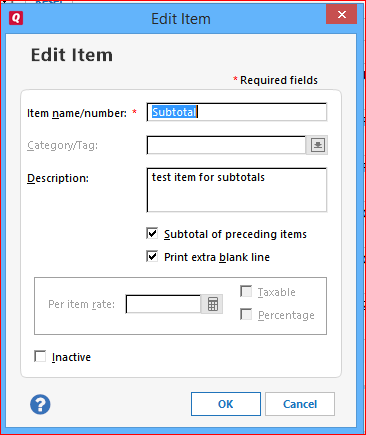
    There is, and always has been, a limited capability to create a Subtotal line for Customer Invoices.

    cap1 invoice subtotal line item.PNG

    However, because this creates a subtotal of ALL preceding line items within the invoice, you can only use it once per invoice.
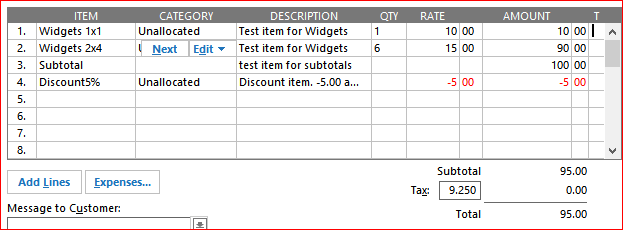
    Usage example: Add a Subtotal line item. Now add a Discount line item. The discount item applies to the amount of the preceding line item, Subtotal, which in turn applies to all preceding line items

    cap1 invoice discount sample.PNG

    So, I don't know what the rep you talked to was talking about … unless there's a major upgrade of the Invoices feature cooking in the Windows kitchen.