Is there a list of what is not supported in Premier version for Mac vs Windows?
I am a long time Quicken Premier for Windows user. I am thinking of converting to the Mac version. Is there a list of features not supported in the Mac version compared to the Windows? Or provide me a list of what is supported in Mac and what is in the Windows version.
Thanks!
Best Answers
-
@mdross171 The Quicken Online Backup service is available on the Mac, so is LifeHub.
1 -
The Online Backup feature (a paid add-on) is available for Quicken Mac.
Of course, Quicken generates backup files both automatically upon quitting and on-demand from a menu option. For someone who already uses cloud-based backups or syncing, like DropBox, iCloud, OneDrive, iDrive, BackBlaze, etc., paying Quicken for a small number of online backups of just Quicken data files may not be necessary. But for users who feel technically challenged with using and navigating online backup products, Quicken's Online Backup can be a useful choice.
Quicken LifeHub is a separate cloud-based product which can connect with Quicken Classic to pull in some summary account information. This integration exists for Quicken Mac. (But there's not a lot of interaction between LifeHub and Quicken Classic other than pulling in a list of accounts and updating their balances periodically.)
Quicken Mac Subscription • Quicken user since 19931
Answers
-
I don't know of any such list to point you to. I doubt even the folks at Quicken have a comprehensive list.
Because the list of differences between Quicken Mac and Quicken Windows would be a pretty long one. There are somewhat big, broad features, like the Lifetime Planner or Savings Goals which don't exist in Quicken Mac. There are small-ish features which aren't an issue for most users, but are an issue if it affects you, such as a transaction to handle a corporate spin-off or merger while preserving cost basis. There are features some might feel are big and others find inconsequential, such as a single-line register display instead of the legacy two-line display. There are features such as Year-End Copy which some Windows users consider important because of problems with data corruption in old , large data files, which don't exist in Quicken Mac because the more modern, robust SQL database in Quicken Mac makes data corruption issues non-existent. (And this there is no Validate and Super Validate feature, either, because there isn't a need for them.) The point is that there are likely hundreds of differences, from very small to potentially very significant, and whether Quicken Mac will work well for you depends entirely on how your use Quicken. Many thousands of Quicken Windows users have switched to Quicken Mac and are happy; some Quicken Windows users have tried it and found one or more showstopper issues for their needs.
Do you have a Mac? If so, the best advice I can give it to try out Quicken Mac. It's included in your existing Quicken subscription, so you have nothing to lose except time in converting and then working your way up the learning curve of the Quicken Mac user interface. And you will need to give it some time, as there are differences which will take you time to discover and differences which will take you time and repetition to reprogram your brain to do a little differently.
If you have questions about certain specific features or "can it do xxx?", feel free to ask. But I don't think there's any comprehensive list of differences anywhere.
Quicken Mac Subscription • Quicken user since 19930 -
Budgeting is another important feature as well.
0 -
Tax categories, planning and reports are other items of importance.
0 -
I assume you can download transactions into financial accounts.
Yes, definitely. At least in broad strokes, Quicken Mac is comparable to Quicken Windows in that regard.
For me, personally I find Quicken Mac is fine for managing my investments. But I don't have ESPPs and RSUs, so I don't need to contend with that. I infrequently have to deal with a corporate merger/spin-off; it can be a minor annoyance if I have one or a handful of lots of a security, or a major pain if I have many lots of a security. But it doesn't happen often with my investments.
For certain things with my investments, I have accepted that while Quicken will always show my correct balances, my cost basis/unrealized gains may be slightly off from what my financial institution reports to me and the government — and that's been fine for my purposes. (Quicken Mac lets you identify specific lots when you sell part of your holdings of a security, or it can use FIFO or LIFO, but it doesn't offer Average Cost Basis, which my Vanguard mutual funds use, so Quicken's tacking of my basis is off slightly from what my brokerage shows. Again, for me, this is not a major issue.)
One of the annoyances with Quicken Mac investments has been outputting reports. A lot is possible with the very flexible Portfolio window, but until recently, there was no other way to generate reports. The last release introduced the first investment reports you can customize and save for re-use, and the developers stated this was just a starting point and that more and improved reports are in the pipeline for future releases.
Quicken Mac Subscription • Quicken user since 19930 -
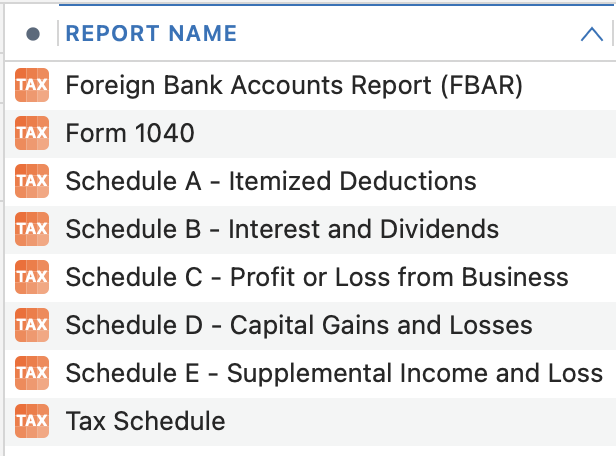
@mdross171 Yes, every category can be assigned to tax forms and tax lines. Although we it comes to investments, categories are locked down so Quicken can internally calculate capital gains, interest, etc. But it can product tax reports for 1040 income and taxes paid and Schedules A, B, C, D, E and F.
(This doesn't show Schedule F because I don't have any farming categories in my test or live data files.)
Quicken Mac Subscription • Quicken user since 19930 -
@mdross171 The Quicken Online Backup service is available on the Mac, so is LifeHub.
1 -
The Online Backup feature (a paid add-on) is available for Quicken Mac.
Of course, Quicken generates backup files both automatically upon quitting and on-demand from a menu option. For someone who already uses cloud-based backups or syncing, like DropBox, iCloud, OneDrive, iDrive, BackBlaze, etc., paying Quicken for a small number of online backups of just Quicken data files may not be necessary. But for users who feel technically challenged with using and navigating online backup products, Quicken's Online Backup can be a useful choice.
Quicken LifeHub is a separate cloud-based product which can connect with Quicken Classic to pull in some summary account information. This integration exists for Quicken Mac. (But there's not a lot of interaction between LifeHub and Quicken Classic other than pulling in a list of accounts and updating their balances periodically.)
Quicken Mac Subscription • Quicken user since 19931