Old accounts
I need an authoritative answer. Not a guess. I want to update to a Classic business/personal subscription. I'll update with a data start date of 1.1.2024 even though data goes back further. This will intentionally exclude over a decade and dozens of closed accounts. I ABSOLUTELY want to delete and NOT INCLUDE those dead accounts and data (NOT hide). What's the best way to purchase and do this? I'm thinking that I should create a NEW account with a new username/pw, export to some quicken file type (QIF? Copy? QXF?) to the dates I want, not include dead investment accounts, then import that data into the new account. One concern is that if I use my existing account, quicken will ignore my selections and just import all of those accounts/data.
Best Answers
-
Hi @MakesMeGrumpy,
Thank you for reaching out to the Quicken Community!
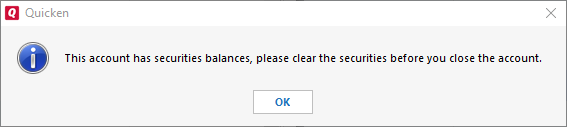
This error message typically appears when there are still securities listed in the Holdings view for the account. The system prevents closing the account until everything is fully cleared—not just sold, but completely settled and removed.
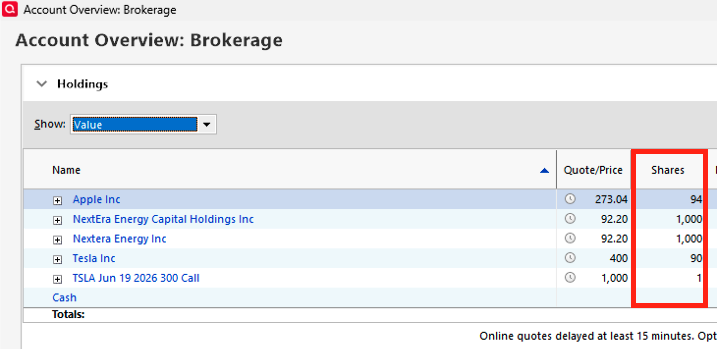
I recommend checking the Holdings view to confirm there are no remaining shares in the account you want to close.
- Go to the account you want to close.
- Click on Holdings (upper left).
- Review the securities listed and check for any remaining shares.
If securities are still listed, you can remove them or update the share balance by following these steps:
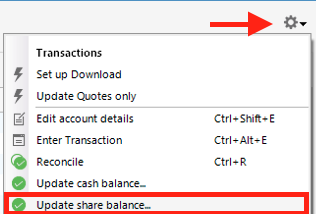
- Click the gear icon on the right-hand side.
- Select Update Share Balance…
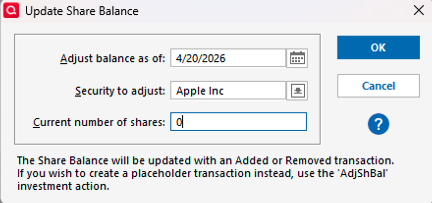
- Choose the day before.
- Select the security to adjust.
- Enter 0 in the current number of shares, then click OK.
Repeat this process for each security until all show a zero share balance or no longer appear in the Holdings view. Then try closing the account again.
I hope this helps! Please let me know how it goes.
Quicken Carlos
Make sure to sign up for the email digest to see a round up of your top posts.
0 -
Thanks for your VERY helpful response! I get the principle: zero out holdings. I'm using an ancient desktop version from 2020 so the UI results differently clicking on the gear icon — isn't showing "update share balance." But I figured it out. Took some back and forth, but got it done! Perhaps soon I'll have to change my user name, LOL. I do have one other post in here that you may be helpful if you wouldn't mind taking a look at it, assuming you work for Quicken.
0
Answers
-
I need an authoritative answer; no guesses, and in sufficient detail to accomplish my intention.
I'm trying to close permanently historic dead investment accounts. I keep getting an error attached. I've tried multiple ways to remove shares to zero them out, and nothing seems to work. What's the workaround or method to close these out?
0 -
Insufficient info provided to assist. WHAT, specifically have you tried to remove shares and what were the specific results.
Because until you get that resolved, you're not going to be able to close the accounts.
Do those securities have a non-zero value? Why can't you simply record a sale of each and then transfer the cash somewhere?
What happened in real-life that these accounts now need to be closed?
Q user since February, 1990. DOS Version 4
Now running Quicken Windows Subscription, Business & Personal
Retired "Certified Information Systems Auditor" & Bank Audit VP-1 -
I was sure hoping for someone with something meaningful to contribute and not chatter. but thanks for the chatter :-)
-1 -
Hi @MakesMeGrumpy,
Thank you for reaching out to the Quicken Community!
This error message typically appears when there are still securities listed in the Holdings view for the account. The system prevents closing the account until everything is fully cleared—not just sold, but completely settled and removed.
I recommend checking the Holdings view to confirm there are no remaining shares in the account you want to close.
- Go to the account you want to close.
- Click on Holdings (upper left).
- Review the securities listed and check for any remaining shares.
If securities are still listed, you can remove them or update the share balance by following these steps:
- Click the gear icon on the right-hand side.
- Select Update Share Balance…
- Choose the day before.
- Select the security to adjust.
- Enter 0 in the current number of shares, then click OK.
Repeat this process for each security until all show a zero share balance or no longer appear in the Holdings view. Then try closing the account again.
I hope this helps! Please let me know how it goes.
Quicken Carlos
Make sure to sign up for the email digest to see a round up of your top posts.
0 -
Thanks for your VERY helpful response! I get the principle: zero out holdings. I'm using an ancient desktop version from 2020 so the UI results differently clicking on the gear icon — isn't showing "update share balance." But I figured it out. Took some back and forth, but got it done! Perhaps soon I'll have to change my user name, LOL. I do have one other post in here that you may be helpful if you wouldn't mind taking a look at it, assuming you work for Quicken.
0 -
Hi @MakesMeGrumpy,
I’m glad to hear the steps above worked for you!
To change your subscription to Business & Personal, please click here to review the available products.
To change your username, you can do so from your my account. If an account has not yet been created with that email address. If an account already exists for that email, I recommend contacting Quicken Support for further assistance.
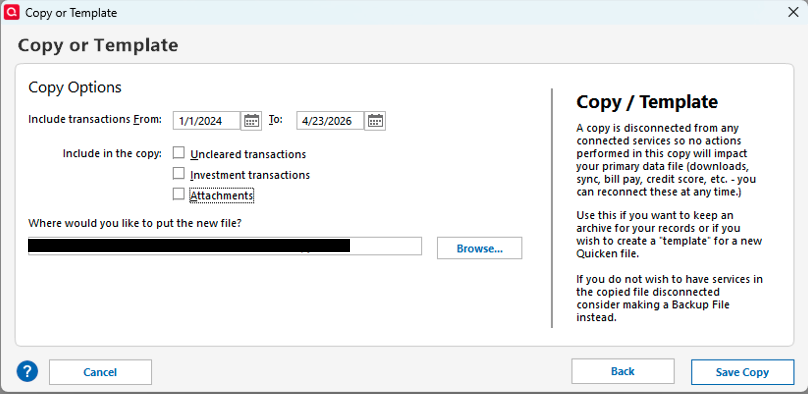
Phone support is available Monday through Friday, from 5:00 AM PT to 5:00 PM PT.If you’d like to keep the same username and create a file that only includes transactions from 01/01/2024 onward, I suggest creating a copy/template. Here’s how:
- Go to File > Copy or Backup File…
- Select Create a copy or template
- Choose the desired date range
(Make sure to uncheck all available boxes this step is important. If they remain checked, the copy will ignore the selected date range.)
- Choose the location and change the name of the file, click Save Copy
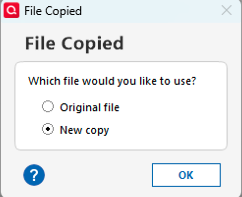
- When prompted, select New Copy, then click OK
Once the new file is created, open it and review the accounts to confirm that only transactions from 2024 to the present are included.
For any accounts you no longer need, you can delete them:
- Open the account
- Click the gear icon
- Select Edit Account Details
- Click Delete Account
- Type “yes” to confirm
Repeat these steps for any additional accounts you wish to remove.
Important: After creating a copy with a limited date range, you’ll need to reconnect and relink any accounts if you download transactions.
I hope this helps!
Quicken Carlos
Make sure to sign up for the email digest to see a round up of your top posts.
0