Quicken won't sync with Intrust Bank NA (but does sync with my credit cards).
Why won't Quicken sync with my bank, Intrust Bank NA?
How can I work with a human?
My Quicken won't sync with my bank, Intrust Bank NA. I am running Quicken Classic on Windows 11`. Other accounts are syncing properly. Intrust doesn't see any problem on their end.
Hello @susan.kotn,
Thanks for reaching out! Please be aware that this is our Community online forum which is primarily user-to-user based with a handful of forum moderators such as myself, so responses are not always immediate. If you prefer immediate assistance, you can contact Quicken Support via chat or phone. Our support agents also have the ability to screenshare with you if you prefer to do so.
After checking your account internally, it looks like INTRUST Bank Personal is currently returning an FDP-350 internal error, which usually presents in Quicken as a CC-901 error.
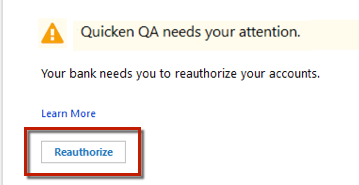
For context, CC-901 generally appears when Quicken detects that your account authorization needs to be refreshed. This can happen if:
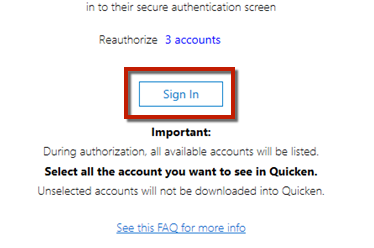
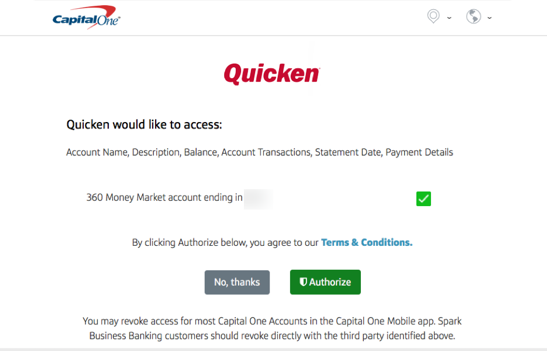
You can resolve this by reauthorizing your account:
Important: If you have multiple accounts or instances in Quicken, you may need to authorize each one individually. Make sure you don’t uncheck accounts unless you don’t want them in Quicken, as that would revoke their authorization.
If reauthorizing doesn’t resolve the issue, you may need to follow the steps in this support article to deactivate and reactivate the affected accounts.
Let us know if you continue to see the error after completing these steps.
Thank you!
Hello again,
We haven't heard back from you in a while. Do you still need assistance?
Checking in once more before this thread is closed. Let us know if you still need assistance.
Due to the lack of response, I went ahead and closed this post.
If you still require assistance, please feel free to start a new post.