Expense report graph report does not equal expense report

Quicken Business & Personal, Windows 11, version R67.7, build 27.1.67.7

Have a month to date and year to date graph on my home screen. This issues applies to both.

April month to date expenses shown in screenshot are $2442.52 on the graph as well as a month to date summary report. All good.
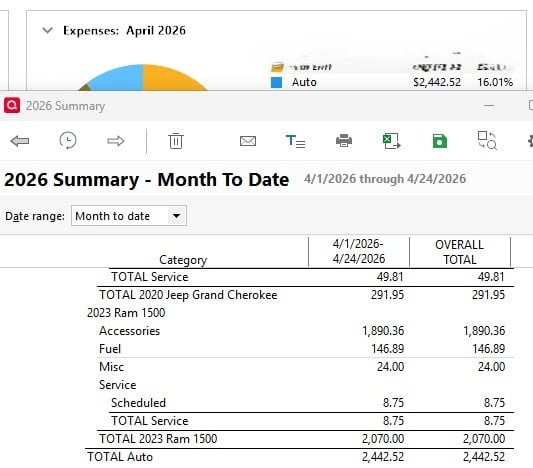
summary_report.jpg

However, if I click the graph and do a report of my Auto expenses, Quicken reports only $426.78 month to date.
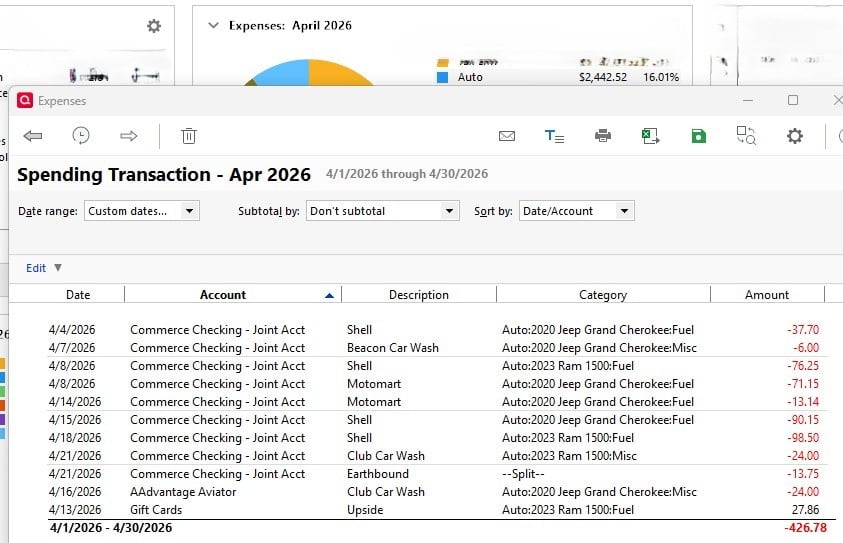
graph_report.jpg

I looked thru the accounts it was pulling from in the graph report and it is leaving out my AMEX account. Selecting the gear icon in the report above shows that my AMEX account is selected so I'm not exactly sure why things are not lining up.


Tagged:

Comments

  • Quicken Kristina
    Quicken Kristina Quicken Windows Subscription Moderator mod

    Hello @epicmountain,

    Thank you for letting us know you're seeing this issue. To clarify, are you using the dashboard, or do you have a View set up to show Expenses (month-to-date) and Auto Expenses?

    Does this happen every time you run the report? Does unselecting the account and reselecting it correct the issue?

    I look forward to your response!

    Quicken Kristina

    Make sure to sign up for the email digest to see a round up of your top posts.