Split transactions
Why was the known issue with split transactions reordering closed even though it is an ongoing issue? This is the most frustrating thing with the whole software. Reports aren't accurate unless you check each transaction. This eliminates the usefulness of reports.
Best Answer
-
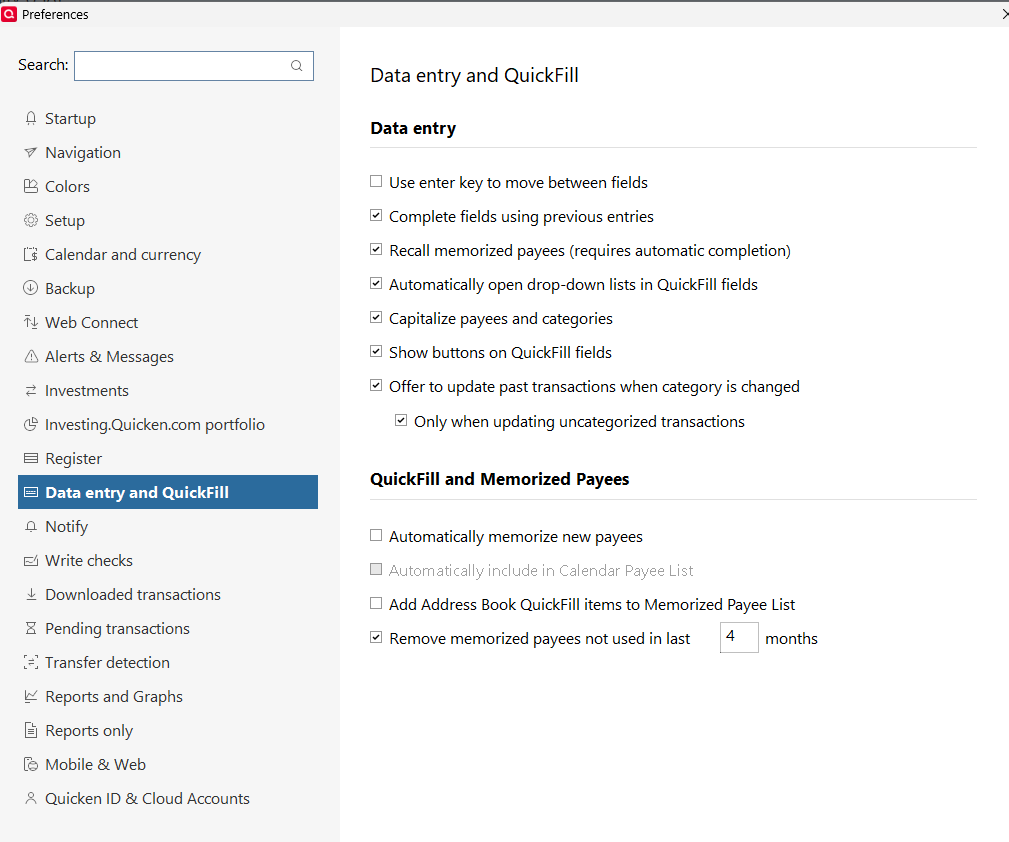
What do you mean, "no way to turn off the memorize every transaction feature"? Because there most certainly is, see EDIT, Preferences, Data Entry & Quickfill … and UNcheck "Automatically memorize …"
Also, with Renaming Rules, you can "standardize" your payee names so that, for example, if you buy gasoline at both "Shell #234" and "Shell #345" you can change them (during download) to just Shell … so they're not new.
Q user since February, 1990. DOS Version 4
Now running Quicken Windows Subscription, Business & Personal
Retired "Certified Information Systems Auditor" & Bank Audit VP0
Answers
-
Hello @CSlouis,
Thank you for reporting the issues you are experiencing and posing this question.
Sometimes, Known Issues are resolved for some users and not others. This can happen for a variety of reasons.
If you’re still encountering the issue, we recommend reaching out to Quicken Support for further assistance.
Thank you!
Quicken Alyssa
Make sure to sign up for the email digest to see a round up of your top posts.
0 -
Just checking in, we haven't heard back from you in a while.
Do you still need assistance?
Thank you!
Quicken Alyssa
Make sure to sign up for the email digest to see a round up of your top posts.
0 -
I think the oroblem is resolved. It will require me to do things differently since there is no way to turn off the memorize every transaction feature. I'm not a fan, but its not a deal breaker now that Im aware of the cause of the issues I was having as well as a location to manually prune memorized entries.
1 -
Quicken Alyssa
Make sure to sign up for the email digest to see a round up of your top posts.
0 -
What do you mean, "no way to turn off the memorize every transaction feature"? Because there most certainly is, see EDIT, Preferences, Data Entry & Quickfill … and UNcheck "Automatically memorize …"
Also, with Renaming Rules, you can "standardize" your payee names so that, for example, if you buy gasoline at both "Shell #234" and "Shell #345" you can change them (during download) to just Shell … so they're not new.
Q user since February, 1990. DOS Version 4
Now running Quicken Windows Subscription, Business & Personal
Retired "Certified Information Systems Auditor" & Bank Audit VP0 -
Thank you so very much NotACPA. I didn't even think to check there to turn it off. The renaming I knew, but wouldn't help the with the way I was doing things.
0