Since update, all Apple Pay transactions no longer show the vendor, just say "Apple"
I notice that in the last 2 months that all downloaded transactions for purchases I made using Apple Pay for my credit card, which for years used to show the name of the actual vendor the transaction was for, now only get imported into Quicken as "Apple" which make is the majority of my transactions. This makes it quite useless to track my expenses. Does anyone know of a way to get this switched back so that the vendor or company I purchased used my apple pay for shows up again automatically, instead of just showing "Apple" with no other information?
Answers
-
Hello @RobMSW,
Thank you for letting us know you're seeing this behavior. To help troubleshoot, please provide more information:
- Do you have multiple accounts set up with Apple Pay?
- If you do, is this happening with all of them?
- If not, which financial institution is the account with?
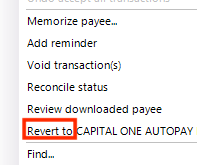
- If you right-click on one of the problem transactions, what do you see for the Revert To option?
I look forward to your response!
Quicken Kristina
Make sure to sign up for the email digest to see a round up of your top posts.
0 - Do you have multiple accounts set up with Apple Pay?