Nordstrom transactions in account reversed
I continue to have an issue with the Web Connect and the Nordstrom’s credit card.
- In November 2025, in the discussion “Nordstrom transactions in account reversed”, I commented “I'm having the same problem, and this started last month (I manually corrected each purchase transaction last month). This month, similar to last month, my transactions are coming in but the purchases are coming in as if they are payments. Here's a screenshot of this month's transactions (payment on 10/13 and three purchases on 10/31)”
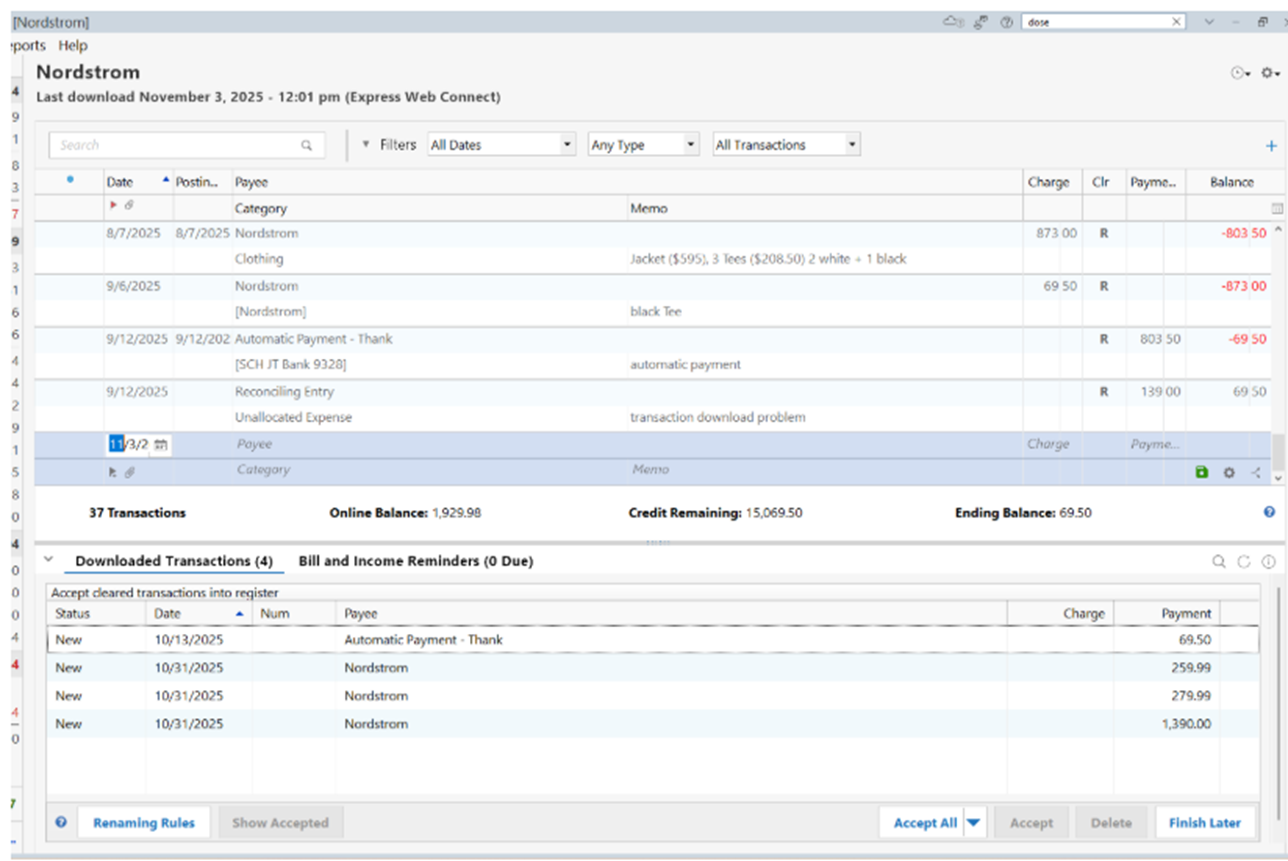
Several Quicken members reported the exact same problem. Yet, this discussion was closed without any resolution.
I’ve checked the Quicken Community and there are multiple disscussions reporting the same problem for Nordstrom’s, and all of these discussions have been closed without resolution.
Here are two examples of this continuing issue, both of which have been closed without resolution.
“Nordstrom transactions in account register reversed, can't reconcile”
“ONGOING 1/15/26 Nordstrom Card Account - CC-511/501 / FDP-530/101”
Something else I’ve noticed: Even though this appears to be a continuing issue, which has been reported multiple times in the Quicken Community, with every single Community Discussion, the discussion has been closed without resolution. Why is that?
2. Since reporting my issue back in November 2025 (when I reported all transactions importing into Quicken as “Payments”, I am now seeing that Purchases and Payments are now all importing into Quicken as “Charges”.
Here are screenshots of Quicken and imported Express Web Connect transactions.
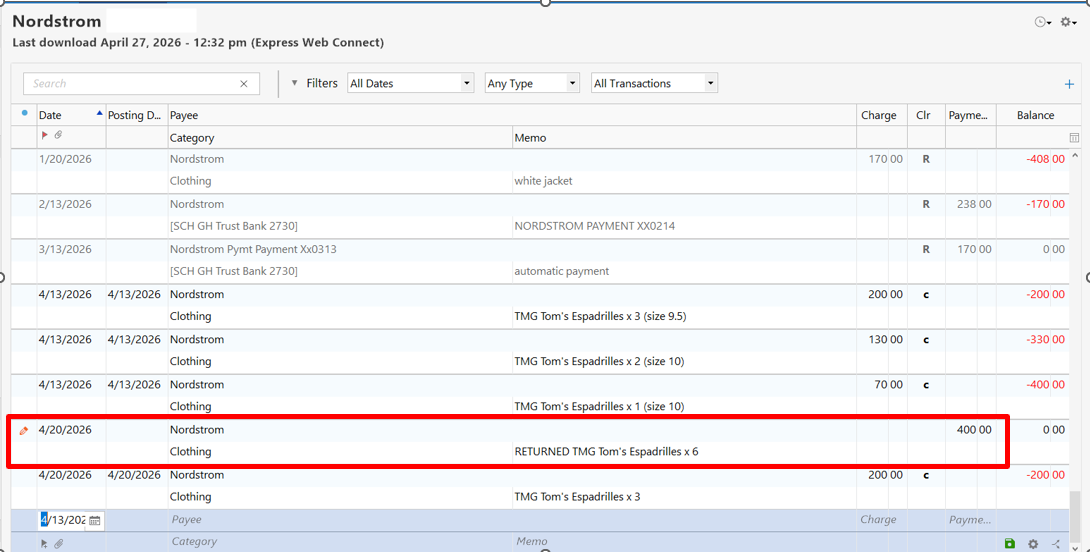
On 4/20/26 I returned $400.00 of merchandise and purchased $200.00 of merchandise.
Here are today’s transactions from Express Web Connect
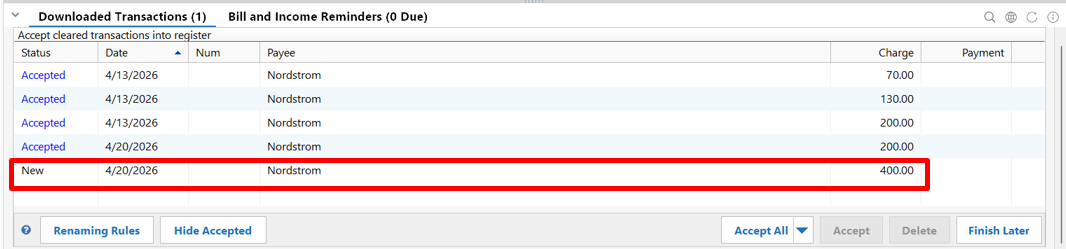
The 4/20/2026 Express Web Connect new transaction, which has not been accepted, is showing a charge of $400.00.
[Edited - Removed partial account number]
Comments
-
Hello @Theresa in Oregon,
Thank you for reaching out! To clarify, your charges and payments download reversed when updating the account in Quicken, and when you import, your payments import showing as charges. Is that correct?
The issue with transactions downloading reversed is a known issue (CTP-15182). I can see that you're already on the ticket.
You mentioned that payments are importing into Quicken as charges. What method are you using to import? Are you using Web Connect/QFX, a CSV file, or an alternate method?
Even though this appears to be a continuing issue, which has been reported multiple times in the Quicken Community, with every single Community Discussion, the discussion has been closed without resolution. Why is that?
Posts on the Community are not the same as contacting Quicken Support. A post is not a trouble ticket and will get closed when it has been inactive for about a month, even if the issue is not resolved.
I look forward to your response!
Quicken Kristina
Make sure to sign up for the email digest to see a round up of your top posts.
0 -
Nordstrom QFX Import Fix - Missing Minus Sign on Balance
After Nordstrom's website redesign, the QFX file downloads correctly but imports into Quicken with the wrong balance - roughly double what you actually owe. After investigation I found the file itself is fine except for one small bug - the ledger balance sign is wrong.
Here is the fix - backup your quicken file FIRST - I do this before any manual file import process (which is ONLY with Nordy Bank)
- Download your QFX file from the Nordstrom Bank website as usual
- Open the file in Notepad or Notepad++
- Find the text: <BALAMT>126.26</BALAMT> (your number will be different)
- Add a minus sign so it reads: <BALAMT>-126.26</BALAMT>
- Save the file and import into Quicken normally
The transaction amounts and types in the file are correct and will import properly. The only bug is that Nordstrom is exporting the outstanding balance as a positive number when it should be negative for a credit card account.
This appears to be a new bug introduced after their website redesign, as the file was importing correctly before February 2026.
Note: you will need to do this every time you download a new QFX file until Nordstrom fixes their export.
0


