I've been paying Quicken for online backup for a few months. Now I've started getting warnings when I sign in that I shouldn't be backing up to the cloud. I'm confused about this.
Hello @katem5689,
Thank you for sharing your experience.
I have some follow-up questions for you:
Looking forward to your response!
Thanks for responding.
I started getting this message about a week ago, whenever I log into Quicken.
Screenshot of the OneDrive Warning is attached.
@katem5689,
Thank you for providing this additional context. That helps a lot!
This OneDrive warning is letting you know that Quicken does not recommend that you use a file while it is being stored on OneDrive, as this can cause damage to the file.
The backup service you have been paying for is Quicken Online Backup, and this is completely safe to use.
I hope this helps clear up the confusion. Let me know if you have more questions, and I will do my best to answer them!
Thanks again!
I'm sorry but I don't understand. I haven't knowingly put Quicken on OneDrive. Nothing has changed in how I use Quicken, so I don't understand why I'm suddenly getting this warning.
Thank you for following up.
Many times, OneDrive is set up to automatically back up certain areas of a Windows computer. The Desktop and Documents folders are usually included in these automatic backups. So this could be one way your file ended up there.
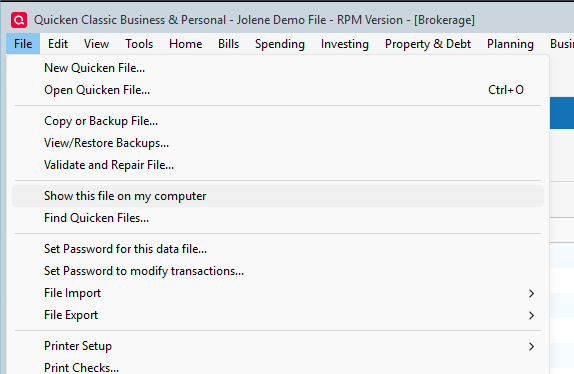
To see where your file is located, you can go to File>Show this file on my computer.
This will open a window showing you where your file is located. The location is also displayed in the screenshot you shared of the message you are receiving in Quicken. Once you have located the file, you should move it to C:/Users/username/Documents/Quicken. This is the default location and is the safest place to store your active data file.
Note: Allowing your backups to be synced is fine. This only applies to the data file you are actively using.
Let us know how it goes!
Just checking in, we haven't heard back from you in a while.
Do you still need assistance?
Thank you!
Hello again,
Checking in once more before this thread is closed.
Let us know if you still need assistance.
Due to the lack of response, I went ahead and closed this post.
If you still require assistance, please feel free to start a new post.