Missing historical transactions after re-adding Chase account

Jillartstudio
Jillartstudio Quicken Mac Other Member ✭✭

I’m having an issue with my Chase account in Quicken. The balance had been incorrect for several months after updates, so I deleted the account and re-added it.

After reconnecting, Quicken only downloaded transactions for 2026. Previously, I had full transaction history going back to 2020, which I rely on for tracking and reporting.

How can I restore or re-download my current plus the historical transactions? Is there a way to recover the deleted data or force Quicken to pull older records from Chase?


Thank you

Comments

  • Quicken Carlos
    Quicken Carlos Quicken Mac Subscription Moderator mod
    edited 11:50AM

    Hi @Jillartstudio,

    Thanks for reaching out to the Quicken Community!

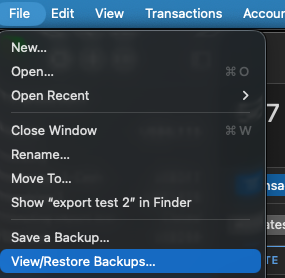
    I recommend restoring a backup from before you deleted the account. This will bring back all the information from when the account was first added to Quicken.

    To do so:

    • Go to File > Restore a Backup File...
    • Select the backup file you want to restore and click Restore Backup
      Screenshot 2026-05-02 at 12.39.12 PM.png
    • Choose whether to overwrite your current file or create a copy
      • If you choose to create a copy, select a location and give the file a unique name
      • Click Save, then Yes to open the restored file.

    If you don’t have a backup from before the account was deleted, please note that transaction downloads are typically limited to the last 90–200 days, depending on the financial institution. If you need older transaction history, many banks make it available on their website via Web Connect.

    You can find more information about Web Connect, including how to import transactions, in our support article.

    I hope this helps! Let us know how it goes.

    Quicken Carlos

    Make sure to sign up for the email digest to see a round up of your top posts.