Why is an account missing from One Step Update?
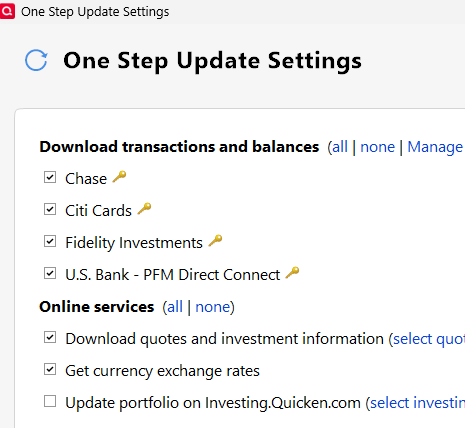
I added a new credit card account to Quicken Classic Deluxe. When I first log in and auto-update runs, the account seems to update OK, but when I run One Step Update, it's not listed among the accounts to update on the One Step Update Settings pop-up.
The account is visible in the Banking section of the sidebar and is connected to Online Services.
Why is this account not included in One Step Update?
Answers
-
Do you have other accounts from this bank that ARE updating … or is this the only one?
Is this the "One Step Update Settings" you referenced?
When you click TOOLS, Account List … what shows in the "Transaction Download", "Last Download" & "Financial Institution" columns next to that account?
Q user since February, 1990. DOS Version 4
Now running Quicken Windows Subscription, Business & Personal
Retired "Certified Information Systems Auditor" & Bank Audit VP0 -
I have another card from the same bank that is on the One Step Update pop-up list.
Under Tools>Accounts>transaction Download that card says Yes(express web connect+)
0 -
Hi @Kabboroo,
Thank you for reaching out!
What you’re seeing can happen because Quicken does not always list each account separately in One Step Update. Instead, accounts are often grouped by financial institution and connection method.
If you already have another account with the same bank, the new credit card may be included under that existing entry rather than appearing as its own line item in the One Step Update settings.
To confirm the account is being updated, you can:
- Run One Step Update
- Review the update summary for your bank
- Check whether new transactions download into the credit card account
If transactions are downloading, then the account is being updated even if it is not listed separately.
If you do not see any updates for the account, please let me know, and we can help troubleshoot further.
Quicken Laura
Make sure to sign up for the email digest to see a round up of your top posts.
1 -
It does seem to update ok, so maybe that is the answer. It just seems like a bug because I am unable to deselect it from updating, unlike the other accounts.
0