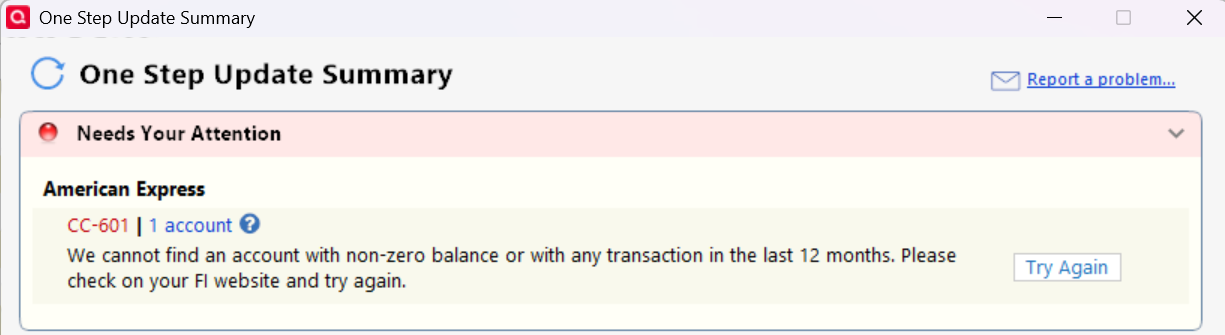
CC-601 American Express
I continue to receive cc-601 on American Express account. Why am I not seeing any updates? This has been going on for months. I have sent MANY reports to support about this.
Quicken Classic - R67.7, Windows 11 PRO current on updates
My data file is NOT being synced nor backed up.
Comments
-
Hello @Greg Brown,
Thank you for reaching out! I understand how frustrating this is.
Our team is actively working on it, though we don’t have an ETA for a fix yet. In the meantime, we advise that you please refer to the Community Alert for any and all available updates and information.
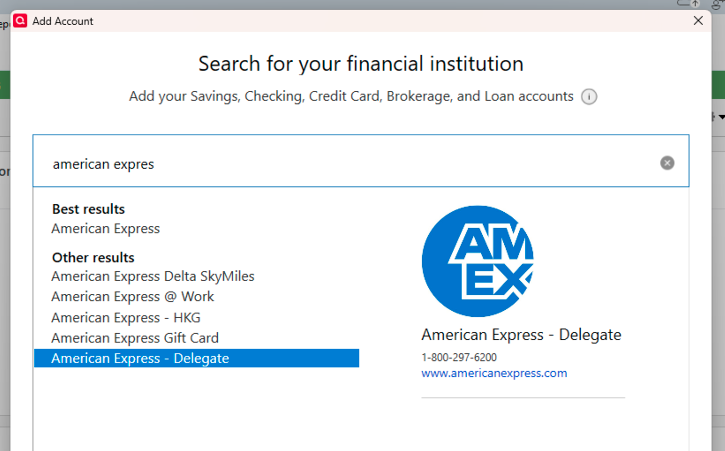
Meanwhile, as a workaround, you can try connecting your accounts using American Express – Delegate instead of the regular American Express option.
To do this, first deactivate all affected accounts and then reconnect them using American Express – Delegate.
Step 1: Deactivate all affected accounts
- Select the Tools menu and select Account List...
- In the Account List, select the account you want to deactivate, and then click Edit.
- In the Account Details window, click the Online Services tab.
- Click Deactivate next to the service you want to disable.
- Click Yes to the message confirming if you want to disable this service.
- Repeat these steps for each affected account.
- Log in to your bank’s website and revoke Quicken’s third-party access (if applicable).
Step 2: Reactivate and link the accounts
- Go to Tools > Add Account.
- Search for and select the Financial Institution.
- If prompted, choose the appropriate connection method.
- Follow the on-screen instructions to sign in.
- When the list of found accounts appears, make sure to select Link to connect them to your existing accounts (do not choose Add, as that would create duplicates).
Hope this helps!
-Quicken Anja
Make sure to sign up for the email digest to see a round up of your top posts.0 -
Thank you very much. I never heard of that before. But it is working for now.😉
Quicken Classic - R67.7, Windows 11 PRO current on updates
My data file is NOT being synced nor backed up.
0 -
Thanks for the update! Glad to hear that worked for you.
-Quicken Anja
Make sure to sign up for the email digest to see a round up of your top posts.0