This discussion was created from comments split from:
One Step Update not updating multiple accounts
.
This is is happening to me as well. Nothing new for about a week now. And confusingly, the blue dot appears next to the accounts showing that there are new downloaded transactions, but then when you click on the account. No new transactions are shown.
Additionally, all of my memorized payee have disappeared and new ones cannot be created.
I have already uninstalled and re-installed to no avail.
Hello @Danzaman,
Thank you for letting us know you're encountering this issue. Since you're seeing the blue dot, indicating new transactions, but there are no new transactions there, I recommend that you backup your file, and start troubleshooting by following the steps from our article on when Quicken says there are transactions to accept, but you don't see any:
1. Press Ctrl+A on the keyboard to bring up the Account List, then click the Edit button next to the affected account in the list.
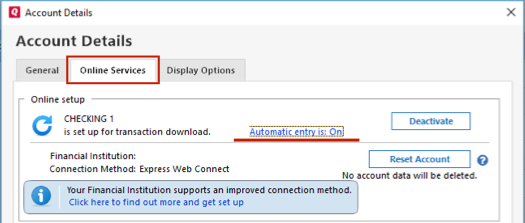
2. In the Account Details window, click on the Online Services tab then click Automatic entry is.
3. Select No on the next dialog box and click OK. Automatic entry should show as "Off" now.
4. Click OK to close the Account Details window, then click Done on the Account List.
5. Close Quicken, wait a few seconds, then re-open it. The transactions should appear upon re-opening Quicken.
Note: If you have multiple accounts affected by this issue, you can make the change outlined above to all the accounts at once by going to Edit > Preferences, then going to Downloaded transactions and unchecking the box next to Automatically add to banking registers.
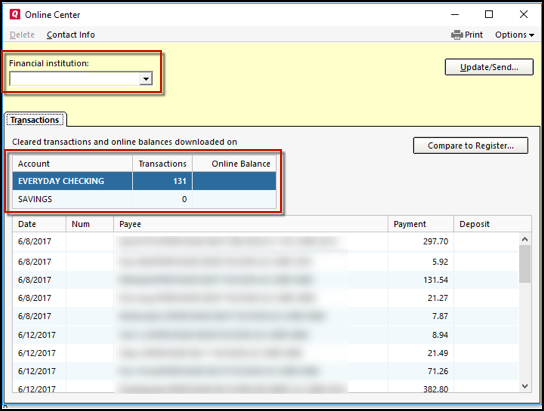
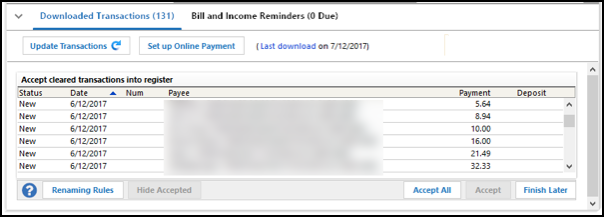
Quicken will show you downloaded transactions in multiple locations. The following information shows you how to check for downloaded transactions in the account register and Online Center.
4. Select Transactions.
If the Quicken data file is damaged, you might receive prompts about downloaded transactions when you don't have any downloaded transactions.
If you know when this issue began, the best solution is to restore a backup created before this issue began.
If you do not have a backup to restore, Quicken has a built-in utility, Validate, that will correct many data issues. Please note this does not correct all issues and these steps should be taken if the other steps outlined did not resolve the problem.
Note: Depending on the size of your data file, you may need to wait a while for the validation process to finish. Do not use the Task Manager to close Quicken. Quicken displays an error message if it cannot validate the file. If Quicken is able to validate the file and any errors are found, Quicken displays a message, "Data losses were found in your file." You can view the log file for more information.
When the validation process is complete, you will need to Reactivate your accounts for transaction download in the new file copy.
Please let me know how it goes!
I appreciate the attempt to help.
None of that worked.
I restored a backup from a couple of weeks ago. My memorized payees list has repopulated and the missing transactions in some accounts appeared upon update. The others I will just manually add and cross my fingers for the future.
Thank you for your reply,
I'm glad to hear that restoring a backup seems to have corrected much of the issue.
If you need further assistance or would like to troubleshoot further, please reach out!
I've experienced an indication of transactions but none were shown for the account. Without fail (as best as I can remember) closing and restarting Quicken has resulted in the downloaded transactions "magically" appearing.
I was hoping that this thread would present a solution to the problem.
Hello @JCMcCarter,
Thank you for letting us know you're encountering a similar issue. To help troubleshoot, please provide more information:
I look forward to your response!
I have the same problem. Three phantom downloaded transactions that I cannot clear from my Schwab account. All other accounts are fine; it only impacts Schwab.
I have tried all of the solutions in numerous threads and discussion groups I have read about this issue to no avail. I cannot reconcile, deactivate online updates, close or do anything to the Schwab account due to pending downloaded transactions that I cannot see in the downloaded transactions dialog.
The account has a $0 balance as of this month and will be physically closed with Schwab, so I tried the 'Close Account' option in Quicken. It doesn't throw an error but also does not change anything whatsoever about the account.
I tried validating and repairing multiple times. Restarting Quicken, rebooting my computer. No help.
I just want to delete these phantom transactions, close the account, hide it and move on.
Attached are a variety of screenshots that seem to show the three offending downloaded transactions. No action can be taken from this screen to view/accept them. When I run an online update just for Schwab and click the "1 new transaction downloaded" message, I get only an invalid date popup warning. No transactions appear in the downloaded transactions list.
Something is clearly messed up with the Schwab online update file. Is there any way to clear this?
Hello @jmeander312,
Thank you for reaching out! To help troubleshoot this, please provide more information:
If all other troubleshooting steps have failed and restoring a backup isn't a viable option, please create a copy of your file, as this will force all your connected accounts to disconnect. To create a copy of your file, first, backup your file, then follow the instructions below:
To create a copy, please navigate to File > Copy or Backup File... > Create a copy or template (see examples below) which will also allow you to select a date range to move forward with.If you wish to move forward with your entire data file, please check the full date range before copying, so you can enter the correct date range if you do not wish to "shrink" your file by eliminating certain dates. Note: There is no reason to "shrink" your file unless you believe older data is the reason for the issue you're encountering.
It's important to know that all online services will be disconnected in the copied file, and you will need to sign back in with your Quicken ID and reconnect all of your online accounts, online billers, Quicken Bill Manager services, etc., if you plan to use that copied file going forward. This is because the new copy also creates a separate dataset ID. If the issue is not resolved in the copied file either, then feel free to switch back to your original file. For instructions on switching between Quicken data files, please click here. Thank you!
Hello,
The problem started about 1-1/2 to 2 years ago with only the Schwab account. Restoring a backup (multiple tries) did not help. Data validation showed nothing.
I made a copy of my Quicken file and included all dates. After opening the new copy I enabled Online Update for only the Schwab account. The blue dot appears and still, the same message about downloaded transactions to accept (although there are zero) appears. I'm unable to close the account or reconcile due to this weird condition.