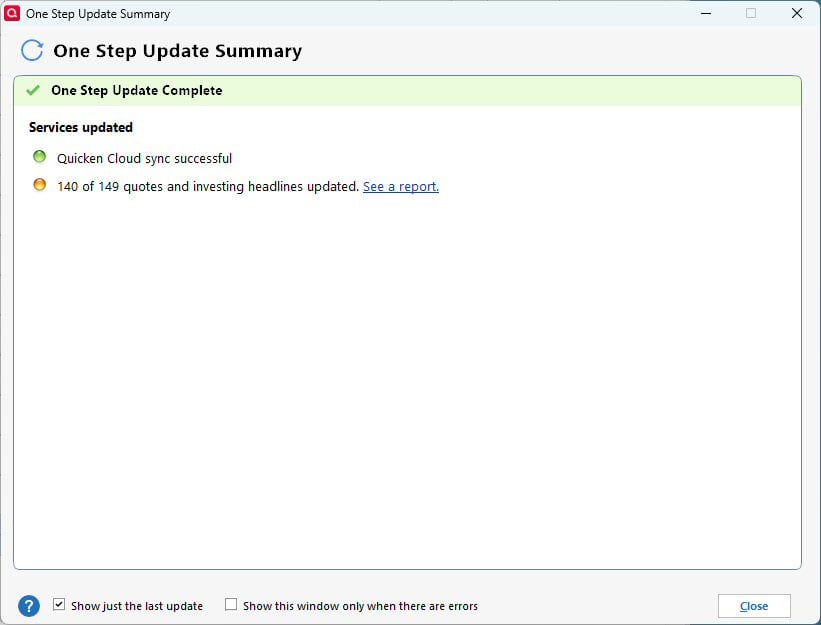
This problem began after Quicken Classic was updated with Version R67.7, Build 27.1.67.7. This is a screenshot of the last One Step Update Summary I performed. Is anyone else encountering this problem? I did file an official report.
I'm also running R67.7, and I ran an OSU just now … and I'm not seeing what you've reported. All of my FIs were shown in the summary.
SO, have you done TOOLS, "One Step Update" and made sure that all of your FIs were checked?
If they are, this might be an indication of corruption in your Q data file. If so, try taking a backup and then doing:
FILE, Validate and Repair File, checking "Validate File" and clicking OK. Then do another OSU and see if that helped.
I made sure all my FIs were checked for OSU, saved a backup, ran Validate and Repair File checking Validate File, and did another OSU. Here are screen shots to verify the results.
Hi @pdmcmanus30,
Thanks for your reply and for trying the steps above, in addition to what @NotACPA has suggested . I recommend following these steps.
These steps should help resolve the issue and allow the updated banks to appear correctly in the OSU summary.
Let us know how it goes.
That did work! Thank you!
Thanks for your reply and for letting us know that the steps above worked. I’m glad to hear that. Your update will be helpful for other users encountering the same issue.
If you need any further assistance, please do not hesitate to reach back out.
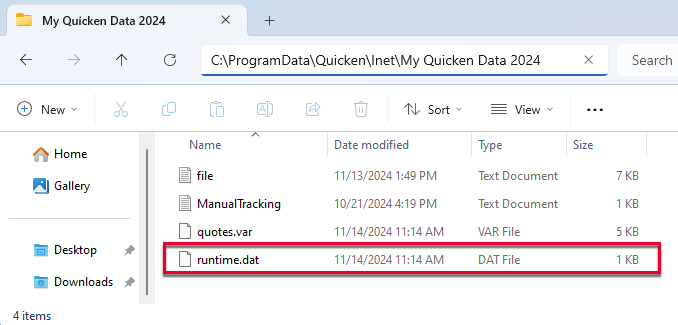
OSU completes for me but shows no status of updates…I do get red flags in the account list as normal but no listing of accounts and their update status. I tried searching for RUNTIME.DAT anywhere on my C drive and it returned no results….Am I suppose to have that file?
Hi @RichardSchreyer,
The ProgramData folder is hidden by default, which is likely why you were unable to find it.
To view hidden files and folders:
The file path you’re looking for is:
C:\ProgramData\Quicken\Inet\FILENAME\
If you still need assistance locating the file, I recommend reaching out to Quicken Support for further help.
You can find the Quicken Support phone number here: Support Home | Quicken. Phone support is available Monday through Friday, from 5:00 AM PT to 5:00 PM PT.
My problem was that under tools one step update summary there was a check mark in the field "Show this window only when there are errors". All is good now.
I’m glad to hear everything is working now!
Please feel free to reach out if you have any additional questions or need further assistance.